
Thermalright Assassin X120 Refined SE
4.7Editor score
Four heat pipes with AGHP
Compact 148mm height design
Quiet 1550 RPM PWM fan
This guide compares the top ten CPU air cooler fan heatsink models for 2026 to help you find efficient cooling and quiet operation for your desktop build.
Finding the right cooling solution is crucial for maintaining system stability. A quality CPU air cooler fan heatsink dissipates heat efficiently while keeping noise levels low during intensive tasks.
We evaluated ten top-rated models based on thermal performance, build quality, and compatibility with modern sockets. Each product was assessed for fan efficiency, heat pipe design, and overall value for money.
Our selections highlight diverse options ranging from budget-friendly single towers to premium dual-tower systems. Prices fluctuate frequently so please check current listings before purchasing your next upgrade.
4.7Editor score

4.8Editor score

4.8Editor score
The following table provides a side-by-side comparison of all ten selected models highlighting their key specifications and distinct features for easier decision making.
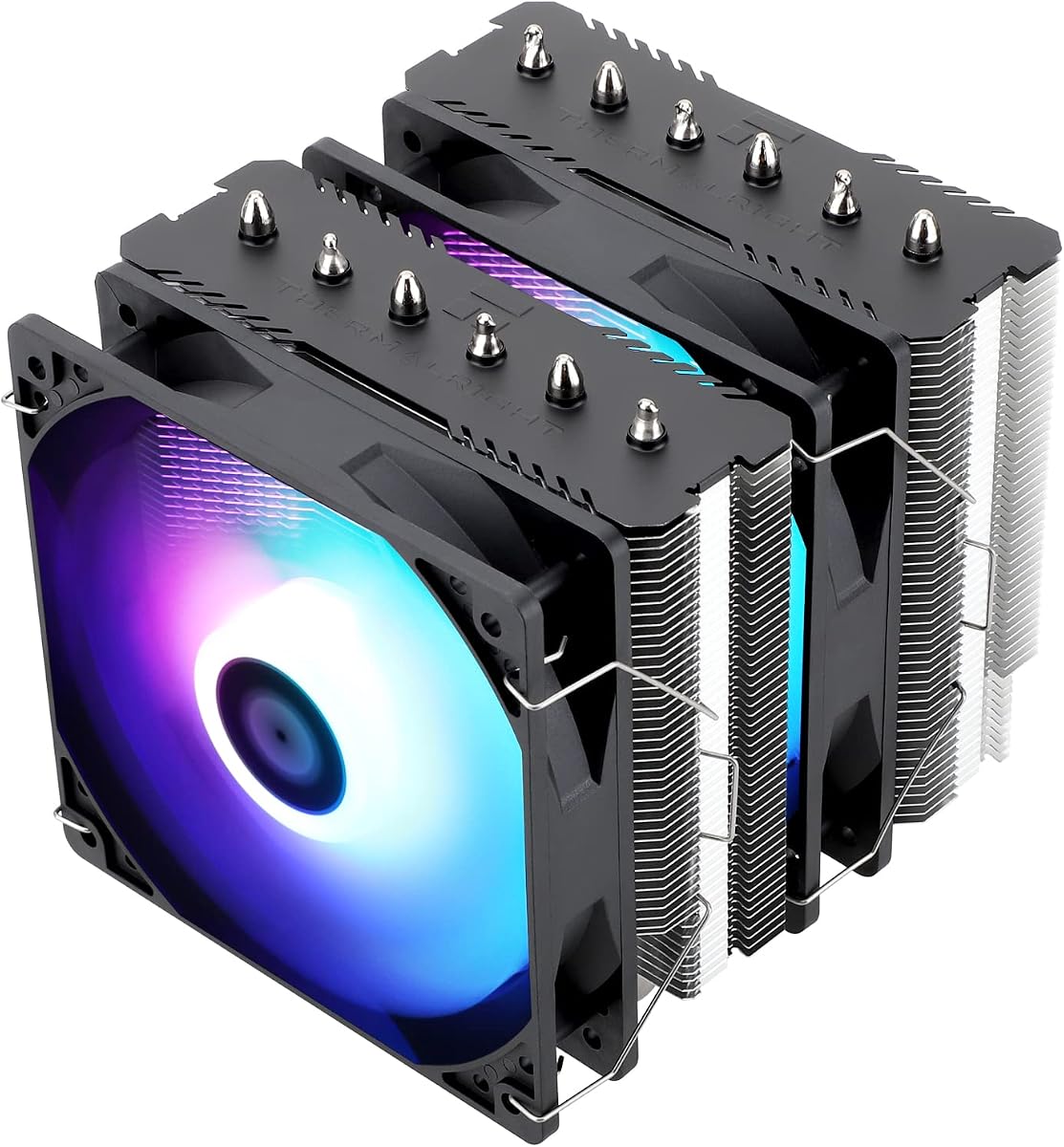


The Thermalright Assassin X120 Refined SE offers outstanding value for budget-conscious builders seeking reliable cooling performance. It holds a strong 4.7 rating from users who praise its thermal efficiency and low noise profile during standard workloads.
We may earn a commission when you buy through this link, at no additional cost to you.
Its design features four 6mm heat pipes utilizing AGHP technology which ensures consistent heat transfer regardless of case orientation. The TL-C12C PWM fan delivers efficient airflow while maintaining whisper quiet levels under idle conditions.
While it lacks flashy RGB features the solid aluminum construction provides durable performance for daily computing tasks. The compact height ensures it fits in most standard cases without interfering with taller RAM modules.
This cooler is ideal for users who need dependable thermal management without breaking the bank. It strikes a perfect balance between cost and capability for mainstream desktop computing environments.
AGHP technology allows the heat pipes to function effectively in both vertical and horizontal orientations ensuring consistent cooling performance in various case setups.
The included PWM fan runs at 1550 RPM providing enough airflow to keep temps low while staying under 25.6 dB noise levels for a peaceful workspace.
We may earn a commission when you buy through this link, at no additional cost to you.
The Thermalright Peerless Assassin 120 SE ARGB brings dual tower performance to the mid-range market with added visual flair. Users rate it highly for its ability to handle high TDP CPUs while delivering customizable lighting effects.
We may earn a commission when you buy through this link, at no additional cost to you.
It employs six copper heat pipes and two TL-C12C-S PWM fans to maximize airflow across the fins. The AGHP technology ensures the cooling remains effective even when the system is installed in unconventional orientations.
While the dual fans increase air movement they remain quiet enough for home offices and gaming setups. The ARGB lighting can sync with motherboards to match your system aesthetic seamlessly.
This unit is perfect for gamers who want strong thermal headroom and style. It delivers premium cooling features at a price point that remains accessible to most builders.
The dual tower design increases surface area for better heat dissipation allowing the cooler to manage more CPU heat output efficiently.
Syncs with 5V 3-pin ARGB headers on compatible motherboards to create cohesive lighting effects throughout your PC build.
We may earn a commission when you buy through this link, at no additional cost to you.
The Noctua NH-D15 chromax.Black is widely regarded as the gold standard for air cooling performance. It consistently tops benchmarks with its dual 140mm fan design and premium build materials ensuring top tier thermal results.
We may earn a commission when you buy through this link, at no additional cost to you.
Its six copper heat pipes and optimized fins move air efficiently to keep even high power CPUs cool under heavy load. The fans run exceptionally quietly thanks to Noctua's advanced bearing technology and aerodynamic design.
The all-black finish adds a sleek modern look to builds while maintaining the performance of the original D15. The included SecuFirm2 mounting system makes installation straightforward on modern and legacy sockets.
For enthusiasts prioritizing silence and cooling power this cooler is an investment that delivers for years. It is the definitive choice for silent systems and overclocked workstations.
The NF-A15 fans deliver massive static pressure to push air through the dense fins while maintaining ultra low noise levels.
SecuFirm2 offers easy and secure mounting across a wide range of Intel and AMD platforms ensuring stable contact.
We may earn a commission when you buy through this link, at no additional cost to you.
The Noctua NH-U12A chromax.Black offers high performance in a slightly more compact form factor than its larger siblings. It is praised for its ability to provide top tier cooling without the massive footprint of dual 140mm fans.
We may earn a commission when you buy through this link, at no additional cost to you.
It features two NF-A12x25 fans that are renowned for pushing significant air volume at low noise levels. The tower design ensures maximum surface area for heat dissipation within a standard width profile.
The black finish gives it a premium look that blends seamlessly into dark themed PC builds. It is an excellent option for cases where width might be a constraint but performance is still key.
This model is ideal for users who want Noctua quality and silence without the bulk of the D15. It fits neatly into most towers while delivering reliable heat management.
The NF-A12x25 fans utilize advanced airflow acceleration channels to boost static pressure and airflow performance significantly.
Its width and height allow it to fit in cases where other large coolers might block drive bays or PCIe slots.
We may earn a commission when you buy through this link, at no additional cost to you.
The Thermalright Assassin X 120R Digital ARGB stands out with its built-in digital screen on the top cover. Users enjoy the convenience of monitoring CPU temperatures directly without installing third party software on their desktop.
We may earn a commission when you buy through this link, at no additional cost to you.
It uses a robust tower design with four heat pipes to ensure efficient heat transfer from the CPU to the fins. The PWM fan runs at 2000 RPM providing adequate airflow for high end desktop processors.
The ARGB lighting around the display adds a modern gaming aesthetic that appeals to enthusiasts. The screen syncs with motherboard RGB headers to match your system lighting theme.
This cooler is perfect for users who want to keep an eye on thermal stats while gaming. It combines practical functionality with a unique look that few other coolers offer.
The LCD display shows live data such as CPU temperature and usage providing quick visual access to system health.
The 4 heat pipe layout and aluminum fins ensure rapid heat dissipation to keep thermal throttling at bay.
We may earn a commission when you buy through this link, at no additional cost to you.
The original Noctua NH-D15 remains a top performer in the air cooling category despite its classic design. It is celebrated for its reliable performance and ability to handle high TDP CPUs silently across all workloads.
We may earn a commission when you buy through this link, at no additional cost to you.
Its dual tower design features six heat pipes that spread heat across two dense fin stacks. The NF-A15 fans are widely considered the best 140mm fans available for quiet high static pressure cooling.
While the brown and grey color scheme may not suit all builds the performance is undeniable. It comes with a six year warranty reflecting Noctua's confidence in the durability of this unit.
This model is recommended for those who prioritize raw cooling capability over aesthetics. It is a workhorse that will keep your system cool for years to come.
The NF-A15 fans include Low Noise Adaptors to further reduce speed and noise levels if maximum cooling is not required.
SecuFirm2 mounting allows for offset positioning which helps clear taller memory modules without compromising contact pressure.
We may earn a commission when you buy through this link, at no additional cost to you.
The Noctua NH-D15S chromax.Black adapts the D15 design to fit more compact cases by using a single fan offset on one tower. This asymmetrical design allows for high RAM clearance without sacrificing too much cooling performance.
We may earn a commission when you buy through this link, at no additional cost to you.
It uses the same high quality NF-A15 fan as the full D15 ensuring silent operation under load. The black finish aligns with modern aesthetics while keeping the thermal performance of the original design.
Users praise its ability to fit in smaller cases where the standard D15 might be too wide. The offset mounting ensures that tall RGB memory modules do not interfere with the airflow.
This cooler is perfect for gaming rigs that need silence and clearance. It offers a balanced solution for builders who want Noctua quality in a narrower package.
The asymmetrical design moves the fan to one side to maximize RAM slot accessibility for taller memory kits.
Despite using one fan the dual tower structure maintains high heat dissipation capable for most mainstream CPUs.
We may earn a commission when you buy through this link, at no additional cost to you.
The Noctua NH-D9L is designed specifically for small form factor builds needing strong cooling in a tiny footprint. Its low height makes it perfect for HTPCs and cases with strict height limits.
We may earn a commission when you buy through this link, at no additional cost to you.
It utilizes a dual tower layout with a single 92mm fan to manage heat effectively. The NF-A9 fan provides excellent airflow for its size while maintaining whisper quiet operation even under stress.
Although it is smaller than standard coolers the build quality remains top notch. The mounting system supports all modern sockets making it a reliable choice for custom ITX builds.
This unit is ideal for users who want to build a powerful PC in a small case. It ensures thermal stability without compromising on noise or system stability.
At just 110mm tall it clears most standard cases allowing for additional components or custom routing in tight spaces.
The NF-A9 fan includes a Low Noise Adaptor for even quieter performance in silent media centers.
We may earn a commission when you buy through this link, at no additional cost to you.
The Noctua NH-U12S is a classic single tower cooler that balances performance and compatibility. It is widely trusted for its ability to cool mainstream CPUs efficiently without blocking motherboard components.
We may earn a commission when you buy through this link, at no additional cost to you.
Its 120mm slim profile allows it to fit in cases where wider dual towers might be problematic. The NF-F12 fan uses a focused flow design to push air directly through the fins for better efficiency.
Users appreciate its reliability and ease of installation. The SecuFirm2 mounting system ensures a secure fit and allows for slight offset to avoid memory interference.
This cooler is a solid choice for standard office PCs and gaming builds. It delivers consistent performance and silence at a reasonable price point for many users.
The NF-F12 fan has optimized airflow channels that increase static pressure to push air through the dense heatsink fins effectively.
It fits most standard towers and leaves room for expansion cards due to its narrow single tower design.
We may earn a commission when you buy through this link, at no additional cost to you.
The Thermalright Peerless Assassin 120 SE offers premium cooling features at a budget-friendly price point. It is highly rated for its ability to outperform many more expensive options in thermal tests.
We may earn a commission when you buy through this link, at no additional cost to you.
It features a dual tower design with six nickel-plated heat pipes that ensure quick heat transfer. The two TL-C12C fans provide strong airflow to move heat away from the fins efficiently.
The AGHP technology ensures consistent cooling performance regardless of orientation inside your case. The base is soldered to the heat pipes to reduce thermal resistance for better contact with the CPU.
This model is perfect for budget builders who do not want to compromise on performance. It delivers reliable cooling for demanding tasks without requiring a large investment.
The nickel-plated base ensures even heat distribution across the heat pipes to minimize hot spots on the CPU surface.
Dual 120mm fans create a wide airflow path to cool the dual tower fins quickly and effectively.
We may earn a commission when you buy through this link, at no additional cost to you.
Choosing the right air cooler depends on several factors including your processor type case size and desired noise level. This guide breaks down the key elements to consider before making your purchase.
Thermal Design Power (TDP) indicates how much heat your CPU generates and what the cooler must handle. Select a cooler rated for a higher TDP than your CPU to ensure stable temperatures under load.
Check the manufacturer specifications to confirm the cooler supports your CPU's TDP rating especially if you plan on overclocking or heavy workloads.
Measure your PC case clearance height to ensure the cooler will fit without hitting the side panel or drives. Larger dual tower coolers often require more vertical space than slim single towers.
Always verify the maximum CPU cooler height listed in your case manual before buying to avoid compatibility issues.
Tall RAM modules with RGB lighting can conflict with large CPU coolers depending on the mounting position. Ensure the cooler has enough clearance or offset options to avoid blocking memory slots.
Single tower or offset dual tower designs are better for setups with bulky RAM kits.
Confirm that the cooler supports your current CPU socket such as LGA1700 or AM5. Manufacturers often provide mounting kits for multiple platforms but verify before purchasing to ensure compatibility.
Look for SecuFirm2 or equivalent mounting systems that allow easy secure installation on your specific motherboard.
Fan noise is measured in decibels and varies by fan size and RPM. Larger fans like 140mm tend to be quieter than 120mm or 92mm fans at the same airflow due to slower rotation speeds.
Check the dB(A) rating in specs to ensure the cooler operates within your acceptable noise range for quiet environments.
PWM fans allow automatic speed control based on temperature which reduces noise at idle. Look for 4-pin PWM connectors to enable this feature on your motherboard header.
DC fans run at a set speed or simple voltage control which may not offer the same dynamic noise management.
Premium coolers often use copper heat pipes and aluminum fins with nickel plating to prevent corrosion. High quality bearings like S-FDB or FDB extend the lifespan of the fans significantly.
Check the manufacturer warranty terms as longer coverage indicates confidence in the product's durability and reliability.
Many coolers come with high quality thermal paste preapplied or in a tube which saves time and ensures proper conductivity. Using included paste avoids the cost of buying a separate compound.
Ensure the paste type matches your needs high viscosity for precision or pre-applied for convenience.
Before installation ensure your CPU is securely seated in the motherboard socket and the area is clean. Apply a pea sized amount of thermal paste to the center of the CPU if not pre-applied on the cooler base.
Mount the cooler brackets according to your motherboard socket manual to ensure even pressure on the CPU surface. Tighten screws in a diagonal pattern to prevent bending the base and causing uneven contact.
Regularly clean the heatsink fins of dust every few months using compressed air to maintain airflow efficiency. Check that the fan spins freely and listen for any unusual noises indicating bearing wear.
High end dual tower air coolers like the Noctua NH-D15 can handle moderate overclocking for most consumer CPUs. However extreme overclocking may still require liquid cooling to manage the additional heat effectively.
Yes third party tower coolers are significantly better than stock boxed coolers offering lower temperatures and quieter operation. They provide much larger surface areas for heat dissipation compared to small aluminum stock solutions.
Most modern air coolers are designed to avoid blocking PCIe slots but tall dual tower units may cover the first slot on some boards. Check clearance and offset mounting options to ensure your graphics card fits properly.
Use a can of compressed air to blow dust out from between the fins and the fan blades. Hold the fan blades still while blowing air to prevent damage to the motor bearings during cleaning.
Generally pre-applied paste or high quality tube paste lasts several years before drying out. Only reapply if you remove the cooler for another reason such as a CPU swap or deep cleaning of the surface.
The ideal fan speed varies but PWM control allows the fan to ramp up under load for cooling and slow down at idle for silence. Aim for 80 to 100 percent speed under heavy load for best thermal results.
Our top picks highlight diverse cooling solutions from budget friendly single towers to premium dual tower systems. Each model offers distinct advantages in thermal performance and noise management to suit different user needs.
Prioritize case clearance and CPU compatibility before focusing on aesthetics or extra features like RGB lighting. A well chosen cooler ensures your processor runs efficiently and quietly for years of reliable use.
Prices and availability change regularly so please review current listings before finalizing your purchase. Verify your motherboard and case specifications to guarantee a seamless fit and optimal performance.