
Seagate Game Drive for Xbox
4.5Editor score
Xbox-certified compatibility
Bold refined design
Built-in LED bar
Compare the top External SSD for Xbox Series X Storage options for 2026. This guide evaluates speed, capacity, compatibility, and design to help you choose the
Finding the right External SSD for Xbox Series X Storage is crucial for gamers who want to expand their library without sacrificing performance. Modern titles require significant space, and internal storage fills up quickly with massive downloads and updates. Choosing a compatible drive ensures smooth gameplay and quick access to your favorite games.
We evaluated the leading options based on speed, compatibility, durability, and design to bring you this comprehensive roundup. Each product was selected for its ability to work seamlessly with the Xbox ecosystem while offering reliable storage solutions. Our analysis covers both official expansion cards and third-party external drives to give you a full picture.
Each pick highlights specific strengths and ideal use cases so you can find the perfect match for your setup. Keep in mind that availability and pricing may change over time as new models enter the market. We recommend checking the latest details before making your final decision to ensure you get the best value available.
4.5Editor score

4.8Editor score

4.7Editor score
This side-by-side comparison helps you quickly identify the key specifications and features of each top-rated drive. Use this table to see how capacity, interface speeds, and physical dimensions vary across the selected models.


This expansion card stands out as the premium choice for Xbox Series X owners seeking perfect parity with internal storage. With an impressive 4.8 rating, it delivers the speed and reliability required for next-gen titles without compromise.
We may earn a commission when you buy through this link, at no additional cost to you.
The NVMe core is optimized for Xbox Velocity Architecture ensuring instant game loads and seamless transitions. It is officially licensed to meet Microsoft standards so you get guaranteed performance and full console integration.
While the cost is higher than standard external drives the performance is unmatched for playing Series X games directly. The lack of cable clutter and simple plug-and-play installation make it a worth it upgrade for serious gamers.
Buy this if you want the absolute best experience and do not mind paying extra for internal-level speed. It is the ideal solution for those who prioritize performance and convenience above all else.
This drive integrates directly into the console slot eliminating the need for external cables and clutter.
The card supports Quick Resume allowing instant switching between suspended games without reloading.
We may earn a commission when you buy through this link, at no additional cost to you.
The Seagate Game Drive offers excellent value with 2TB of space at a budget-friendly price point. It is specifically built for Xbox and carries the certified label so you know it works seamlessly with your console.
We may earn a commission when you buy through this link, at no additional cost to you.
Its bold refined design features a built-in LED bar that matches the Xbox green aesthetic of your setup. The included Rescue Data Recovery Services provide peace of mind for preserving your valuable game libraries.
As a hard drive it is slower than SSDs but perfect for archiving older titles or less demanding games. The external form factor means it requires a power source which adds a small cable to your desk.
Choose this drive if you need maximum storage for a lower price and do not mind slightly slower speeds. It is the best option for gamers who want to store a massive library economically.
With 2TB of capacity you can store hundreds of titles without worrying about running out of space.
Xbox certification ensures full compatibility with Series X S and Xbox One generations for trouble-free use.
We may earn a commission when you buy through this link, at no additional cost to you.
Samsung brings its flash memory expertise to gaming with this highly versatile portable SSD that performs well on Xbox. Its high ratings reflect consistent performance and reliability across various use cases beyond just console gaming.
We may earn a commission when you buy through this link, at no additional cost to you.
The drive offers fast read and write speeds enabling efficient file transfers and quick access to game data. Its compact design weighs very little and fits easily in a pocket making it great for LAN parties.
Although not branded for Xbox it is fully compatible with the system via USB ports. The lack of specific Xbox features means you might miss some integrated design touches compared to licensed drives.
This is a great choice for users who also use the drive on PCs or laptops for general storage needs. It delivers premium quality and speed that meets the demands of modern gaming.
Use this same drive on your Xbox PC or laptop without needing to buy separate storage solutions.
The solid aluminum unibody construction protects against drops and ensures long-term reliability for travel.
We may earn a commission when you buy through this link, at no additional cost to you.
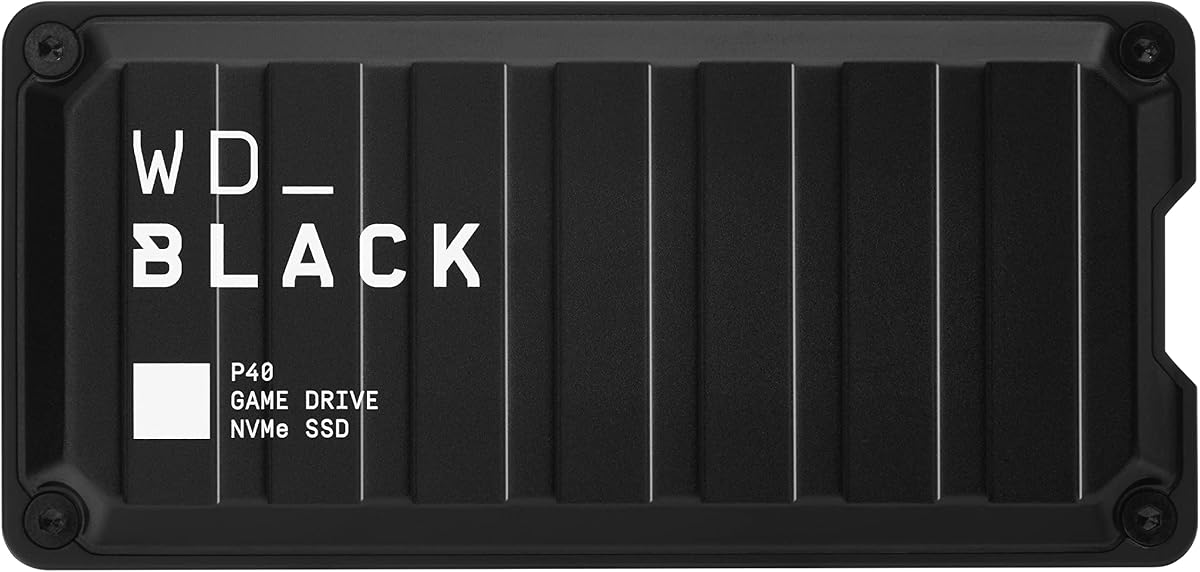
The WD P40 combines high-speed performance with flashy RGB lighting that appeals to enthusiasts who want style. It is an SSD that rivals the speed of internal drives while remaining portable enough to take anywhere.
We may earn a commission when you buy through this link, at no additional cost to you.
With speeds up to 2000MB/s loading times are significantly reduced compared to traditional hard drives. You can customize the RGB lighting using the dashboard software to match your setup aesthetic perfectly.
The drive is built tough with a shock-resistant structure capable of surviving drops up to two meters. However the high speed requires a specific USB-C connection which might need a compatible cable on some systems.
Buy this if you want high performance and style in a portable package that works on Xbox. PC. It is ideal for gamers who appreciate both speed and visual customization.
SSD speeds minimize load times keeping you in the game without unnecessary waiting periods.
Customize the RGB patterns to match your console and desk setup for a unified look.
We may earn a commission when you buy through this link, at no additional cost to you.
Lexar delivers a sleek and portable SSD option that is easy to carry and performs well with Xbox consoles. Its slim design makes it one of the most travel-friendly drives on the market today.
We may earn a commission when you buy through this link, at no additional cost to you.
Data transfer speeds reach up to 1050MB/s which is fast enough for most gaming and file backup needs. The drive includes 256-bit AES encryption software to help keep your personal files secure at all times.
It is incredibly thin and lightweight fitting easily into a pocket without adding bulk to your bag. Users should note that full speed depends on host device compatibility which may vary on some systems.
Choose this drive if you need a compact solution that fits in a pocket and travels well. It is a great choice for users on the go who want reliable portable storage.
Weighing only 42g it slips into a pocket or bag without adding noticeable weight.
Built-in encryption ensures your files remain private and secure across different devices.
We may earn a commission when you buy through this link, at no additional cost to you.
This external SSD brings the trusted Seagate name to Xbox with a design that perfectly matches the console. It offers the speed benefits of an SSD while maintaining the branded look fans appreciate.
We may earn a commission when you buy through this link, at no additional cost to you.
The drive features a built-in LED bar that glows green to match your gaming center lighting. It includes Rescue Data Recovery Services to provide extra security for your valuable data and game saves.
As a 3.5 inch drive it requires a separate power connection which adds a bit of complexity to setup. Despite the external power it offers faster speeds than traditional hard drives for better performance.
Buy this if you want an SSD experience with official Xbox styling without using the expansion slot. It is a solid choice for those who want speed and reliability in a branded package.
The design matches the console style perfectly keeping your gaming setup looking cohesive.
The included rescue service helps recover lost data offering peace of mind over your saves.
We may earn a commission when you buy through this link, at no additional cost to you.
The WD P50 offers a rare combination of massive storage and blistering SSD speeds for serious gamers. With up to 4TB you can store virtually your entire library without ever worrying about space limits.
We may earn a commission when you buy through this link, at no additional cost to you.
Its speed of up to 2000MB/s ensures that loading times are kept to a minimum for a smooth experience. The drive is built to withstand drops and rough handling making it suitable for travel and LAN parties.
To get full performance you need a USB SuperSpeed connection which may not be available on older setups. The price is higher than standard drives but the value of high capacity and speed is clear.
Choose this drive if you need the most storage possible without sacrificing the fast SSD experience. It is perfect for collectors who want to keep years of games installed at once.
With 4TB of space you can hold over a hundred modern games without needing to delete titles.
Designed to survive drops this portable drive takes performance anywhere you go with confidence.
We may earn a commission when you buy through this link, at no additional cost to you.
This ES3 model provides a solid balance of capacity and performance for gamers needing more space. It is a versatile portable SSD that works well with Xbox consoles and other devices.
We may earn a commission when you buy through this link, at no additional cost to you.
Double layer graphite sheets help conduct heat away from the drive ensuring it stays cool during transfers. The drive is drop-resistant up to two meters which protects your data during travel or accidental slips.
It offers read speeds of 1050MB/s which is sufficient for most gaming and file backup scenarios. The included USB-C cable adds convenience for quick setup and easy connection to your console.
Buy this if you need reliable storage with good thermal performance and drop protection for travel. It is a practical choice for gamers who value durability and consistent performance.
Graphite sheets help manage heat ensuring stable performance even during long gaming sessions.
The drive can survive drops up to two meters keeping your data safe from accidental falls.
We may earn a commission when you buy through this link, at no additional cost to you.
The SE880 delivers top-tier speeds with USB 3.2 Gen2 x2 making it one of the fastest portable options. It features a premium titanium finish that looks sleek and feels durable in the hand.
We may earn a commission when you buy through this link, at no additional cost to you.
With speeds up to 2000MB/s this drive handles large game files and fast transfers with ease. Its compact form factor makes it easy to carry and store without taking up much space.
To achieve the top speeds you need a compatible host device with the right USB interface. Without that connection performance may drop to standard USB speeds which is still good but less impressive.
Choose this if you want the fastest possible portable storage for your setup. It is ideal for users who value speed and premium design above all else.
Top-tier interface speeds ensure minimal wait times when loading games or moving files.
The titanium look adds a touch of elegance to your desk setup and travel gear.
We may earn a commission when you buy through this link, at no additional cost to you.
This P10 drive offers the highest capacity in this list ideal for storing massive game libraries cheaply. With up to 6TB you can keep hundreds of titles on hand without needing to delete old favorites.
We may earn a commission when you buy through this link, at no additional cost to you.
As a mechanical hard drive the speed is lower than SSDs but sufficient for storing older or less demanding games. The sleek metal top gives it a professional look that fits well with modern gaming setups.
It is an excellent choice for archiving Series X titles which can be moved back to internal storage when needed. While not fast enough to play current gen games directly it is perfect for storage.
Buy this if you need to save money and hold a large number of games simultaneously. It is the best value option for those who prioritize capacity over raw speed.
With 6TB you can hold up to 150 games for an unmatched price per gigabyte value.
Store older titles or Series X games that you can move back when needed to play.
We may earn a commission when you buy through this link, at no additional cost to you.
Choosing the right storage involves understanding compatibility, speed, and capacity needs for your specific gaming habits. Use these factors to narrow down the options and find the best fit.
Always check if the drive is officially licensed for Xbox to ensure seamless integration and feature support. Unlicensed drives may work for storage but might lack specific console optimizations.
Look for Xbox-certified or officially licensed labels when shopping to guarantee that your device will work perfectly with your console.
Games can take up large amounts of space so consider how many titles you plan to keep installed at once. A 1TB drive is good for starters while 2TB or more suits larger libraries.
Choose a capacity that matches your game library size to avoid frequent managing and deleting games.
SSDs provide faster load times and better performance compared to traditional mechanical hard drives. For playing Series X games you need a drive that can match internal speed or use the expansion card.
Prioritize SSDs for performance and mechanical drives for cheap archival storage to balance speed and cost.
USB 3.0 and newer interfaces ensure faster data transfer rates and compatibility with modern consoles. A drive with USB 3.2 or higher will deliver better performance for gaming and file transfers.
Select a drive with a compatible USB interface to take advantage of faster load and transfer speeds.
If you travel often look for a portable drive that is lightweight and durable enough to withstand movement. A sleek design also complements your gaming setup without cluttering your desk or table.
Opt for a portable design with durable materials if you plan to take your games to different locations.
Check the warranty period and data recovery services to ensure your investment is protected over time. Reputable brands offer better support and longer warranties which can save you money on repairs.
Choose a drive with a strong warranty and data recovery options to protect your valuable game data.
Compare the price per terabyte to understand the value of each drive relative to its storage and performance. Sometimes paying more for a faster drive is worth it depending on how you use your console.
Balance your budget with the speed and capacity you need to find the best value for your situation.
Connect your drive to a USB port on your console and follow the on-screen instructions to format it for Xbox use. Ensure you select the option to use it as external storage for games and media.
Always use the safe eject feature before disconnecting the drive to prevent data corruption or file system errors. Properly ejecting ensures that all transfers are complete and your data remains safe.
Keep the drive in a cool and dry place away from direct sunlight and liquids to ensure long-term performance. Regular cleaning with a dry cloth helps maintain the drive and prevent dust buildup.
No, Xbox Series X games must be played from the internal storage or the official expansion card. You can store them on an external drive and move them back when you want to play. This helps save space while keeping your library accessible.
An SSD is better for performance because it loads games much faster than an HDD. However, an HDD is more cost-effective for storing large libraries of games you do not play often. Choose based on whether you prioritize speed or capacity.
Yes, you will need to format the drive using your Xbox console to use it for games. This process erases all data on the drive so make sure to back up any important files first. Follow the on-screen prompts for a quick setup.
The Xbox Velocity Architecture is a technology that optimizes storage and memory to reduce load times. Expansion cards and high-speed SSDs work best with this system to deliver the fastest performance. It is key to the next-gen experience on Series X.
Yes, you can use external drives with Xbox Series S to store and play games. Just ensure the drive is compatible with the console and meets the speed requirements. Many USB drives work seamlessly with the Series S.
You can manage games via the console dashboard to move them between internal and external storage. Select the game, choose manage, and then select move to the external drive. This process is quick and lets you free up internal space.
Choosing the right storage depends on your budget and whether you prioritize speed or capacity. The top picks offer excellent solutions for both performance and affordable storage options.
For the best experience consider the expansion card or an SSD for fast loads and seamless gameplay. If you need to store many titles at once a mechanical drive offers great value.
Remember to check current availability and specs before buying to ensure you get the latest model. Your gaming setup will benefit from the extra space and reliability these drives provide.