
Hamile for iPad 9/8/7th Generation Case with Keyboard
4.5Editor score
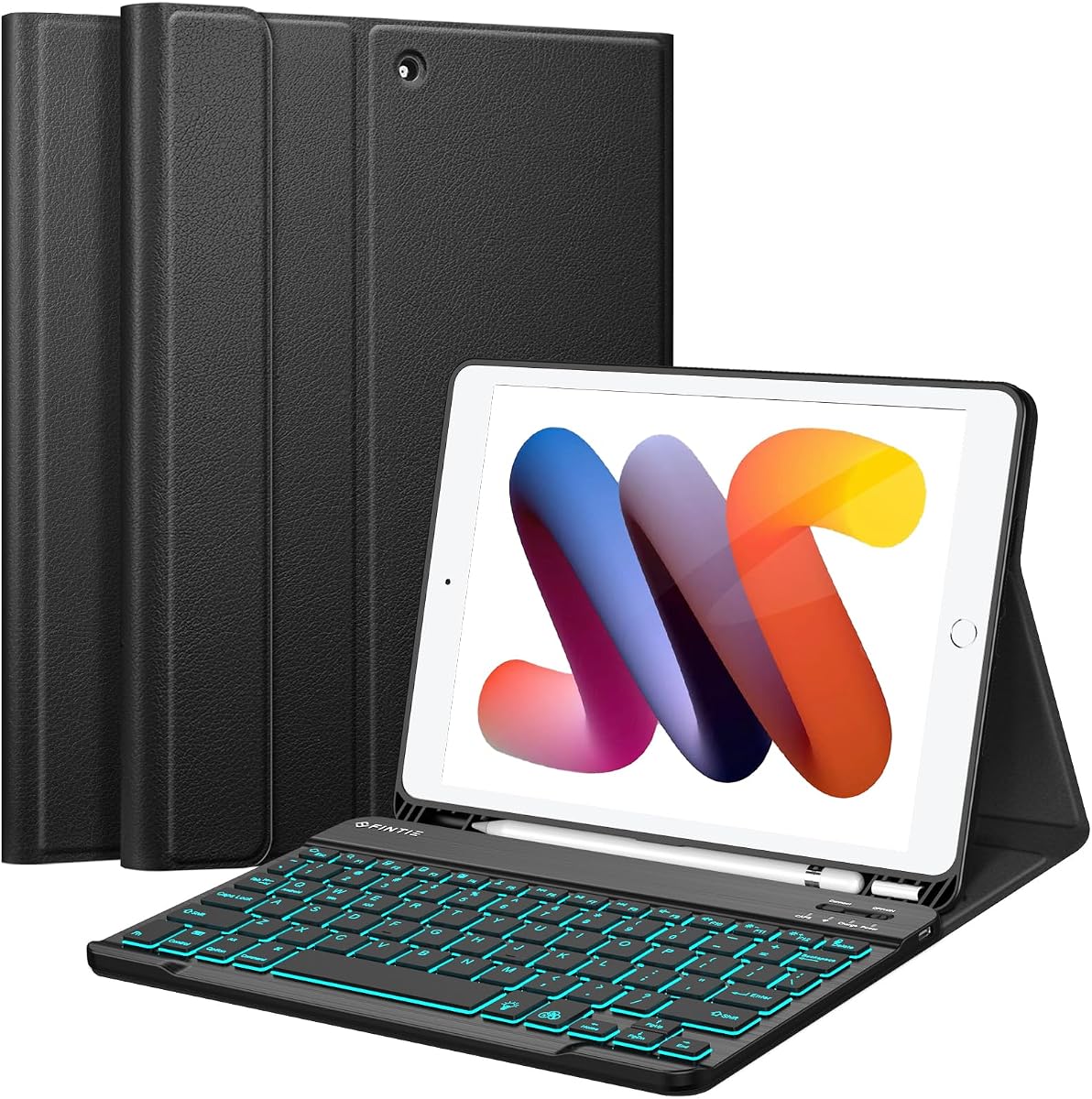
Seven color backlit keyboard
Detachable magnetic keyboard
Pencil holder included
Finding the right keyboard case for your iPad can transform how you work and create. A good case offers typing comfort, protection, and portability all in one sleek package. We looked at the latest models to see which ones truly stand out.
Our team reviewed ten top-rated options available online. We examined compatibility, build quality, battery life, and unique features like trackpads or backlit keys. Each product was evaluated based on user feedback and detailed specifications.
Each pick highlights key strengths and trade-offs to help you decide. We include pros, cons, and detailed breakdowns of features. Keep in mind that availability and offers may change over time so check current listings before buying.
4.5Editor score

4.4Editor score

4.4Editor score
As an Amazon Associate we earn from qualifying purchases.
This comparison table highlights the key differences between our top ten picks. You can quickly see which models offer trackpads, backlit keys, or longer battery life to match your specific needs and preferences.



The Logitech Slim Folio is a standout choice for iPad users seeking reliability and comfort. With a strong rating and a design built for long-term use, it transforms your tablet into a productive laptop-like device seamlessly.
We may earn a commission when you buy through this link, at no additional cost to you.
Its standout feature is the incredible four-year battery life powered by replaceable coin cells, ensuring you rarely worry about charging. The full row of iOS shortcut keys provides quick access to volume and media controls, enhancing workflow efficiency significantly.
While the lack of a backlight might be a downside for low-light environments, the ergonomic design compensates with spacious keys that reduce typing fatigue. The pencil holder keeps your stylus secure without adding bulk to the overall profile.
This case is ideal for professionals and students who prioritize typing comfort and long battery life over flashy features. If you value a lightweight, trusted accessory that integrates smoothly with iPadOS, this is a top recommendation.
The smart power management system allows for up to four years of use on two batteries based on daily usage.
Dedicated iOS keys let you control media and adjust volume without switching apps or tapping the screen.
We may earn a commission when you buy through this link, at no additional cost to you.
Hamile offers a compelling budget-friendly option without sacrificing essential features. This case delivers on typing comfort and protection, making it a favorite for price-conscious buyers who still want a great user experience.
We may earn a commission when you buy through this link, at no additional cost to you.
The seven-color backlit keyboard allows for comfortable typing in dim environments, while the magnetic detachable design lets you use the keyboard as a standalone device. The rechargeable battery ensures you can use it for hours without interruption.
Though the materials are primarily PU leather and plastic rather than premium aluminum, they provide solid protection for daily use. The honeycomb interior helps dissipate heat, preventing your iPad from overheating during extended sessions.
If you need a versatile and affordable keyboard case that offers backlit keys and pencil storage, this model is an excellent choice. It balances cost and functionality well for students or casual users.
Choose from seven vibrant colors and three brightness levels to match your mood or environment.
The keyboard can be detached easily allowing you to read or draw without the weight of the keyboard.
We may earn a commission when you buy through this link, at no additional cost to you.
The typecase Touch Keyboard Case brings laptop-like precision to your iPad with a built-in precision trackpad. This premium option is designed for users who want seamless navigation without constantly touching the screen.
We may earn a commission when you buy through this link, at no additional cost to you.
Its patented hinge allows for three-sixty degree rotation giving you multiple use modes from typing to video watching. The ten-color RGB backlight and full row of iPadOS shortcuts add a touch of style and efficiency to your setup.
While it comes at a higher price, the sturdy hard-shell design and comprehensive protection justify the cost. The trackpad supports smooth gestures like tap, pinch, and swipe, which enhances the overall user experience significantly.
This case is perfect for professionals or power users who demand the best features and durability. If you value precise cursor control and versatile viewing angles, the typecase is worth the investment.
Navigate documents and web pages effortlessly with multi-gesture trackpad controls similar to a laptop.
The patented hinge lets you adjust the iPad to any angle for typing, reading, or watching videos.
We may earn a commission when you buy through this link, at no additional cost to you.
TUNKARMOR offers a unique value proposition by including a detachable Bluetooth mouse in the package. This makes it an excellent choice for users who prefer mouse navigation over trackpads or touch inputs.
We may earn a commission when you buy through this link, at no additional cost to you.
The keyboard features seven-color backlighting and magnetic attachment allowing it to function as a stand. The auto sleep and wake function helps preserve battery life while the honeycomb grid pattern protects the iPad from overheating.
While managing a keyboard and mouse might be slightly more complex than a all-in-one trackpad solution, the extra control is valuable for precision tasks. The case provides robust protection with full edge coverage.
If you want a complete input solution with a physical mouse included this case is a strong contender. It is well-suited for productivity tasks where precise cursor control is essential.
Package includes both keyboard and mouse providing versatile input options for different tasks.
The internal honeycomb grid helps dissipate heat effectively extending the lifespan of your iPad.
We may earn a commission when you buy through this link, at no additional cost to you.
FINTIE stands out with its robust battery performance and comfortable scissor switch keys. This model is designed for those who type frequently and need a device that keeps up with long work sessions.
We may earn a commission when you buy through this link, at no additional cost to you.
The four hundred mAh battery provides ample power for extended use, supported by energy-saving modes that activate after inactivity. The ergonomic keys ensure that your fingers are not strained during long typing periods.
The detachable design allows for flexibility whether you want to type or just read. The dual protection with PU leather and TPU ensures your device is safe from daily wear and tear.
For users prioritizing battery longevity and typing comfort this is a reliable choice. The bright backlight ensures visibility in any setting making it practical for travel or office work.
Smart power management saves energy after ten minutes of inactivity ensuring you get maximum usage.
Mechanical scissor keys offer a quiet and responsive feel suitable for long writing sessions.
We may earn a commission when you buy through this link, at no additional cost to you.
Divufus provides a versatile keyboard case that supports iOS Android and Windows systems. This makes it ideal for users who switch between devices or prefer universal compatibility across their tech ecosystem.
We may earn a commission when you buy through this link, at no additional cost to you.
The customizable shortcut keys allow for efficient workflow adjustments. With a standby time of one hundred and thirty days you won't need to worry about frequent charging interruptions or battery drain.
The honeycomb grid design on the back helps prevent overheating which is crucial for performance. The non-slip rubber lining ensures the iPad stays stable even when used on uneven surfaces.
If you need a reliable case that works with multiple systems and offers strong heat management this is a great option. It is practical for students or professionals with diverse device setups.
Seamlessly switch between iOS Android and Windows with simple key combinations for better flexibility.
Non-slip lining and durable materials ensure your iPad stays secure during typing or reading.
We may earn a commission when you buy through this link, at no additional cost to you.
KBCASE delivers a sleek and lightweight solution for iPad users on the go. Its slim design ensures it fits easily into bags and briefcases without adding unnecessary weight or bulk to your daily carry.
We may earn a commission when you buy through this link, at no additional cost to you.
The scissor-structure keys provide a relaxed tactile experience ideal for quick typing tasks. With multiple viewing slots you can adjust the angle for comfortable reading or typing on the fly.
The heat dissipation design helps keep the iPad cool which is vital for performance. While it lacks a backlight it compensates with excellent portability and a comfortable feel.
This case is perfect for those who prioritize mobility and simplicity. If you want a thin reliable case that doesn't compromise on typing comfort this is a solid choice.
Ultra-thin profile and light weight make it easy to carry anywhere without added burden.
Scissor-structure keys provide a spacious and relaxed typing feel for better comfort.
We may earn a commission when you buy through this link, at no additional cost to you.
Dexnor combines durability with a stylish aluminum alloy hinge that offers a floating cantilever stand. This design not only looks premium but also provides sturdy support for various viewing angles and typing positions.
We may earn a commission when you buy through this link, at no additional cost to you.
The built-in precision trackpad and rechargeable battery ensure smooth navigation and long usage times. With six hundred fifty mAh capacity you can work for hours without interruption while enjoying backlit keys in the dark.
The magnetic connection is strong and secure preventing accidental slips. While it adds some weight the stability and build quality make it worth the trade-off for professional use.
If you want a case that offers robust construction and a modern aesthetic this is a great pick. It is well-suited for users who value design as much as functionality.
Aluminum alloy hinge guarantees a sturdy and stylish connection that lasts over time.
Customizable angles allow for comfortable typing and viewing in any environment.
We may earn a commission when you buy through this link, at no additional cost to you.
INFILAND focuses on responsiveness with a zero-lag magnetic keyboard that ensures every keystroke is registered instantly. This is crucial for fast typists or those who rely on quick input for efficiency.
We may earn a commission when you buy through this link, at no additional cost to you.
The multi-mode design allows you to fold the cover into a stand or detach the keyboard for reading. The precision trackpad brings smooth cursor control making navigation intuitive and comfortable for various tasks.
The bright backlit keys with seven colors let you work comfortably in any lighting. The protective case shields against scratches and bumps ensuring your device stays in pristine condition.
If speed and versatility are your priorities this case delivers with reliable performance. It is ideal for students and professionals who need fast input and flexible usage modes.
Zero-lag magnetic connection ensures your keystrokes are registered instantly without delay.
Fold into a stand detach the keyboard or use it flat to adapt to any task.
We may earn a commission when you buy through this link, at no additional cost to you.
KBCASE offers a rotatable design that supports three-sixty degree swivel for versatile viewing angles. This feature makes it easy to switch between typing and media consumption modes without removing the case.
We may earn a commission when you buy through this link, at no additional cost to you.
The precision trackpad allows you to control the cursor without touching the screen enhancing your workflow. The hardshell design provides all-around protection ensuring your device remains safe from scratches and drops.
With a built-in pencil holder you can keep your stylus secure and accessible at all times. The precise cutouts ensure full access to ports and features without needing to remove the case.
If you need a case that offers unique rotation and solid protection this is a strong option. It is perfect for creative users who need flexible angles for their work.
Supports three-sixty degree swivel allowing you to find the perfect angle for any task.
Hardshell design safeguards all sides of your tablet from dust and impacts.
We may earn a commission when you buy through this link, at no additional cost to you.
Selecting the right keyboard case involves considering your specific needs such as typing comfort protection and extra features. Here are the key factors to evaluate before making your purchase.
Ensure the case explicitly states it fits the 8th Generation iPad 10.2-inch model. Check model numbers like A2270 or A2430 on the back of your device to confirm a perfect fit.
Always verify compatibility details before purchasing to avoid returns or fit issues with your tablet.
Decide between a trackpad mouse or basic keyboard. Trackpads offer precise cursor control while keyboards are often lighter and simpler to use.
Choose the input method that aligns with how you use your iPad most often for better efficiency.
Backlit keys are essential if you type in low-light environments. Look for models with adjustable brightness and color options for better visibility.
Prioritize backlighting if you frequently work in dim rooms or need to type at night.
Check the battery capacity and estimated hours of use. Rechargeable batteries are common so consider how often you are willing to charge the keyboard.
Look for models with energy-saving features like auto sleep to maximize your battery life between charges.
The case should offer full edge coverage and durable materials like PU leather or hardshell plastic. Some models include heat dissipation grids to prevent overheating.
Select a case with sturdy build quality to protect your iPad from drops and daily wear.
Adjustable stands or multiple viewing angles are important for comfort. Some cases offer thirty-sixty degree rotation for flexible positioning.
Choose a design that allows you to find a comfortable angle for both typing and watching media.
If you travel often consider the weight and thickness of the case. Detachable keyboards can add flexibility by reducing weight when you only need a cover.
Balance protection with weight to ensure the case is easy to carry in your bag.
Features like pencil holders and shortcut keys can enhance usability. Some cases include mice or specialized software support for extra convenience.
Evaluate these extras based on whether they genuinely improve your daily workflow and productivity.
To pair the keyboard connect Bluetooth on your iPad and select the keyboard from the list. Most models pair instantly once charged. Follow the manual instructions for any specific button combinations to enable features.
Clean the keyboard regularly with a soft dry cloth to remove dust. Avoid liquids near the charging port and keyboard keys. Keep the case away from extreme temperatures to preserve battery life.
Store the case in a cool dry place when not in use. If detachable always secure the keyboard to avoid losing it. Rotate your viewing angle occasionally to reduce strain on the hinges.
Most of the cases listed include a dedicated pencil holder for the first-generation Apple Pencil. Please check the product details to ensure compatibility. Keep in mind that the pencil itself is not included with the case.
Many keyboards are compatible with multiple systems like Android and Windows. However the case itself is molded for specific iPad sizes. You should verify the device compatibility before purchasing to ensure a fit.
Most models use a USB-C charging cable provided in the package. Charge it fully before first use. Some keyboards have an auto sleep mode to save power when not in use for extended periods.
Many models feature a magnetic detachable keyboard allowing you to remove it for reading or drawing. Others have a fixed design. Check the product description to see which style suits your needs.
Some premium options include a precision trackpad for cursor control. Basic models typically do not. If you want trackpad functionality ensure the listing specifically mentions it before buying.
Most products come with a warranty period. Contact the seller support if you experience issues. Ensure the keyboard is charged and Bluetooth is enabled. Restarting your iPad often helps resolve connectivity problems.
Yes most keyboards include iOS-specific shortcut keys for volume and media control. These help you access common functions quickly without tapping the screen. Check the manual for key mapping details.
The cases offer robust protection with materials like PU leather and TPU. They provide all-around coverage to guard against scratches and bumps. However heavy drops might still damage the screen so use caution.
We have reviewed ten top options ranging from budget-friendly picks to premium trackpad models. The Logitech Slim Folio leads in reliability while Hamile offers great value for backlit needs.
When choosing prioritize what matters most to you such as battery life typing comfort or specific features like trackpads. The right case should enhance your workflow without adding unnecessary bulk or hassle.
Remember that availability and stock may vary so check current listings before deciding. Whether you need a simple cover or a full input solution one of these cases will suit your setup perfectly.