
Microsoft Surface Dock (Pd9-00003),Black
4.5Editor score
Magnetic Surface Connect cable
Four USB 3.0 ports
Dual Mini DisplayPort outputs
Discover the top docking stations for Surface Pro in October 2026. We compare connectivity, charging power, display support, and build quality to help you
Transforming your Surface Pro into a full desktop workstation requires the right docking station. A quality dock consolidates multiple ports into one sleek hub, enabling seamless connectivity for monitors, peripherals, and high-speed data transfer without cluttering your desk.
We evaluated ten top-rated docking solutions based on port variety, charging capacity, display support, and compatibility across the Surface ecosystem. Our analysis focuses on real-world performance, build quality, and ease of setup for professionals and students alike.
Each pick highlights specific strengths like triple display support, fast charging, or compact design. Prices and availability fluctuate frequently, so verify current details before purchasing to ensure you get the best value for your specific Surface model.
4.5Editor score

4.4Editor score

4.5Editor score
This side-by-side comparison highlights key specifications across all ten selected docking stations. Review each product's port selection, charging wattage, display capabilities, and unique features to find the perfect match for your workflow needs.




The Microsoft Surface Thunderbolt 4 Docking Station stands out as a premium connectivity hub for Surface users. Boasting a 4.4-star rating, it delivers exceptional speed and reliability through Thunderbolt 4 technology, making it ideal for power users.
We may earn a commission when you buy through this link, at no additional cost to you.
Its standout quality is the combination of rapid charging and high-speed data transfer. You can power up your laptop in just 2.5 hours while simultaneously transferring large files or streaming media without performance bottlenecks.
While the price reflects its premium features, the durability and performance justify the investment. The eco-friendly design using recycled ocean-bound plastic adds a meaningful touch for environmentally conscious buyers seeking top-tier hardware.
Creative professionals and IT administrators should buy this dock for its robust multitasking capabilities. It transforms your Surface into a high-performance desktop station seamlessly, ensuring you stay productive without interruption during busy workdays.
Thunderbolt 4 ports ensure you get the fastest possible data speeds and charging rates for your Surface device.
Built with 20% recycled ocean-bound plastic, this dock balances high performance with environmental responsibility.
We may earn a commission when you buy through this link, at no additional cost to you.
The Microsoft Surface Dock offers a straightforward and affordable way to expand your Surface Pro capabilities. With a solid 4.5-star rating, it remains a popular choice for users needing basic connectivity without complex features.
We may earn a commission when you buy through this link, at no additional cost to you.
Its magnetic Surface Connect cable is a major highlight, providing a secure and easy connection that simplifies daily use. The inclusion of four USB 3.0 ports and Mini DisplayPorts covers essential peripherals effectively for home and office.
While it lacks newer Thunderbolt speeds, its reliability and broad compatibility with older Surface models make it a safe bet. The compact design fits easily into any setup without requiring extra power outlets beyond the included supply.
Students and budget-conscious users should choose this dock for its simplicity and value. It transforms your Surface into a desktop PC effortlessly, keeping costs low while delivering the core functionality needed for productive work.
The Surface Connect cable snaps on magnetically, making daily docking quick and secure without fumbling with ports.
Works seamlessly with a wide range of Surface devices including Pro, Laptop, and Book models from various years.
We may earn a commission when you buy through this link, at no additional cost to you.
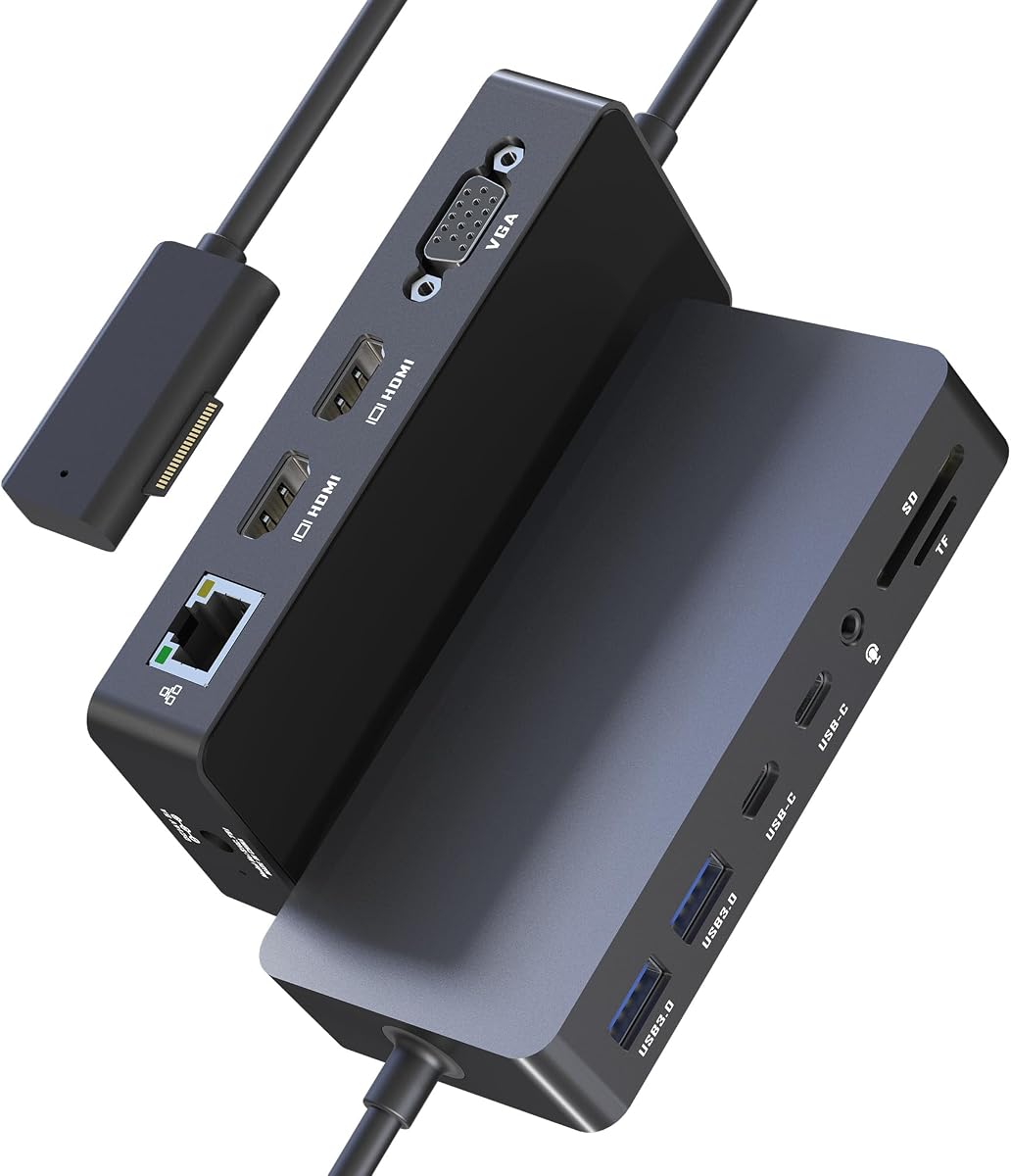
This 12-in-1 Surface Docking Station is designed for users who need maximum screen real estate without breaking the bank. It supports triple displays through HDMI and VGA ports, enabling enhanced multitasking for complex workflows.
We may earn a commission when you buy through this link, at no additional cost to you.
The hub features robust data transfer speeds via USB 3.0 and USB-C ports, allowing rapid file movement. Card readers for SD and TF formats add convenience for photographers, while the Ethernet port ensures a stable internet connection.
The main limitation is the need to turn off the Surface screen to achieve three external displays, which may not suit everyone. However, the value provided by the extensive port selection and display flexibility is impressive for the price.
Multitaskers and content creators should consider this dock for its versatile connectivity. It transforms a single device into a powerhouse workstation, giving you multiple screens to manage projects efficiently while keeping all essential peripherals connected.
Extend your productivity with support for three external displays, letting you arrange windows exactly how you need.
Quickly offload photos and videos with built-in SD and TF card slots supporting high-speed data transfers.
We may earn a commission when you buy through this link, at no additional cost to you.
With an impressive 4.8-star rating, this docking station is a top choice for hybrid workers needing reliable performance. It transforms your Surface into a robust workstation, supporting multiple screens and fast data transfer for creative tasks.
We may earn a commission when you buy through this link, at no additional cost to you.
The 72W power supply ensures your device stays charged while running peripherals simultaneously, avoiding the limitations of standard chargers. Its minimalist design reduces clutter, making it ideal for office desks or conference room presentations.
While the VGA port is older technology, the dual 4K HDMI outputs provide high-resolution visuals. The combination of audio and network ports allows for immersive calls and stable downloads without needing extra dongles or adapters.
Professionals and educators should select this dock for its seamless plug-and-play connectivity. It offers exceptional value for those seeking to expand their Surface capabilities quickly, ensuring efficient workflows across home and office environments.
The 72W adapter provides ample power for your Surface and connected devices, ensuring uninterrupted usage all day.
Move 4K footage or large design files instantly with USB 3.0 and USB-C ports supporting up to 5Gbps.
We may earn a commission when you buy through this link, at no additional cost to you.
This 12-in-1 Surface Dock consolidates all your connectivity needs into one sleek unit, perfect for students. It supports dual 4K HDMI and a VGA port, enabling triple-screen setups that enhance multitasking during study sessions.
We may earn a commission when you buy through this link, at no additional cost to you.
The 72W fast charging capability keeps your laptop powered while connected, eliminating the need for the original charger. SD card slots support up to 2TB, allowing quick access to photos or videos directly from camera cards.
The included Ethernet port ensures a stable, low-latency internet connection crucial for video conferences. While the 30Hz limit on HDMI might affect gamers, it is sufficient for academic and office work where clarity matters most.
Students and home users should choose this dock for its reliability and comprehensive feature set. It simplifies your workspace and expands device capabilities instantly, backed by an 18-month warranty for peace of mind.
Maximize multitasking with crystal-clear dual 4K and VGA outputs that let you extend your desktop across three monitors.
Transfer large media files or documents instantly using high-speed USB 3.0 and USB-C ports with 5Gbps speeds.
We may earn a commission when you buy through this link, at no additional cost to you.
The Microsoft Surface Dock 2 instantly transforms your Surface into a desktop PC with next-gen ports for professional use. With a 4.5-star rating, it delivers high-power charging and dual 4K video support for immersive visual experiences.
We may earn a commission when you buy through this link, at no additional cost to you.
Its 199W power supply ensures your laptop and peripherals run without interruption, even under heavy loads. The dual 4K at 60Hz capability provides smooth visuals perfect for creative work, while eight USB ports cover various device needs.
The longer Surface Connect cable and Kensington-compatible security slot add practical value for office setups. While the price is higher, the performance and durability justify the cost for users demanding reliable, high-end connectivity features.
Business professionals and power users should choose this dock for its robust capabilities. It ensures seamless connectivity whether you are at your desk or in a meeting room, maximizing productivity with zero compromise on speed or quality.
Future-proof your setup with USB-C ports and high-speed video connections designed for modern Surface devices.
Built-in security lock support protects your investment, making it ideal for shared or public office environments.
We may earn a commission when you buy through this link, at no additional cost to you.
This Microsoft Surface Dock 2 converts your device into a desktop PC with next-gen ports designed for efficiency. Its high 4.8-star rating reflects seamless connectivity and performance, making it a favorite for professionals.
We may earn a commission when you buy through this link, at no additional cost to you.
The included 199W power supply and longer 80 cm cable offer extended reach and ample power for peripherals. Dual 4K monitors at 60Hz provide immersive visuals ideal for detailed design work or multi-window productivity.
While the standard Ethernet speed is adequate for most tasks, the port variety ensures compatibility with legacy devices. The versatile layout with front and rear USB-C adds convenience for frequently plugged in peripherals.
Office workers should choose this dock for its reliable plug-and-play functionality. It simplifies desk setups, reducing clutter while maximizing functionality, and the comprehensive warranty ensures worry-free support if issues arise.
Enjoy dual 4K monitors at 60Hz for high-resolution, immersive visuals perfect for professional creative tasks.
Front and rear USB ports keep your workspace organized, giving easy access to frequently used devices.
We may earn a commission when you buy through this link, at no additional cost to you.
This docking station transforms your device into a desktop powerhouse, featuring essential ports for high-performance workflows. With a 4.3-star rating, it balances speed and versatility, catering specifically to creative professionals and demanding users.
We may earn a commission when you buy through this link, at no additional cost to you.
It supports dual 4K@60Hz HDMI and 1080P VGA outputs, enabling triple-screen setups that boost multitasking efficiency. The dedicated 100W DC charging adapter ensures your laptop stays fast-charged while powering connected drives and devices.
The 1000Mbps Gigabit Ethernet port guarantees lightning-fast internet for smooth conferencing and downloads. Integrated card readers support high-speed photo offloading, making it ideal for designers needing quick access to large media files.
Creators and power users should choose this dock for its future-proof expansion. It bridges the gap between your tablet and a fully functional desktop setup, ensuring you have the speed and capacity needed for complex projects.
Boost multitasking efficiency by 300% with lag-free crystal-clear resolutions across three external monitors simultaneously.
The 1000Mbps Ethernet port provides a stable, low-latency connection perfect for large file transfers and calls.
We may earn a commission when you buy through this link, at no additional cost to you.
This Renewed Microsoft Surface Dock 2 offers a cost-effective way to access premium features. With a 4.7-star rating, it provides multi-port high-efficiency expansion, ensuring your Surface transforms into a desktop PC quickly.
We may earn a commission when you buy through this link, at no additional cost to you.
The bundle includes the original 199W power supply and a USB-C cable, simplifying setup. It supports dual 4K@60Hz outputs, delivering high-resolution visuals, along with robust data transfer rates for your connected peripherals.
Rigorously tested for durability, this dock ensures consistent performance through thermal management. While it is renewed, the warranty provides protection against hardware failures, making it a reliable choice for budget-conscious buyers.
Users seeking high-end features at a lower price should choose this dock. It delivers the same capabilities as a new unit, backed by a limited warranty, ensuring you get premium performance without the premium cost.
The package includes the dock, original power supply, and USB-C cable for instant setup without extra purchases.
Enjoy dual 4K@60Hz display output and 10Gbps data transfer rates for smooth, professional workflows.
We may earn a commission when you buy through this link, at no additional cost to you.
This Surface Dock uses connection technology to charge your laptop and transfer video data seamlessly. With a 4.2-star rating, it offers a tidy desktop solution using two Mini DP ports to connect external monitors effectively.
We may earn a commission when you buy through this link, at no additional cost to you.
The 90W power supply ensures stable operation, and the four USB 3.0 ports cover various peripheral needs. A 3.5 audio jack and gigabit network card port add essential connectivity for internet speed and audio equipment.
Resolution limitations on multiple displays are typical for older Mini DP ports, but the setup is easy to use. It works with a wide range of Surface devices, making it a reliable expansion for older models.
Users with older Surface models should choose this dock for its broad compatibility. It simplifies your workspace while maintaining stable performance, backed by a replacement warranty that adds peace of mind to the purchase.
The sleek dock keeps your desktop tidy by consolidating multiple ports into one compact and easy-to-use unit.
Supports a vast range of Surface models including Pro, Laptop, and Book, ensuring it fits your specific device.
We may earn a commission when you buy through this link, at no additional cost to you.
Selecting the right docking station requires understanding your specific needs regarding ports, power, and display support.
Ensure the dock offers the specific ports your peripherals need, such as HDMI, USB-C, or Ethernet. Some models focus on USB-A while others prioritize modern USB-C connectivity.
Choose a hub that covers your current devices and future upgrades to avoid needing multiple adapters.
Check the wattage of the included power adapter to ensure it can charge your laptop while running connected devices. Higher wattage prevents battery drain during heavy use.
Prioritize docks with 72W or higher if you plan to use multiple peripherals simultaneously.
Determine how many monitors you need and at what resolution. Some docks support dual 4K while others offer triple display setups.
Confirm refresh rates like 60Hz are supported if you use your Surface for design or video work.
Verify that the dock is compatible with your specific Surface model and generation. Older models may use different connectors.
Modern docks work with Surface Pro 4 and newer, but always check the product details to be sure.
Look for durable materials and efficient thermal management to prevent overheating. Quality docks often feature metal casings.
A solid build ensures longevity and consistent performance over time without degradation.
Consider the length of the included Surface Connect cable to ensure it reaches your device comfortably. Longer cables offer flexibility in desk placement.
Short cables may force you to place the dock too close to your Surface, causing clutter.
Ethernet ports provide stable internet connections superior to Wi-Fi for large file transfers. Look for Gigabit or 2.5G Ethernet support.
A dedicated network port reduces latency and ensures reliable connections during online meetings.
Check the warranty period provided by the manufacturer. Longer warranties indicate confidence in product durability.
Responsive customer support is essential if you encounter issues with setup or functionality.
Always connect the power adapter to the dock before plugging in your Surface to ensure stable power delivery. This prevents potential voltage fluctuations that could affect your device.
Keep the vents on your docking station clear of dust and clutter to avoid overheating. Use compressed air occasionally to clean out any debris from the ports.
Update your Surface drivers regularly to ensure compatibility with the new ports and features. This helps maintain optimal performance and resolves any connection glitches quickly.
Most modern docks are compatible with Surface Pro 4 and newer models that feature a Surface Connect port or USB-C. Always check the specific product details to ensure it fits your exact device model and generation.
Yes, many docks support dual or triple monitor setups. Some allow extending your display across three screens while others focus on dual 4K output for higher resolution and refresh rates.
Most high-quality docks include a power adapter that charges your Surface while connected. However, verify the wattage to ensure it matches your device's requirements for full-speed charging.
Thunderbolt docks offer faster data transfer and higher bandwidth for multiple displays compared to standard USB-C. They are generally more expensive but provide superior performance for demanding creative work.
Connect the dock to a power source, plug in your peripherals, and then connect your Surface via the Surface Connect cable. Most docks are plug-and-play requiring no extra software installation.
Yes, refurbished docks often come with warranties and rigorous testing. They offer significant savings while maintaining high performance and reliability comparable to new units.
Our top picks include the Microsoft Surface Dock 2 for premium users and budget-friendly options like the Surface Dock for basics. Each option balances speed, port variety, and build quality to meet diverse needs.
Prioritize your workflow requirements such as triple display support or fast charging when selecting a model. The right dock transforms your mobile tablet into a stationary powerhouse effectively.
Prices and availability change frequently so always check current deals before purchasing to secure the best value. Verify compatibility with your specific Surface device to ensure seamless operation.