
Zalman CUBIX M-ATX Micro-ATX Compact Desktop PC Case with 80mm Fan
4.5Editor score
Compact 17.1L volume
Supports standard ATX PSU
Pre-installed cooling fan
This guide compares the top 10 Compact E ATX Case options for powerful builds in small spaces, evaluating airflow, compatibility, and design features for
Building a powerful computer often requires a large footprint, but modern gaming and workstation needs demand flexibility. A Compact E ATX Case allows you to fit high-performance components into a smaller space without sacrificing thermal performance or expandability. This selection focuses on cases that support larger motherboards while maintaining a streamlined profile.
We evaluated these models based on airflow efficiency, component compatibility, and build quality. Each entry was chosen for its ability to house flagship hardware like top-tier GPUs and large coolers. The list includes options ranging from budget-friendly builds to premium chassis designed for enthusiasts seeking portability.
Each pick highlights key strengths, potential trade-offs, and ideal use cases for different types of users. Whether you need a portable rig for LAN parties or a space-saving tower for your desk, these models offer distinct advantages. Prices and availability change frequently, so check the linked product pages for the most current details.
4.5Editor score

4.4Editor score

3.9Editor score
This side-by-side comparison evaluates all ten selected cases based on critical specifications including motherboard support, GPU clearance, cooling options, and build materials to help you make an informed decision.



The Cooler Master QUBE 540 is a standout choice for users seeking a Compact E ATX Case that does not compromise on component size. With a 4.4 rating, this mid-tower balances a small footprint with the ability to house high-end graphics cards and large motherboards. Its unique orientation design sets it apart from standard towers.
We may earn a commission when you buy through this link, at no additional cost to you.
This chassis offers up to 415mm of GPU clearance, which is critical for accommodating the latest flagship graphics cards like the RTX 5090. The reversible I/O panel and movable handles allow you to customize the layout to fit your desk or shelf perfectly. The mesh-optimized front ensures that cooling remains effective even when space is tight.
While the flexible design is a major plus, the internal layout requires attention to cable management to look clean. The price is higher than entry-level options, but the versatility justifies the cost for enthusiasts. It is ideal for those who need a powerful machine that can be rotated or moved without a full rebuild.
Buy this case if you need to fit a full E-ATX motherboard into a smaller space without restricting your GPU choice. The robust feature set and unique orientation capabilities make it a top recommendation for flexible workstation or gaming builds where space and performance are equally important.
Supporting motherboards up to 11 inches wide allows for advanced workstation builds without needing a massive chassis footprint.
The full front mesh panel paired with a pre-installed 120mm fan ensures consistent airflow for thermally demanding components.
We may earn a commission when you buy through this link, at no additional cost to you.
The Lian Li O11D Mini V2 earns a high 4.7 rating for its refined approach to compact building. It maintains the dual-chamber aesthetic of the larger models but shrinks the footprint significantly. This makes it an excellent choice for builders who prioritize looks alongside raw performance in a smaller package.
We may earn a commission when you buy through this link, at no additional cost to you.
The 10-degree slanted bottom design is a key feature that enhances cold air intake for the GPU, leading to better thermal performance. It supports ATX back-connect motherboards, which are becoming increasingly popular for cleaner cable runs. The inclusion of horizontal and vertical anti-sag brackets ensures heavy GPUs remain stable during transport.
One trade-off is that the case does not come with fans, so you must budget for additional cooling components. While the view is stunning with pillar-less glass, the lack of included accessories might increase the total build cost. It suits users who want a premium aesthetic and plan to source their own high-quality fans.
Choose this case if you want a sleek, premium look with excellent cooling potential in a compact form. The support for new motherboard standards and robust GPU support make it a smart investment for future-proof builds where visual appeal is a priority.
The slanted bottom design improves direct cold air flow to the GPU, maintaining lower temperatures during intensive loads.
Robust anti-sag brackets protect your motherboard and graphics card from strain when using heavy modern graphics adapters.
We may earn a commission when you buy through this link, at no additional cost to you.
The Mechanic Master C34Pro is a powerhouse in the Compact E ATX Case category, rated at 3.9 due to its unique mix of high-end support and portability. It is built for users who need to transport a high-performance PC to events or between workstations regularly. The aluminum construction ensures durability without excessive weight.
We may earn a commission when you buy through this link, at no additional cost to you.
It supports GPUs up to 420mm and radiators up to 360mm, allowing for flagship-level hardware in a portable chassis. The flexible PSU mounting options give you control over airflow and cable management. The integrated handle makes moving the rig significantly easier than typical bulky cases.
While it offers great specs, the price is on the higher end and might not suit budget-conscious builders. Some users might find the aluminum exterior adds more weight than expected despite the portable design. It is best for those who prioritize ruggedness and high-performance compatibility in a travel-friendly form.
Opt for this case if you need a truly portable PC that can handle top-tier components without breaking down. The mix of durability, cooling support, and carrying convenience makes it a top choice for competitive gamers and mobile workstation users.
Accommodating 420mm GPUs and 360mm radiators ensures you never hit a bottleneck when choosing high-end hardware.
A 2mm aluminum shell and 1mm steel frame provide robust protection for sensitive components during transport.
We may earn a commission when you buy through this link, at no additional cost to you.
The Cooler Master Q300L V1 is a classic choice for entry-level builders needing a Compact E ATX Case option. With a 4.5 rating, it delivers high airflow and modular flexibility at a budget-friendly price. It is ideal for users who do not need E-ATX support but want a small footprint.
We may earn a commission when you buy through this link, at no additional cost to you.
The modular I/O panel can be moved to the top, front, or bottom, giving you flexibility in cable routing. It supports GPUs up to 360mm, which is impressive for its size. The open thermal design with perforated panels ensures heat does not build up inside the case.
Since it only supports Micro-ATX motherboards, you cannot use larger E-ATX boards which limits future expansion. Also, it does not come with fans, requiring you to buy them separately. This is a trade-off for the low price but can add to the overall cost.
Buy this if you need a reliable, compact case for a standard gaming PC without needing extreme features. Its high airflow and flexible design make it a solid starting point for many first-time builders on a budget.
Move the panel to front, top, or bottom to optimize your desk setup and cable management easily.
Perforated sides promote constant air exchange keeping internal temperatures low without extra fans.
We may earn a commission when you buy through this link, at no additional cost to you.
The Mechanic Master C34 Ultra brings a sleek design to the Compact E ATX Case market with a 4.6 rating. It is designed for portability with a built-in handle and supports standard ATX motherboards and GPUs up to 335mm. The metal front panel adds a premium feel to the build.
We may earn a commission when you buy through this link, at no additional cost to you.
It supports liquid cooling up to 240mm and air coolers up to 162mm. The internal layout is optimized for easier building and clean cable management. Using an SFX/L PSU is recommended for the cleanest build but standard ATX is supported.
The main trade-off is that it may require careful planning for standard ATX power supplies to avoid cable crowding. It is pricier than micro cases but offers more build quality and features. Ideal for those who want a mix of power and portability.
Choose this case if you need a compact rig that can move easily and looks good doing it. The handle and ATX compatibility make it a strong candidate for both desktop and mobile gaming setups.
Metal I/O and sturdy construction provide a durable feel that rivals much larger and more expensive cases.
Clean cable management zones help keep the inside tidy and airflow clear for better cooling results.
We may earn a commission when you buy through this link, at no additional cost to you.
The ASUS Prime AP201 offers excellent value in the Compact E ATX Case category with a 4.7 rating. It features a unique mesh panel design that increases airflow and visibility. It supports large ATX power supplies and GPUs up to 338mm, making it versatile for performance builds.
We may earn a commission when you buy through this link, at no additional cost to you.
The tool-free side panels allow for quick access to internal components. With support for up to six fans and 360mm radiators, cooling is a major strength. The extended motherboard tray helps hide cables for a cleaner look.
Since it is Micro-ATX only, you cannot use larger E-ATX boards. Also, it lacks fans which means you must buy them. This is acceptable given the price but adds to the total cost. Ideal for users who prioritize cooling and build simplicity.
Opt for this case if you want strong airflow and easy maintenance without breaking the bank. Its cooling potential and build convenience make it a great pick for budget-focused performance rigs.
Thousands of precision holes ensure your hardware stays cool even under heavy workload conditions.
Quick-release clips let you remove panels instantly for easy cleaning and part swaps.
We may earn a commission when you buy through this link, at no additional cost to you.
The Cooler Master Q300L V3 is a refined version of the popular V1. With a 4.6 rating, it offers a high-airflow design and tempered glass for a modern look. It supports GPUs up to 366mm which is very generous for this class of Compact E ATX Case.
We may earn a commission when you buy through this link, at no additional cost to you.
The movable I/O panel provides flexibility for cable routing and desk layouts. It allows for multiple fan configurations to suit air or liquid cooling needs. The magnetic dust filters help keep the inside clean over time.
It remains Micro-ATX only which may limit expansion compared to larger cases. You also need to buy your own fans to get full cooling performance. The price is low but adds up with accessories. Great for stylish builds on a budget.
Buy this case if you want a modern look with good compatibility for standard gaming components. Its flexibility and airflow features make it a practical choice for everyday use and light gaming.
Tempered glass and flexible panel design give your build a sleek look without sacrificing cooling power.
Dust filters prevent debris buildup while making maintenance quick and easy for busy users.
We may earn a commission when you buy through this link, at no additional cost to you.
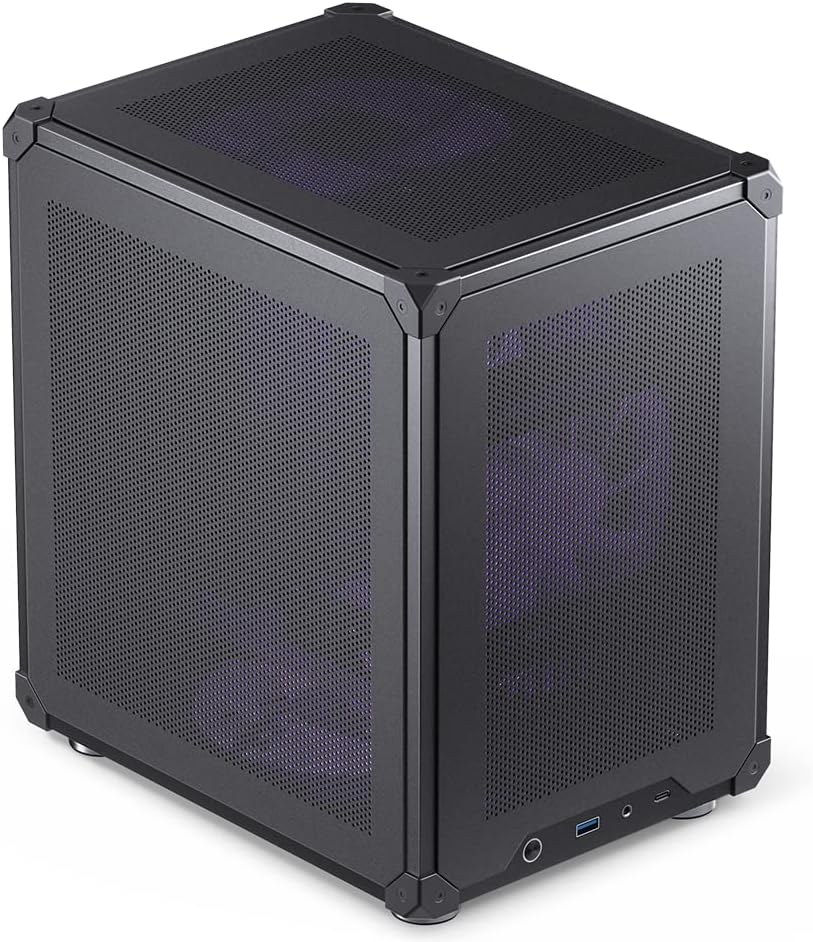
The Zalman CUBIX M-ATX is one of the most affordable Compact E ATX Case options available. Rated at 4.5, it offers a tiny 17.1L footprint that saves desk space. It includes a pre-installed fan which helps keep costs down for beginners.
We may earn a commission when you buy through this link, at no additional cost to you.
It supports standard ATX power supplies and GPUs up to 260mm. The 0.8T steel construction makes it durable despite the small size. USB 3.0 connectivity ensures you can connect modern peripherals easily.
The GPU limit means you cannot use massive high-end cards. It is best for smaller GPUs and mid-range builds. The feature set is basic but effective for a budget setup. Ideal for entry-level users needing a cheap compact case.
Choose this if you need a small case for basic computing and want to avoid extra fan purchases. Its low cost and durability make it a practical option for office or light gaming PCs.
A tiny footprint leaves more room on your desk for monitors and other gear without sacrificing usability.
Pre-installed cooling means you can start building right away without buying extra components first.
We may earn a commission when you buy through this link, at no additional cost to you.
The JONSBO C6 Black is a compact option for the Compact E ATX Case category with a 4.6 rating. It features full mesh panels for maximum airflow and a tool-free design for easy access. It is simple and efficient for small form factor builds.
We may earn a commission when you buy through this link, at no additional cost to you.
The upper cover and side panel open without tools making maintenance very easy. It supports ATX PSUs up to 185mm and GPUs up to 255mm. The layout is straightforward and focuses on function over flash.
The GPU limit is a major restriction for high-end hardware. The small size means you must pick components carefully to fit. It is not for power users needing massive parts. Ideal for simple and portable builds.
Buy this if you want a simple and well-ventilated case for basic computing needs. Its tool-free design and mesh construction make it an excellent choice for minimalists.
Remove panels instantly without screws so you can swap parts or clean dust quickly and easily.
Mesh on all sides allows air to flow freely through the system to keep components cool naturally.
We may earn a commission when you buy through this link, at no additional cost to you.
The NZXT H5 Flow is a strong contender in the Compact E ATX Case market with a 4.6 rating. It combines a compact size with excellent airflow features including ultra-fine mesh panels. It is designed to balance looks and performance well.
We may earn a commission when you buy through this link, at no additional cost to you.
It includes two pre-installed fans for immediate cooling out of the box. The PSU shroud is perforated to allow air intake from two fans improving GPU temperatures. Cable management is efficient with wide channels and hooks.
The case supports 360mm radiators and offers a clean look. It is not compatible with larger E-ATX boards. The included fans are a nice perk that saves cost and effort. Great for users wanting a balanced and reliable build.
Opt for this case if you want a complete package with good cooling and a clean design. Its airflow features and included fans make it a top pick for reliable daily gaming PCs.
Mesh panels and perforated shrouds ensure heat escapes quickly keeping your system running cool.
Wide channels and hooks help route cables neatly for a professional look inside the chassis.
We may earn a commission when you buy through this link, at no additional cost to you.
Choosing the right case requires careful attention to component sizes, cooling needs, and daily use cases.
Ensure the case supports your specific motherboard size whether ATX or E-ATX. Some compact cases only support Micro-ATX which limits future upgrades.
Check the internal tray dimensions to confirm your board will fit without blocking ports or slots.
High-end graphics cards are long and require significant internal space. Verify the maximum GPU length before buying to avoid compatibility issues.
Some cases require removing front fans to fit large cards so consider this when planning your build.
Small cases run hot so look for mesh panels and multiple fan mounts. Liquid cooling support is a big plus for high-performance systems.
Check if the case comes with fans or if you need to buy them separately to get proper airflow.
Standard ATX power supplies are long and may not fit in very small chassis. Check the maximum PSU length or consider SFX units.
Some cases allow flexible PSU mounting to improve airflow and space usage inside the case.
If you need to move your PC often look for cases with handles and durable materials. Lightweight aluminum is better than heavy steel for transport.
Consider the weight of the case plus components when deciding if it is portable enough for your needs.
Tight spaces make routing cables difficult so look for good cutouts and cable routing channels. A tidy build improves airflow significantly.
Check the space behind the motherboard tray to ensure you have room for connectors and wire loops.
Durable materials protect your hardware during transport and daily use. Steel is strong while aluminum is lighter for portable options.
Look for sturdy hinges and latches that do not rattle or break during use over time.
The look of the case matters for your desk setup. Mesh panels look great but ensure dust filters are included to keep it clean.
Consider if you prefer a transparent side panel for showing off components or a closed look for a simpler vibe.
Install components carefully and plan cable routing before locking panels. Use the provided cutouts to hide wires and prevent airflow blockage.
Clean dust filters regularly to maintain cooling efficiency. Use compressed air to clear the mesh panels and internal fans on a monthly basis.
If transporting the case remove the GPU or use anti-sag brackets to protect the PCIe slot. Secure the case in a bag with padding to avoid damage.
Yes many cases support E-ATX motherboards up to a specific width. Check the manufacturer specs to ensure your board fits within the tray dimensions before buying.
Most modern compact cases support 240mm or 360mm radiators. Verify the mounting positions for the radiator to ensure it fits without blocking other components.
GPU clearance varies from 260mm to 420mm depending on the model. Check the max GPU length specs and remove front fans if required to fit your card.
A carry handle makes transporting your PC easier for LAN events or office moves. It reduces strain on your back and ensures safer transport.
Yes most offer tool-free panels and clear cable routing. The smaller space requires patience but the compact layout often simplifies the process for beginners.
Proper ventilation prevents overheating. Choose a case with mesh panels and adequate fan mounts to keep temperatures low even in tight spaces.
Standard ATX PSUs up to 160mm-180mm usually fit. For tighter spaces consider using an SFX power supply to save room for cable routing.
Use compressed air to blow out dust from the mesh and fans. Remove filters and wash them with water to restore airflow efficiency regularly.
The Cooler Master QUBE 540 leads our list for its flexible orientation and high compatibility. The Lian Li O11D Mini V2 is a close second for its premium dual-chamber design.
Prioritize cases that match your GPU size and motherboard type. If portability matters choose a model with a handle and durable material.
Check current product availability before buying since stock changes often. These ten options offer a range of features to fit almost any compact build need.