
Wireless Gaming Mouse Rechargeable
4.3Editor score
Rechargeable wireless
Silent click buttons
20 day battery life
This guide compares the top light up LED mouse models for gaming and office use, focusing on features, comfort, and value to help you choose the right one.
Finding a light up LED mouse can transform your workspace into a vibrant gaming setup or a stylish office environment. These devices combine functionality with aesthetic appeal, offering adjustable lighting modes that match your personal style or ambient lighting conditions.
We evaluated ten top-rated models based on performance, build quality, ergonomic design, and lighting versatility. Each product was assessed for its connection stability, DPI adjustability, battery life for wireless options, and overall user experience across different operating systems.
Each pick highlights key strengths and ideal use cases to help you find the perfect match for your needs. Please note that availability and pricing may change over time, so check current listings before making your final purchase decision.
4.3Editor score

4.6Editor score

4.5Editor score
The following table provides a side-by-side comparison of all ten selected light up LED mouse models, highlighting their core specifications and key differentiators to simplify your decision-making process.




This BENGOO gaming mouse stands out for its reliable wired performance and customizable RGB backlighting. With a 4.6 rating, users appreciate the balance between affordability and functional design features.
We may earn a commission when you buy through this link, at no additional cost to you.
The four adjustable DPI settings allow you to control cursor speed freely without installing drivers. Six buttons provide essential controls for gaming and navigation tasks efficiently.
While the lighting is vibrant, it lacks advanced software customization found in higher-end models. However, the ergonomic shape ensures comfort during extended use sessions effectively.
It suits gamers and office workers seeking a dependable mouse with visual flair. If you prefer plug-and-play simplicity over complex software, this is a strong choice.
Switch between 1200 to 3600 DPI instantly to match your screen resolution and task needs without delay.
The contoured shape fits naturally under your palm, reducing strain during long gaming or work sessions.
We may earn a commission when you buy through this link, at no additional cost to you.
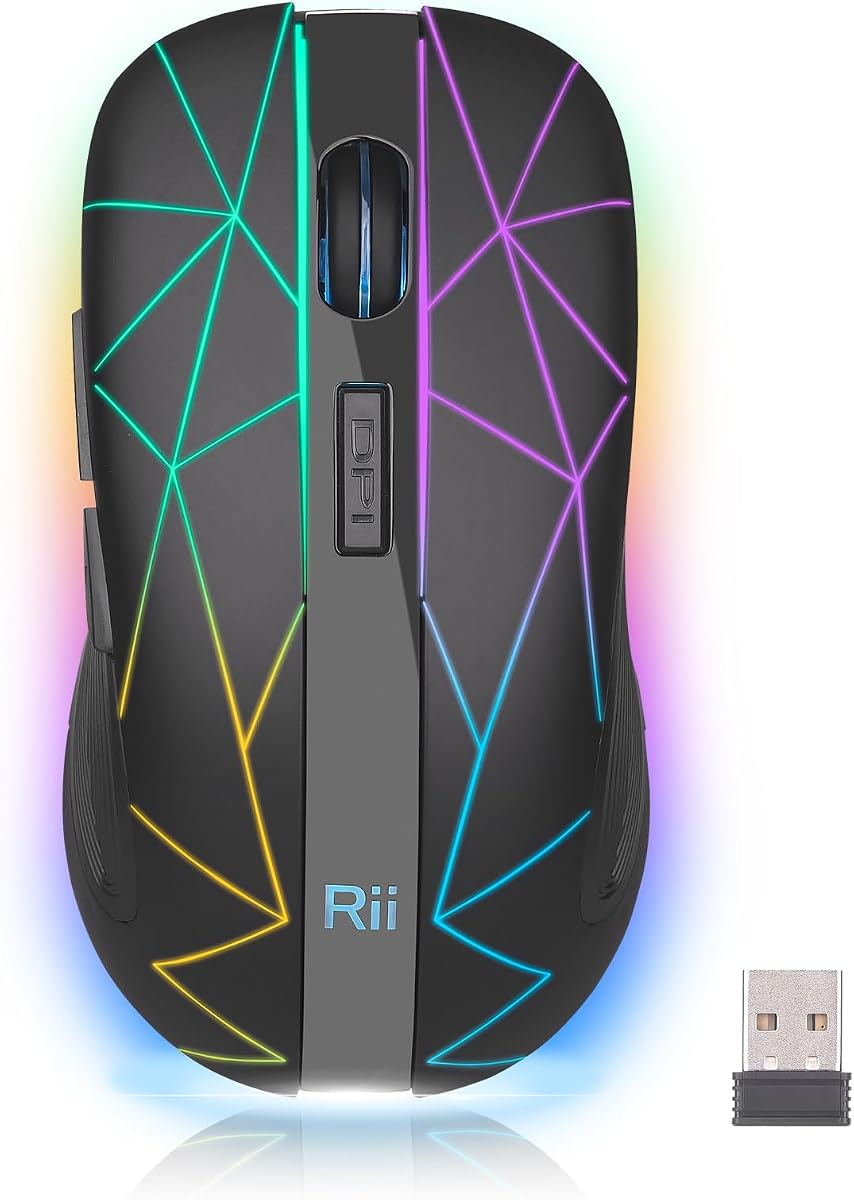
This rechargeable wireless mouse offers exceptional value with silent clicks and a vibrant LED lighting system. Users rate it 4.3 stars for its balance of convenience and aesthetic appeal.
We may earn a commission when you buy through this link, at no additional cost to you.
The silent buttons make it ideal for quiet environments like offices or libraries. Its rechargeable battery lasts up to 25 days without lights, ensuring uninterrupted usage.
Though lights reduce battery life, the option to turn them off extends runtime significantly. The 2.4G connection remains stable within ten meters of your device.
It is perfect for budget-conscious buyers needing a quiet, stylish mouse. If you want wireless freedom without frequent charging, this model delivers strong performance.
Enjoy noiseless clicks that prevent distractions, making it perfect for shared workspaces or late-night use.
With smart power management, the battery lasts weeks on a single charge, reducing maintenance hassle.
We may earn a commission when you buy through this link, at no additional cost to you.
This premium wired mouse combines durable construction with a striking seven-color breathing light effect. Rated 4.5 stars, it appeals to users seeking robust build quality and aesthetic flair.
We may earn a commission when you buy through this link, at no additional cost to you.
The laser-carved surface and metal chassis resist wear and tear over time. Four DPI options up to 3200 ensure precise tracking across various gaming and work environments.
While it is wired, the stability it provides is unmatched compared to wireless alternatives. The silent click mechanism ensures quiet operation during critical tasks.
It is best for users prioritizing build longevity and visual impact. If you want a mouse that looks unique and lasts long, this is a top contender.
Metal flanking and multiple surface coatings protect the mouse from shocks and scratches during daily use.
The breathing light effect enhances your gaming setup ambiance without requiring software configuration.
We may earn a commission when you buy through this link, at no additional cost to you.
This slim wireless mouse offers versatile connectivity via Bluetooth or 2.4G wireless. Its 4.4 rating reflects satisfaction with its portability and useful desktop return button.
We may earn a commission when you buy through this link, at no additional cost to you.
The rechargeable battery supports long sessions, and silent clicks prevent disruptions. Its compact dimensions make it easy to slip into a laptop bag for travel.
DPI options are limited to three levels, which may not suit precision gamers. However, for general office tasks, it performs reliably with smooth tracking.
It is ideal for travelers needing a versatile, light-up mouse. If you often switch between devices, the dual-mode capability adds significant convenience.
Switch seamlessly between Bluetooth for tablets and 2.4G for desktops to maximize device compatibility.
The dedicated M button lets you return to the desktop instantly, speeding up web browsing workflows.
We may earn a commission when you buy through this link, at no additional cost to you.
This wired gaming mouse features a unique 7-color breathing light that adds atmosphere to your desk. With a 4.5 rating, it is praised for its comfortable ergonomic shape and reliable tracking.
We may earn a commission when you buy through this link, at no additional cost to you.
Four adjustable DPI levels allow instant speed changes without software. The plug-and-play nature means you can start using it immediately after connecting to your USB port.
While the build is functional, it lacks premium materials found in higher-cost models. The breathing light is distinct but may not offer RGB customization options.
It is best for gamers wanting affordable atmospheric lighting. If you prioritize comfort and ease of use over complex features, this model is a solid pick.
The circular breathing light creates a calming yet dynamic visual effect for gaming environments.
Up to 3200 DPI ensures accurate cursor movement even on high-resolution displays or fast-paced games.
We may earn a commission when you buy through this link, at no additional cost to you.
This rechargeable wireless mouse offers a vibrant 7-color breathing light with silent clicks. Rated 4.4, it is valued for its comfortable ergonomic design and reliable wireless connection.
We may earn a commission when you buy through this link, at no additional cost to you.
The smart power-saving technology extends battery life by sleeping after idle periods. Three DPI levels suit most general gaming and office productivity needs effectively.
Light mode does impact battery life, so turning it off helps maintain uptime. The nano receiver is small but easily stored in the bottom compartment.
It is suitable for users seeking a colorful, wireless mouse at a fair price. If you want style and silence without constant battery changes, this works well.
Automatic sleep after inactivity keeps the battery charged longer between usage sessions.
The tiny USB receiver fits seamlessly into your laptop, minimizing clutter and keeping your workspace tidy.
We may earn a commission when you buy through this link, at no additional cost to you.
This compact wireless mouse features a rechargeable battery and random RGB LED color changes. With a 4.4 rating, it is appreciated for its portability and ergonomic contour.
We may earn a commission when you buy through this link, at no additional cost to you.
The auto-sleep mode helps conserve power when idle for five minutes. Its small form factor makes it easy to carry in a laptop bag for travel.
Color changes are random rather than customizable, which limits personalization. However, the reliable 2.4GHz connection ensures smooth cursor control for daily tasks.
It is ideal for travelers needing a small, stylish mouse. If you want a device that fits easily in your pocket and looks unique, this is a great choice.
Its compact size ensures it fits in tight spaces or travel bags without adding bulk.
Intelligent sleep mode extends battery life, reducing the frequency of charging interruptions.
We may earn a commission when you buy through this link, at no additional cost to you.
This wireless mouse offers a cool, soft LED light and silent clicks for quiet environments. Rated 4.4, it is favored for its ergonomic design and lag-free wireless transmission.
We may earn a commission when you buy through this link, at no additional cost to you.
The advanced 2.4G technology ensures stable tracking up to ten meters away. Rechargeable power eliminates the need for disposable batteries entirely.
The soft LED light provides ambiance without being too bright or distracting. However, DPI switching is basic compared to advanced gaming models.
It is best for users prioritizing comfort and quiet operation. If you want a distraction-free workspace with subtle lighting, this mouse delivers.
Super silent buttons allow for noiseless clicking, perfect for shared offices or libraries.
Lag-free technology ensures smooth cursor movement, even during fast-paced actions or gaming.
We may earn a commission when you buy through this link, at no additional cost to you.
This rechargeable wireless mouse features a rainbow breathing light and silent click technology. With a 4.5 rating, it stands out for comfort and reliable high-precision tracking.
We may earn a commission when you buy through this link, at no additional cost to you.
The auto-wake feature lets you resume use instantly by clicking a button. Battery life remains robust thanks to intelligent power-saving sleep modes.
Lighting cannot be customized via software, but the breathing effect adds a nice visual touch. Silent buttons make it a good choice for shared spaces.
It suits users wanting a silent, colorful mouse for gaming or work. If you want reliable performance with stylish lighting, this model is excellent.
The colorful breathing light cycles through hues, adding a dynamic visual element to your setup.
Click any button to wake the mouse from sleep, ensuring seamless workflow interruptions.
We may earn a commission when you buy through this link, at no additional cost to you.
This dual-mode mouse supports both Bluetooth and 2.4G wireless for maximum flexibility. Its 4.4 rating reflects satisfaction with its unique lightning crackle LED design.
We may earn a commission when you buy through this link, at no additional cost to you.
Rechargeable power and silent buttons enhance the user experience for long sessions. Three DPI levels cover most common productivity and light gaming needs.
The crackle design is distinctive but may not appeal to minimalist setups. However, its ergonomic shape ensures comfort during extended use.
It is ideal for users needing connectivity options across devices. If you want a stylish, versatile mouse that works with many systems, this is a great choice.
Use Bluetooth for modern devices and 2.4G for broader compatibility with older hardware.
The lightning crackle design makes your mouse stand out on any desk with vibrant visuals.
We may earn a commission when you buy through this link, at no additional cost to you.
Selecting the right light up LED mouse involves evaluating several key features that impact performance, comfort, and visual style.
Decide between wired and wireless based on your preference for stability versus freedom of movement. Wireless models offer convenience but may introduce slight lag.
For gaming, wired ensures zero latency, while wireless suits general office use well.
Look for mice with adjustable color modes, brightness levels, and effects like breathing or static lighting. Software support allows deeper personalization.
If you want simple aesthetics, fixed-color options work fine for most users.
Choose a shape that fits your palm size and grip style to prevent wrist strain over time. Contoured designs reduce fatigue during extended sessions.
Try to find one that supports your hand naturally without causing cramping.
Higher DPI allows faster cursor movement across large screens, crucial for gaming or multitasking. Adjustable levels provide flexibility for different tasks.
Ensure the mouse has at least three DPI settings for basic versatility in use.
For wireless models, check battery capacity and rechargeability. Rechargeable units reduce long-term costs compared to disposable batteries.
Smart power-saving features can extend battery life significantly during inactive periods.
Ensure the mouse works with your operating system, whether Windows, macOS, or Linux. Some models support tablets or mobile devices too.
Verify connection types match your device ports, such as USB-C or Bluetooth.
Extra buttons can enhance productivity or gaming efficiency, allowing quick access to functions. Silent click options are useful for quiet environments.
Check if buttons are programmable or fixed based on your specific workflow needs.
Durable materials and solid construction ensure longevity and resistance to wear. Metal components often add to robustness compared to plastic-only designs.
Look for warranties or guarantees that reflect manufacturer confidence in quality.
To set up your mouse, plug the USB receiver or enable Bluetooth mode on your device. Ensure the switch is set to the correct mode for your system.
Use the DPI button to cycle through speed levels that suit your screen size and preference. Adjust lighting via the switch if available to save battery or change style.
Keep the surface clean with a soft cloth to maintain sensor accuracy. Charge wireless models before the battery indicator shows low levels for best performance.
Yes, the LED lights consume power, reducing battery life in wireless models. Most users can turn lights off when not needed to extend runtime.
Many models are designed with ergonomic right-handed shapes, but some are ambidextrous. Check the specific design details before purchasing if you use your left hand.
Yes, most models allow you to toggle the lights off via a dedicated switch. This saves battery and reduces distractions during focused work sessions.
Gamers often prefer 1200 to 3200 DPI for precise control. Adjustable settings let you switch between high speed for movement and low speed for aiming.
Most operate plug-and-play with basic functions. Advanced features like custom lighting may require specific software for full customization.
Use a dry cotton swab to gently wipe the optical sensor area. Avoid liquids or compressed air that might damage internal components.
Bluetooth saves USB ports but may have slight lag. 2.4G offers faster response times, ideal for gaming or precise tasks.
Most brands offer a one-year warranty covering defects. Some may provide 18 months or more, so check the seller details before buying.
We reviewed ten top light up LED mouse models ranging from budget-friendly to premium options. Each offers unique features to suit different needs, from silent office work to vibrant gaming setups.
Prioritize ergonomics, DPI options, and battery life when making your decision. Consider whether wired or wireless connectivity best fits your daily workflow habits.
Prices and availability change frequently, so verify current listings before purchasing. We hope this guide helps you find the perfect mouse to enhance your experience.