
TP-Link ER605, Wired Gigabit VPN Router
4.4Editor score
Five Gigabit ports
USB WAN port support
Robust VPN options
This expert guide compares the top ten load balancing router models for small businesses and advanced users, evaluating port counts, VPN support, security
Modern networks demand reliability and speed. A load balancing router distributes traffic across multiple internet connections, ensuring uptime and optimized bandwidth for critical operations in homes and offices.
We evaluated ten top-rated models based on WAN port flexibility, VPN capabilities, security suites, and management interfaces. Each selection offers unique strengths for different network sizes and technical requirements.
Every pick highlights core specs and real-world performance traits. Note that stock and pricing fluctuate frequently, so verify current availability before purchasing your ideal network device today.
4.4Editor score

4.7Editor score

4.0Editor score
This table provides a side-by-side view of key specifications across all ten selected routers. Compare port types, WAN capabilities, and security features to find the right fit for your setup.



This router offers a compelling mix of speed and ease of use. With a 4.7 rating, it stands out for its five 2.5G ports and intuitive touchscreen interface designed for on-site management.
We may earn a commission when you buy through this link, at no additional cost to you.
The quad-core CPU ensures fast processing even when load balancing multiple connections. Its touchscreen provides instant insights into health scores and traffic, reducing the need for a laptop during maintenance.
While the price is higher than basic models, the included license-free cloud access justifies the investment. The lack of a Wi-Fi radio means you must pair it with access points for full coverage.
Network administrators who value quick access and high-speed wired connections will find this device ideal. It balances performance and management simplicity effectively for modern small to medium business needs.
The built-in touchscreen allows admins to run speed tests and view alerts directly on the device without needing a laptop.
Unlike many competitors, all advanced Omada cloud features are available from day one without requiring extra software licenses.
We may earn a commission when you buy through this link, at no additional cost to you.
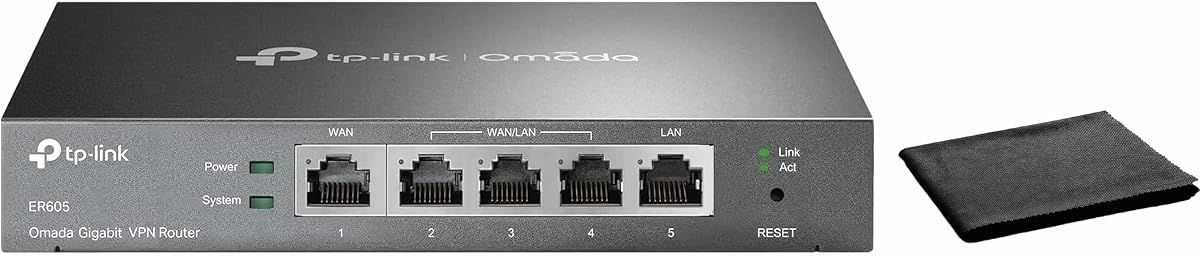
The TP-Link ER605 delivers solid performance for a very reasonable cost. With a 4.4 rating, it is a popular choice for small offices needing load balancing without breaking the bank.
We may earn a commission when you buy through this link, at no additional cost to you.
It features five Gigabit ports and a USB WAN port for mobile broadband backup. This flexibility ensures your business stays online even if a primary line fails, while security features like SPI firewall protect data.
While it lacks the advanced scalability of enterprise models, its feature set covers most SMB needs. The Omada app support adds a layer of modern management to this affordable wired router.
If you need a reliable load balancing solution that offers great value, this model is a top contender. It proves you do not need to spend a fortune to get essential network redundancy.
The USB WAN port supports 4G modems, allowing seamless failover to cellular data when wired connections drop.
Built-in DoS defense and IP filtering keep your network perimeter safe from common threats without extra hardware.
We may earn a commission when you buy through this link, at no additional cost to you.
The Alta Labs Route10 is built for users who demand the highest wired speeds available. With a 4.0 rating, it appeals to advanced homes and businesses needing 10Gbps routing capabilities.
We may earn a commission when you buy through this link, at no additional cost to you.
It features a Quad-Core Qualcomm processor and hardware acceleration to maintain low latency. The integrated PoE+ output simplifies power delivery to access points, reducing clutter and extra adapters.
While it comes at a premium price, the performance and real-time monitoring tools justify the cost. Since it does not broadcast Wi-Fi, it serves best as a dedicated core router paired with access points.
For power users seeking a future-proof, high-performance wired backbone, this router is an excellent choice. It offers professional-grade features in a compact form factor for demanding network workloads.
The router can directly power network devices through Ethernet cables, eliminating the need for separate injectors.
Live statistics allow admins to monitor bandwidth usage and system performance instantly for quick optimization.
We may earn a commission when you buy through this link, at no additional cost to you.
The TP-Link ER7206 is a robust choice for growing networks needing significant scalability. With a 4.5 rating, it supports up to 700 clients and integrates with the Omada SDN platform.
We may earn a commission when you buy through this link, at no additional cost to you.
Its flexible port configuration includes an SFP WAN port, allowing fiber connections. The high VPN limit supports complex site-to-site setups, making it ideal for multi-location businesses.
While the SDN features offer centralized control, they may require additional hardware or a cloud controller. This adds complexity but provides powerful management options for large environments.
Businesses planning to expand will find the ER7206 ready to grow with them. It balances professional features with solid performance for demanding network management scenarios.
The Omada SDN platform allows unified management of gateways, switches, and access points through a single interface.
Supporting up to 700 clients ensures the router remains stable even in busy office environments.
We may earn a commission when you buy through this link, at no additional cost to you.
The Cudy R700 offers enterprise-level control with OpenWRT support at an accessible price. With a 4.4 rating, it is a favorite among tech-savvy users who want full VLAN segmentation.
We may earn a commission when you buy through this link, at no additional cost to you.
Its automatic failover ensures business continuity if a connection drops. The VPN suite includes WireGuard and OpenVPN, providing flexible secure remote access options for various setups.
While powerful, unlocking advanced features may require community packages or technical know-how. This makes it best suited for those comfortable with custom network configurations.
For users needing deep control without enterprise costs, the R700 is a compelling option. It delivers professional-grade continuity and security through open standards.
Full OpenWRT support lets users install custom packages and configure advanced firewall rules freely.
Built-in server and client support for multiple protocols ensures secure connections from anywhere.
We may earn a commission when you buy through this link, at no additional cost to you.
The Omada ER7412-M2 stands out with its 2.5G ports and extensive Gigabit options. With a 4.5 rating, it caters to environments needing high-speed WAN connections alongside load balancing.
We may earn a commission when you buy through this link, at no additional cost to you.
It supports balancing across up to 11 WAN ports, maximizing bandwidth usage. The inclusion of IPS/IDS and DPI adds robust security, protecting internal assets from external threats.
While it is pricier, the throughput and security features are ideal for busy offices. It integrates seamlessly with Omada ecosystems for unified network control.
For offices needing both speed and security, this model delivers strong performance. It ensures efficient use of multiple broadband lines with advanced threat detection.
Two 2.5G RJ45 ports allow faster internet connections than standard Gigabit WAN links.
DPI helps identify and control application traffic, ensuring critical services get priority.
We may earn a commission when you buy through this link, at no additional cost to you.
The TP-Link TL-R470T+ is a classic choice for small offices needing basic load balancing. With a 4.2 rating, it supports four WAN ports for bandwidth aggregation and backup.
We may earn a commission when you buy through this link, at no additional cost to you.
It includes features like portal authentication and DDNS for remote management. The compact case makes it suitable for internet cafes or small office setups where cost is a primary factor.
While the ports are limited to 100Mbps, it remains effective for lower bandwidth needs. The advanced load balance ensures maximum bandwidth utilization across multiple providers.
For tight budgets where high speed is not critical, this router offers essential redundancy. It provides reliable management tools in a small, cost-effective package.
Administrators can manage client accounts and network access easily with built-in portal authentication support.
Bandwidth resources are marshaled to specific clients based on application environments.
We may earn a commission when you buy through this link, at no additional cost to you.
The TP-Link TL-R480T+ is a straightforward option for basic load balancing tasks. With a 4.2 rating, it provides configurable WAN/LAN ports to suit various connection needs.
We may earn a commission when you buy through this link, at no additional cost to you.
Its five-port design offers flexibility for small networks needing redundancy. It delivers reliable performance for homes or small offices with multiple broadband lines.
While it lacks advanced features, it gets the job done at a low cost. The compact design fits well in any desk or server rack setup.
For those seeking simplicity without unnecessary bloat, this router is practical. It focuses on core routing functions to maintain stable internet access.
With configurable WAN/LAN ports, users can adapt the router to their specific network topology easily.
We may earn a commission when you buy through this link, at no additional cost to you.
The TP-Link ER-605 provides a modern take on business networking with cloud tools. With a 4.3 rating, it features dual WAN ports for seamless load balancing and enhanced performance.
We may earn a commission when you buy through this link, at no additional cost to you.
Its cloud monitoring allows real-time status checks from anywhere. QoS settings ensure critical applications run smoothly, making it ideal for medium-sized businesses.
While it supports fewer WAN ports, the management tools are robust. The Omada app compatibility simplifies configuration for IT staff on the go.
For businesses valuing remote visibility, this router is a smart choice. It balances security with ease of use for efficient network operations.
Centralized cloud monitoring provides real-time network status and configuration access from anywhere.
Intelligent bandwidth management with QoS settings ensures optimal performance for business apps.
We may earn a commission when you buy through this link, at no additional cost to you.
The Ubiquiti EdgeRouter 4 is a powerhouse for advanced network configurations. With a 4.6 rating, it offers reliable performance with fanless silent operation for quiet environments.
We may earn a commission when you buy through this link, at no additional cost to you.
It features an internal PSU and multiple mounting options for flexibility. The robust firmware supports complex routing, firewall rules, and custom configurations for technical users.
While setup requires more knowledge, the control it offers is unmatched. It is ideal for professionals who need precise network management capabilities.
For advanced users prioritizing silent, reliable routing, this device is a strong contender. It delivers high-end networking capabilities in a compact, efficient package.
The fanless design ensures quiet operation, making it suitable for offices or residential setups.
Powerful hardware supports extensive routing features and custom configurations for complex networks.
We may earn a commission when you buy through this link, at no additional cost to you.
Choosing the right load balancing router requires evaluating several key factors that impact network reliability and performance. This guide outlines essential considerations to help you select the best model for your needs.
The number and type of WAN ports determine how many internet connections you can balance. Look for Gigabit ports to avoid bottlenecks and consider SFP options if you need fiber connectivity.
Select a router with enough ports to support your current lines and future expansion.
Different routers use various methods like round-robin, weighted, or content-aware balancing. Ensure the device supports the strategy that fits your traffic patterns for optimal efficiency.
Advanced algorithms help direct traffic based on connection health rather than simple distribution.
Failover ensures you stay online if one line drops. Check how quickly the router detects failures and switches traffic to the backup line.
Fast failover prevents downtime during critical moments like video calls or transactions.
A good router should offer multiple VPN protocols like OpenVPN, IPsec, and WireGuard. Strong security features including SPI firewalls protect your internal network from external threats.
Verify the router supports the VPN types you need for secure remote access.
An intuitive interface saves time. Look for cloud monitoring, mobile apps, or touchscreen options that simplify configuration and troubleshooting without needing complex command lines.
User-friendly management tools reduce administrative overhead significantly.
As your business grows, your router should keep up. Consider client limits and whether the device integrates with controllers for broader network expansion.
Invest in hardware that can handle future demands to avoid premature replacement.
Ensure LAN and WAN ports match your internet speeds. 2.5G or 10G ports are valuable for high-speed broadband to prevent internal bottlenecks.
Matching port speeds guarantees you utilize your full internet bandwidth.
Balance cost with features. Higher-end models offer advanced control but may be overkill for small setups. Choose a device that meets your needs without excess bloat.
Value comes from reliability and features you will actually use.
Set up your router by connecting your internet lines to the designated WAN ports. Follow the wizard to configure load balancing settings like ratios and failover rules.
Regularly check the dashboard to monitor connection health and adjust traffic distribution as needed. Update firmware periodically to ensure security patches are applied.
Keep the router in a well-ventilated area to prevent overheating. Avoid placing it near heat sources to ensure stable performance over time.
A load balancing router distributes network traffic across multiple internet connections to maximize bandwidth and provide redundancy. This ensures your business stays online if one connection fails.
Yes, to utilize load balancing, you generally need multiple internet service provider lines connected to the router. This allows the device to balance traffic effectively.
Most routers have fixed hardware ports, but some support USB modems as additional WAN connections. Check your specific model's compatibility before purchasing.
It aggregates speeds from multiple lines, so total throughput increases. However, individual single-threaded downloads will not exceed the speed of one line.
The router automatically reroutes traffic to the remaining active connections. This failover happens quickly to minimize disruption to your network.
Most dedicated load balancing routers are wired-only. You will need separate access points or mesh systems to provide wireless coverage.
They typically include SPI firewalls and DoS protection. Ensure you change default passwords and update firmware to maintain security.
It is not mandatory but helpful for remote monitoring. Local web interfaces work well if you manage the network on-site.
This guide covered ten distinct models ranging from budget-friendly options to premium high-speed units. The Omada Fusion 2.5G and TP-Link ER605 stand out for their balance of features and value.
Prioritize port speed and WAN flexibility based on your current ISP plans. For small offices, cost-effective models work well, while larger enterprises should look to SDN solutions.
Prices and availability change regularly, so check the latest listings on Amazon before buying. Ensure your selected model fits your network size and technical comfort level.