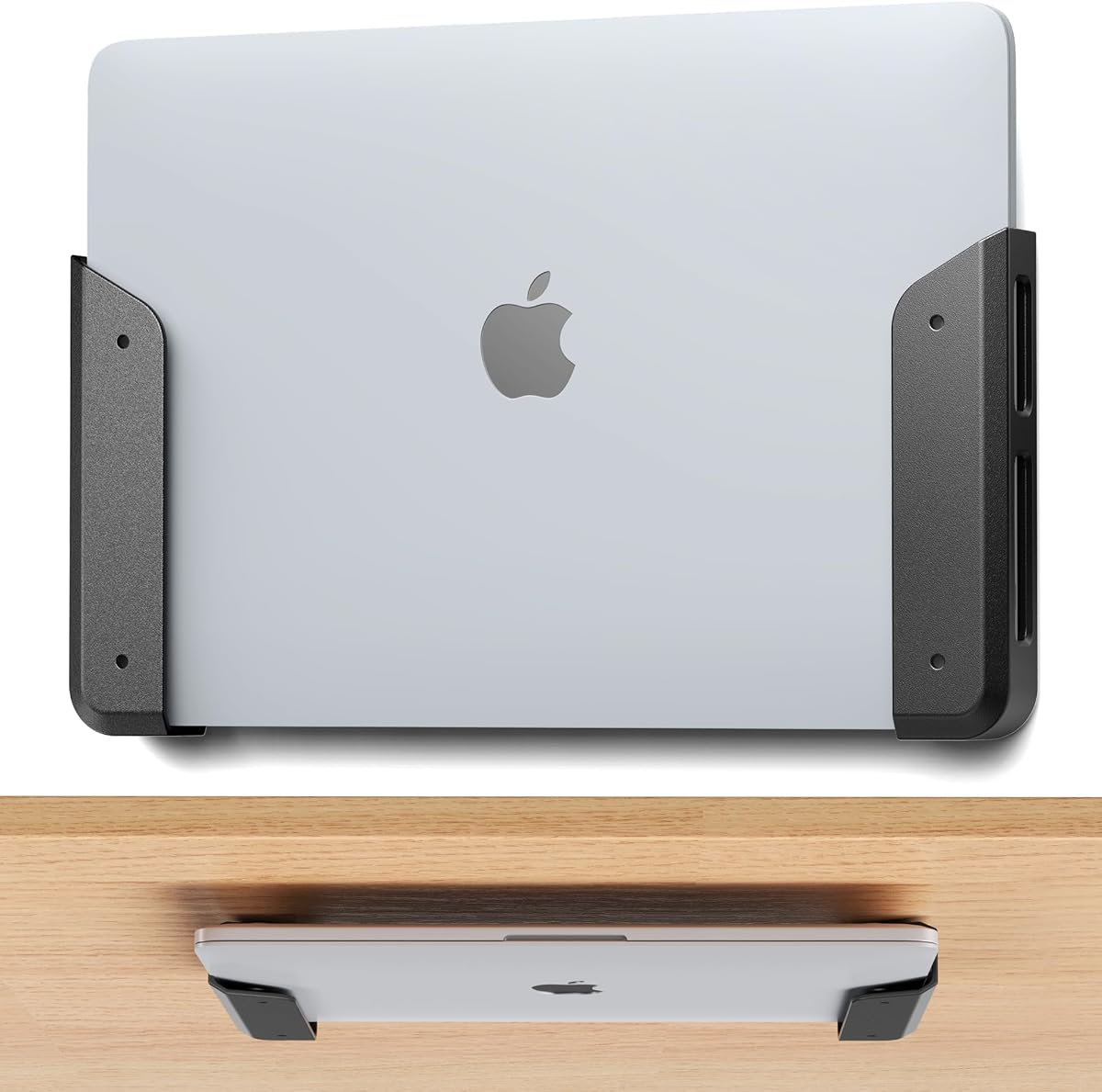
ELETIUO Wall & Under Desk Mount
4.2Editor score
Universal fit for laptops tablets
Dual adhesive and screw mounting
Anti-scratch pads included
Mounting your laptop on a wall transforms cluttered workspaces into clean, ergonomic environments. A quality mount secures your device while allowing flexible positioning for typing or viewing without taking up desk space.
We evaluated ten leading laptop wall mounts based on stability, range of motion, ventilation, and ease of installation. Each product was assessed for its ability to support various device sizes and maintain a sleek aesthetic.
Each review highlights key features, pros, and cons to guide your decision. Note that product availability and pricing can change frequently, so verify current details before purchasing your chosen wall mount solution.
4.2Editor score

4.6Editor score

4.5Editor score
As an Amazon Associate we earn from qualifying purchases.
The following table provides a side-by-side comparison of all ten selected laptop wall mounts, highlighting their key specifications and unique features to help you identify the best fit for your setup.


The MOUNT PRO Laptop Wall Mount stands out as a versatile solution for modern workspaces, earning its top spot with robust support for both laptops and monitors. With a rating of 4.6 stars, users appreciate its ability to free up desk space while maintaining stability.
We may earn a commission when you buy through this link, at no additional cost to you.
Its dual functionality allows you to switch between a laptop holder and a monitor arm using the included VESA plate. The full motion arm provides smooth tilting, swiveling, and rotating, ensuring you can position your device exactly where you need it for optimal ergonomics.
While the mount is highly durable, it requires a solid wall like wood stud or concrete for safety, which might be a limitation for renters or those with drywall-only setups. However, the included hardware and clear instructions make installation straightforward for those with suitable walls.
This mount is ideal for professionals seeking a long-term ergonomic upgrade. Whether you are working from home or setting up a kitchen workspace, the MOUNT PRO offers the flexibility and stability needed to keep your devices secure and accessible.
The ability to convert from a laptop holder to a monitor arm adds significant value, saving you from needing to purchase separate mounts for different devices.
With tilts up to 90 degrees and full rotation, you can adjust the screen to reduce neck strain during long work sessions, enhancing comfort significantly.
We may earn a commission when you buy through this link, at no additional cost to you.
For those on a tight budget, the ELETIUO Wall & Under Desk Mount offers a practical and cost-effective solution. It is designed to hold a wide range of devices including laptops, tablets, and even Nintendo Switch consoles, making it a flexible choice for various needs.
We may earn a commission when you buy through this link, at no additional cost to you.
The dual mounting options allow you to choose between adhesive strips for quick, tool-free installation or screws for a more permanent setup. This versatility makes it suitable for temporary setups or lighter devices where drilling is not desired.
However, this mount lacks the full motion arm found in premium models, meaning it does not offer the same level of height or angle adjustment. It is best suited for static positions where the device does not need frequent repositioning.
Ideal for students or users with limited space, this mount provides a neat way to store devices vertically or under desks. Its compact design and protective pads ensure your devices stay safe and organized without breaking the bank.
Unlike many mounts that focus only on laptops, this option supports keyboards and tablets, offering a more universal solution for your electronics.
The included adhesive strips mean you can set up this mount in minutes without tools, which is perfect for renters who cannot drill into walls.
We may earn a commission when you buy through this link, at no additional cost to you.
The Long Arm 2-in-1 Laptop Wall Mount sets a high standard for premium wall mounts with its exceptional reach and smooth adjustment. With a gas spring arm, it offers a seamless experience for positioning your laptop exactly where you need it without fighting resistance.
We may earn a commission when you buy through this link, at no additional cost to you.
One of its standout features is the extra-long reach extending up to 27 inches, allowing you to pull the laptop out from the wall to work comfortably or push it back to save space. This flexibility is unmatched in many other options on the market.
While the price is higher than budget models, the build quality and functionality justify the investment for those who demand precision and durability. The detachable tray ensures compatibility with monitors as well, adding to its utility in hybrid setups.
This mount is perfect for professionals working in large rooms or shared spaces where distance and flexibility matter. If you value a stable, sag-free hold and maximum adjustability, this model delivers a premium experience worth the cost.
The gas spring arm ensures smooth movement and prevents the laptop from drooping over time, maintaining your preferred viewing angle effortlessly.
With nearly 28 inches of extension, you can position your laptop far from the wall, which is ideal for typing or presenting without leaning over a desk.
We may earn a commission when you buy through this link, at no additional cost to you.
This 2-in-1 laptop wall mount balances performance and affordability, offering a robust solution for users needing to support heavier devices. It supports up to 22 lbs, making it reliable for thicker laptops or monitors that require stronger support.
We may earn a commission when you buy through this link, at no additional cost to you.
The design includes an innovative locking mechanism and dual-adjustable clamps to ensure your device remains secure in any position. The ventilated slots promote airflow, preventing overheating during intensive tasks like gaming or video editing.
While it lacks the advanced motion of the highest-end models, it provides essential tilt and swivel functions that cover most daily needs. Installation requires a solid wall surface, which is standard for this level of stability and safety.
Ideal for users who want reliable performance without overspending, this mount is a practical choice for home offices and small businesses. It offers a strong hold and good ventilation, ensuring your device stays cool and secure.
The dual-adjustable clamps and locking system provide peace of mind that your device is held firmly without slipping during use.
With support for up to 22 lbs, this mount handles heavier laptops and monitors that might strain lesser models.
We may earn a commission when you buy through this link, at no additional cost to you.
The MOUNTUP Laptop Wall Mount delivers reliable performance with a focus on security and ease of use. Its unique latch lock system ensures your laptop stays safely in place, addressing a common concern with wall-mounted setups.
We may earn a commission when you buy through this link, at no additional cost to you.
Designed to save up to 80% of desk space, this mount allows you to create a clutter-free workspace. The full motion arm provides the flexibility to tilt, swivel, and rotate, giving you control over your viewing angle for better ergonomics.
While it shares similar requirements to other mounts regarding wall type, the included hardware and clear instructions simplify the process. It is a robust choice for those looking to convert a desktop setup into a wall-mounted one efficiently.
For users who prioritize safety and space savings, this mount is an excellent investment. Whether you are a gamer or a professional, the secure hold and wide adjustability make it a versatile tool for any environment.
The clever latch lock prevents your laptop from slipping, providing extra security for expensive devices mounted on the wall.
By freeing up to 80% of desk space, you can reclaim valuable area for other work essentials or a cleaner desk surface.
We may earn a commission when you buy through this link, at no additional cost to you.
The WALI Laptop Wall Mount is designed for those who value ergonomic movement and device cooling. It features a high-grade monitor arm that supports full motion adjustments, allowing you to customize your setup for comfort and productivity.
We may earn a commission when you buy through this link, at no additional cost to you.
With a specially designed ventilated platform, this mount actively helps dissipate heat, keeping your laptop running smoothly even during heavy workloads. The support for screens up to 32 inches adds versatility for users who switch between laptops and monitors.
While the price is above entry-level options, the build quality and smooth mechanics justify the cost. It is built to reduce neck and eye strain, making it a long-term investment in your health and workspace efficiency.
This mount is ideal for professionals and students working long hours who need a stable and adjustable setup. If you want a mount that combines ergonomic benefits with device protection, the WALI offers a strong and reliable solution.
The full motion arm lets you adjust the screen to eye level, reducing strain during extended typing or viewing sessions.
The ventilated platform helps prevent overheating, which is crucial for maintaining performance during intensive tasks.
We may earn a commission when you buy through this link, at no additional cost to you.
This 2-in-1 laptop wall mount offers excellent flexibility with its detachable tray design, allowing you to convert it into a monitor mount easily. The ability to switch modes makes it a practical choice for users who need multiple display options.
We may earn a commission when you buy through this link, at no additional cost to you.
The concealed cable management system keeps your setup looking neat by organizing wires neatly on the hanging arm. Along with full motion adjustments, it provides the ergonomic benefits needed for comfortable long-term use.
While the tray requires careful installation to ensure it holds securely, the ventilation holes contribute to heat dissipation for better device longevity. The mount supports a wide range of laptop sizes, adding to its general utility.
For those looking for a versatile and organized workspace solution, this mount delivers both function and style. It is especially useful for shared spaces where flexibility and neatness are key priorities.
The detachable tray allows you to remove it and use the arm as a standard monitor mount, adding adaptability to your setup.
Concealed cable management keeps your workspace tidy, preventing wires from dangling and ruining the aesthetic of your room.
We may earn a commission when you buy through this link, at no additional cost to you.
The VIVO Black Laptop Wall Mount stands out for its pneumatic arm technology, offering tool-less height adjustment for effortless positioning. This feature makes it easy to find the perfect ergonomic viewing angle without struggling with knobs or levers.
We may earn a commission when you buy through this link, at no additional cost to you.
Supporting laptops up to 9.9 lbs, it is designed for lighter devices, which ensures the pneumatic arm functions correctly. The counterbalance design allows the laptop to stay securely in place once adjusted, reducing strain on the mounting bracket.
While the weight limit is lower than other options, the three-year warranty and durable steel construction provide confidence in its longevity. It is a great choice for users who prioritize ease of use and smooth motion.
Ideal for home offices and dorm rooms where simplicity is key, this mount offers a reliable and user-friendly experience. If you value quick adjustments and strong customer support, this model fits those needs well.
The tool-less height adjustment lets you change the laptop's position instantly, making it easy to switch between sitting and standing positions.
Backed by a three-year warranty, this mount offers peace of mind that you are protected against manufacturing defects over time.
We may earn a commission when you buy through this link, at no additional cost to you.
The Mount-It! Ergonomic Laptop Arm is unique for its ability to mount on both walls and round poles, giving you flexibility in installation options. This feature is particularly useful for offices or clinics where poles are already available for support.
We may earn a commission when you buy through this link, at no additional cost to you.
The spring arm keeps your laptop planted securely without sagging, and you can adjust the tension to match your preference. With a reach of 21.8 inches, it provides ample range to position your device comfortably for various tasks.
While the pole is sold separately, the mount comes with all necessary hardware and step-by-step instructions for a smooth setup. The responsive US-based support team adds value by offering help if you face any issues.
This mount is perfect for those who need a versatile solution beyond standard wall setups. If you value adaptability and reliable support, the Mount-It! Ergonomic Laptop Arm is a thoughtful choice for your workspace.
The ability to mount on a pole or wall means you can adapt the arm to existing structures in your room for more flexibility.
Adjustable tension bolts allow you to fine-tune the arm's movement, ensuring your laptop stays exactly where you put it without slipping.
We may earn a commission when you buy through this link, at no additional cost to you.
This Universal Wall Mount offers a static but highly versatile storage solution, capable of holding multiple devices like laptops, keyboards, and tablets simultaneously. With a two-tier design, it maximizes vertical space while keeping your electronics organized.
We may earn a commission when you buy through this link, at no additional cost to you.
The high-quality metal construction ensures durability, and the included EVA pads protect your devices from scratches. It supports up to 22 lbs, making it reliable for storing multiple items without bending or breaking.
While it does not offer the motion adjustability of arm mounts, its simplicity and strength make it ideal for fixed storage needs. It works well as a place to store devices when not in use, keeping your desk clear.
If you prefer a sturdy shelf over a moving arm, this mount is a great option for organizing your workspace efficiently. It is a practical choice for homes and offices where storage is more critical than frequent adjustment.
The two-tier design lets you store different devices together, such as a laptop and a keyboard, in one neat vertical unit.
The included EVA pads ensure your devices are protected from metal edges, preserving their condition even when stored vertically.
We may earn a commission when you buy through this link, at no additional cost to you.
Choosing the right laptop wall mount involves considering several factors to ensure compatibility and ergonomic comfort.
Ensure the mount supports your laptop's size and weight. Most mounts handle 11 to 17-inch laptops, but check the maximum weight limit to avoid instability.
Choose a mount that fits your device's dimensions and weight range.
Most mounts require a solid wall like wood stud or concrete for safety. Drywall alone often cannot support the weight without anchors.
Always verify your wall type before purchasing to ensure a secure installation.
Look for full motion arms that allow tilting, swiveling, and rotating. This helps you find the best viewing angle for comfort.
Prioritize mounts with multiple adjustment points for ergonomic health.
Mounts with ventilated trays help dissipate heat from your laptop. Overheating can reduce performance and device lifespan.
Select a mount with open slots or a platform designed for airflow.
Cable management systems keep wires organized and hidden. This contributes to a clean and clutter-free workspace.
Check for mounts that include clips or channels for cables.
Consider the installation process and required tools. Some mounts offer tool-less options or adhesive strips for simpler setup.
Choose a mount that matches your installation skill and available tools.
A good warranty protects your investment against defects. Responsive customer support helps resolve setup issues quickly.
Look for products with at least a one-year warranty and good support reviews.
Some mounts can convert to monitor arms using VESA plates. This adds value if you plan to use a monitor later.
Consider a convertible mount for future flexibility in your setup.
Start by ensuring your wall is suitable for mounting. Use a stud finder to locate solid supports or cement surfaces where necessary for safety.
Follow the instructions to secure the bracket firmly. Double-check all screws and anchors to prevent any movement once your laptop is attached.
Regularly inspect the mount for signs of wear or loosening. Keep the ventilation areas clear of dust to maintain proper airflow for your device.
Most mounts require a solid surface like wood studs or concrete for safe installation. If you only have drywall, you must find studs or use heavy-duty anchors designed for the weight. Avoid mounting directly on drywall alone to prevent accidents.
Not all mounts fit all sizes. Check the product specifications to ensure it supports your laptop's width and weight. Many mounts are designed for 11 to 17-inch devices but always confirm compatibility before buying.
While the laptop is mounted, you can use an external keyboard or the built-in one if positioned low enough. Ensure the angle allows comfortable typing without straining your neck or wrists.
Weight capacity varies from around 10 lbs to over 20 lbs. Always check the maximum load specified for the mount to ensure it can safely support your device without sagging or failing.
Many models come with a VESA plate to convert into a monitor arm. Verify if the mount supports VESA patterns for monitors if you plan to switch devices later.
Look for mounts with built-in cable management clips or channels. These help route power and data cables neatly to keep your space tidy and prevent tangles.
Most mounts come with clear instructions and necessary hardware. If you have basic tools and can follow simple steps, assembly is straightforward. Some options even allow tool-less height adjustments.
We explored ten top laptop wall mounts ranging from budget-friendly to premium options. The MOUNT PRO and ELETIUO stand out for versatility and value respectively, while the Long Arm model offers superior adjustability.
Prioritize stability and ergonomics to protect your health and devices. A good mount should offer full motion, proper ventilation, and a secure hold for your specific setup needs.
Always check current availability and pricing before making a purchase. Prices and stock change frequently, so verify the latest details on the product page to ensure you get the best deal.