
FIFINE Mini Gooseneck USB Microphone
4.3Editor score
Adjustable gooseneck design
Plug and play USB connection
Compatible with Dragon software
This guide compares the top 10 dictation microphone for computer options to help professionals choose the best device for speech recognition and recording
Finding the right dictation microphone for computer use is essential for professionals who rely on speech recognition software. A high-quality device ensures accurate transcription, reduces errors, and saves valuable time during document creation and communication tasks.
We compared ten leading microphones based on sound clarity, noise cancellation, compatibility with dictation software, and build quality. Our evaluation includes budget-friendly options and specialized tools designed for intensive transcription workflows in diverse environments.
Each pick highlights key features, pros, cons, and ideal use cases to help you decide quickly. Prices and availability change often, so verify current details before purchasing to ensure you get the best value for your specific setup.
4.3Editor score

4.6Editor score

4.2Editor score
This side-by-side comparison outlines the core specifications and capabilities of each microphone to help you find the perfect match for your workflow.




The Logitech Blue Yeti stands out as a top choice for dictation and recording thanks to its versatile pickup patterns and professional-grade sound. With a rating of 4.6 stars, it delivers clear audio that works well with speech recognition software.
We may earn a commission when you buy through this link, at no additional cost to you.
Its three-capsule array allows you to switch between cardioid, omni, bidirectional, and stereo modes depending on your setup. The included Blue VO!CE software enhances vocal clarity, while physical knobs let you adjust gain and volume without leaving your document.
While it requires a separate stand for optimal positioning and costs more than basic options, the flexibility and audio quality justify the investment for frequent users. Its durability ensures long-term reliability in busy office environments.
Ideal for professionals who need precise control and high fidelity, this microphone is the best overall pick for dictation tasks. We recommend it for users who prioritize audio clarity and adaptability in their workflow.
Switch between patterns to isolate your voice or capture ambient sound as needed for different recording scenarios.
Monitor your voice with zero latency to ensure consistent output quality during long transcription sessions.
We may earn a commission when you buy through this link, at no additional cost to you.
Designed specifically for transcription work, the Philips LFH3500 SpeechMike Premium offers unmatched precision with its free-floating microphone and built-in motion sensor. It holds a rating of 4.2 stars among professional users who demand accuracy.
We may earn a commission when you buy through this link, at no additional cost to you.
The motion sensor allows gesture-based device control, reducing reliance on the mouse. Configurable function keys streamline your workflow by letting you assign commands for pause, resume, or navigation directly on the device.
While the high price limits accessibility and it is optimized for specific dictation software, the ergonomic design and clarity make it a top choice for heavy daily use. Its build quality supports rigorous professional environments.
Professionals in legal or medical fields should consider this premium tool for maximum efficiency. It delivers the specialized features needed for high-volume dictation with minimal setup complexity.
Use hand gestures to control playback and navigation without touching the keyboard or mouse.
The microphone grille structure ensures crystal clear sound for accurate transcription results.
We may earn a commission when you buy through this link, at no additional cost to you.
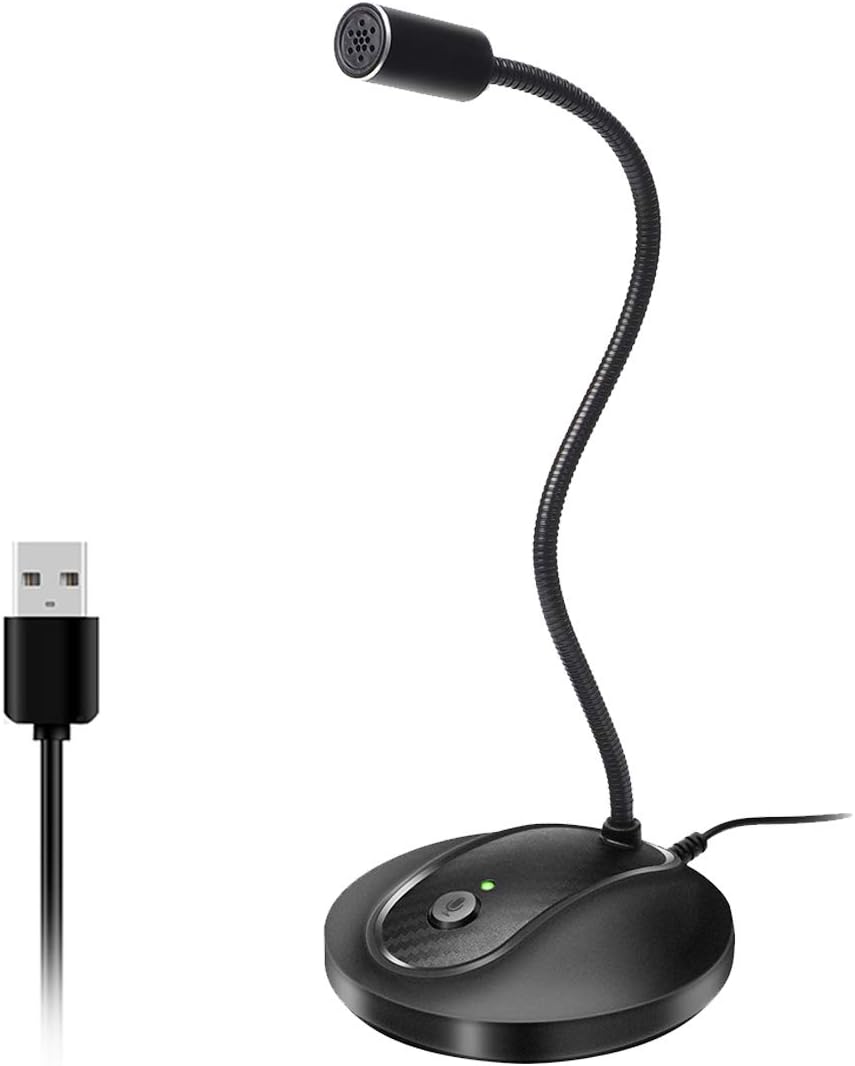
The FIFINE Mini Gooseneck delivers solid performance for its price, making it the best budget option for general dictation and recording. It earns a 4.3 star rating for its balance of quality and value.
We may earn a commission when you buy through this link, at no additional cost to you.
Its compact size saves desk space while the flexible gooseneck ensures optimal positioning. The plug-and-play design works seamlessly with Dragon speech recognition and other applications without needing drivers.
Although it lacks advanced noise cancellation features found in premium models, the included windscreen helps reduce basic background noise. The metal base provides stability during active use.
This mic is perfect for students or home office users on a tight budget who need reliable speech recognition. It offers a straightforward solution that meets the core needs of most casual dictation users.
The tiny footprint ensures your desk remains clutter-free while maintaining effective microphone placement.
Works across Windows and macOS systems for seamless integration with your existing software suite.
We may earn a commission when you buy through this link, at no additional cost to you.
This USB Microphone features a 360-degree adjustable gooseneck design that lets you position the mic perfectly for voice input. With a 4.4 rating, it offers practical features for everyday dictation tasks.
We may earn a commission when you buy through this link, at no additional cost to you.
Noise-canceling technology helps minimize background distractions, while the mute button with LED indicator gives quick visual feedback. It connects via USB without requiring drivers for Windows and macOS systems.
The solid construction uses metal pipes and a heavy-duty stand to ensure durability, though the cable length may limit desk placement. It is suitable for users needing a simple yet effective microphone setup.
Ideal for casual users who need reliable audio without complex settings, this microphone provides a cost-effective solution for transcription. It balances functionality and ease of use for most home office scenarios.
Integrated technology filters out ambient sounds to improve transcription accuracy.
We may earn a commission when you buy through this link, at no additional cost to you.
The TONOR G11 is designed for conferences, offering an omnidirectional pickup pattern that captures voices from 360 degrees. It scores 4.3 stars for its ability to handle multiple speakers effectively.
We may earn a commission when you buy through this link, at no additional cost to you.
With a 11.5 ft pickup distance, it ensures clear audio even when participants are seated around a table. The mute button with blue indicator provides quick control, and the shielded cable reduces interference.
While it excels at group settings, it may not be the first choice for solo dictation due to its broad pickup pattern. Setup is simple but may require manual device selection on some computers.
Choose this microphone if you need to record meetings or collaborative sessions in addition to personal dictation. It offers reliable performance for shared environments where multiple voices are present.
Captures sound from all directions for consistent quality in group environments.
We may earn a commission when you buy through this link, at no additional cost to you.
The ZealSound K66 delivers studio-quality audio with intelligent noise reduction, making it versatile for dictation and content creation. It holds a 4.4 rating for its professional features at a mid-range price.
We may earn a commission when you buy through this link, at no additional cost to you.
A cardioid pickup pattern focuses on your voice while the noise reduction mode filters out background noise. The 3.5mm jack allows zero-latency monitoring, which helps maintain consistent vocal levels.
While primarily marketed for streaming, its clarity and adjustable echo controls make it effective for transcription. The included adapters extend compatibility to mobile devices for flexible recording options.
For creators who need a single mic for both dictation and content, this is a smart investment. It offers advanced audio shaping tools that enhance speech recognition accuracy significantly.
Activate this mode to suppress ambient noises and keep audio clean for better transcription.
We may earn a commission when you buy through this link, at no additional cost to you.
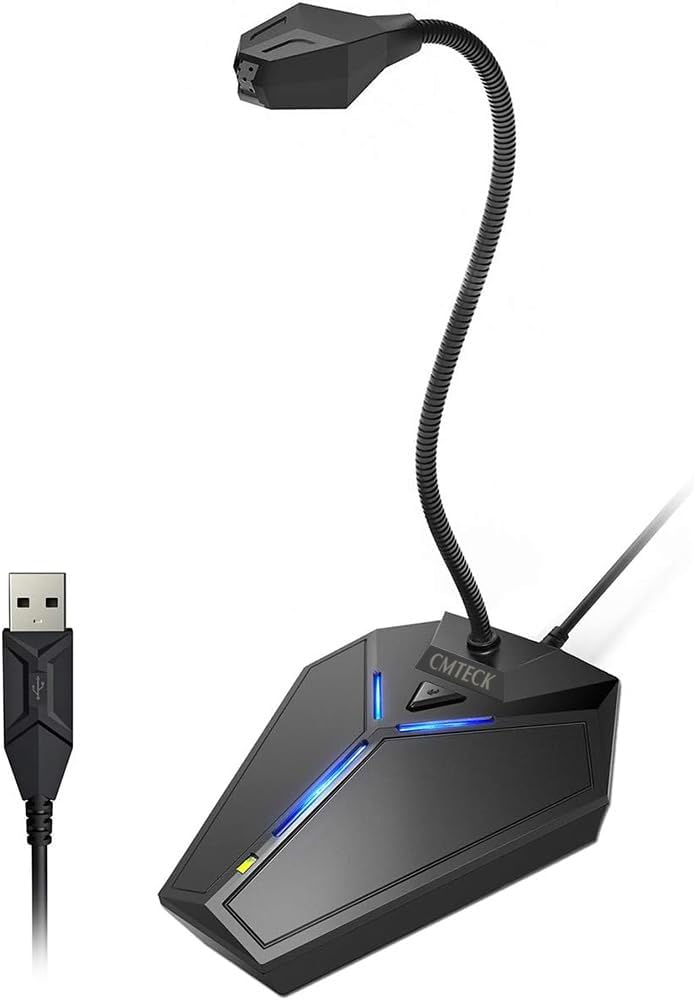
CMTECK’s USB Microphone uses a SMART CHIP to suppress background noise, ensuring crisp voice capture for dictation. It achieves a 4.4 rating for its reliable performance in home office settings.
We may earn a commission when you buy through this link, at no additional cost to you.
The adjustable metal gooseneck allows precise positioning, while the blue LED light adds visual flair. Mute status is clearly shown with green and red indicators, preventing accidental audio transmission.
Though the base is lighter than metal alternatives, it remains stable enough for typical use. Its plug-and-play nature means no driver installation is needed for Windows or macOS.
This microphone fits users who want clear audio without complex settings. It is a practical choice for daily transcription tasks where simplicity and sound clarity are key priorities.
Built-in chip technology automatically filters out ambient sounds to improve voice clarity.
We may earn a commission when you buy through this link, at no additional cost to you.
The Nuance PowerMic III combines a robust USB microphone with PC mouse capabilities, allowing hands-free navigation. It scores 4.2 stars among users prioritizing efficiency in Dragon software environments.
We may earn a commission when you buy through this link, at no additional cost to you.
Thumb control buttons handle dictation and navigation tasks, reducing reliance on the keyboard. The unidirectional design with noise cancellation ensures high accuracy even in noisy offices.
While the price is higher and compatibility is limited to specific Dragon versions, the speed gains are significant for heavy users. It is a specialized tool rather than a general-purpose microphone.
For legal or medical professionals using Dragon Legal or Medical, this mic is a productivity booster. Its ergonomic design supports long sessions without fatigue or repeated keyboard switching.
Control your PC cursor with voice commands and thumb buttons for true dictation efficiency.
We may earn a commission when you buy through this link, at no additional cost to you.
Designed for Dragon Naturally Speaking, the PHILIPS LFH3200 SpeechMike III Pro delivers accurate results through advanced noise-canceling technology. It holds a 4.3 rating for its consistent performance in professional settings.
We may earn a commission when you buy through this link, at no additional cost to you.
Its advanced speaker design ensures clear playback for review, while push button operation provides intuitive control. Energy Star compliance adds to its efficiency for long-term use.
Though it lacks some modern features like motion sensors, the core dictation functionality remains robust. It integrates seamlessly with existing speech recognition workflows.
This model suits professionals who prioritize reliability and speed in document creation. It remains a strong choice for environments where accuracy and energy efficiency are essential.
Noise-canceling technology minimizes errors for reliable transcription outcomes.
We may earn a commission when you buy through this link, at no additional cost to you.
The OLYMPUS RecMic II features a trackball for enhanced navigation alongside push buttons for speech recognition. It holds a 4.0 rating among users who require specialized control options.
We may earn a commission when you buy through this link, at no additional cost to you.
Silent keys minimize contact noise during operation, while the UV coating ensures smooth use. The dual microphone systems allow recording in noisy environments with better clarity.
While its rating is lower due to compatibility constraints, it remains useful for specific workflows. The trackball adds a unique dimension to voice-driven navigation tasks.
Consider this mic if you need fine-tuned control beyond standard buttons. It suits specialized environments where trackball integration and low-contact noise are priorities.
Integrated trackball allows cursor control without needing a separate mouse device.
We may earn a commission when you buy through this link, at no additional cost to you.
Choosing the right microphone depends on your workflow, software compatibility, and budget. We outline eight key factors to consider before making a decision.
Ensure the microphone works with your specific dictation software such as Dragon, Windows Speech Recognition, or Google Docs. Some specialized mics like the PowerMic require specific software licenses for full features.
Check official compatibility lists before purchasing to avoid driver conflicts or missing features.
Look for microphones with high sample rates and clear frequency response to capture your voice accurately. Higher quality reduces errors in transcription and improves overall productivity.
Prioritize models with dedicated condenser elements for the best vocal clarity in quiet environments.
Background noise can interfere with dictation accuracy. Microphones with noise-canceling technology or directional pickup patterns help isolate your voice from ambient sounds.
Select a mic with active noise reduction if you work in busy offices or open spaces.
Consider the physical size of the microphone and its stand. Compact gooseneck designs save space while full-sized desktop mics offer more stability but require more room.
Measure your workspace to ensure the device fits comfortably alongside your keyboard and monitor.
Most modern USB microphones require no drivers, allowing instant setup on Windows and Mac systems. This reduces downtime during installation and ensures compatibility across devices.
Choose a USB model with standard connectors to avoid the need for additional adapters.
Look for mute buttons, LED indicators, and volume controls that improve workflow efficiency. Some models offer trackballs or motion sensors that enable hands-free navigation.
Evaluate which controls are essential for your daily tasks to avoid paying for unused features.
A microphone used daily should have a sturdy base and metal components to withstand regular adjustments. Plastic-only units may feel less stable during active use.
Check customer reviews for long-term reliability feedback before committing to a purchase.
While specialized dictation mics cost more, budget options often meet basic needs well. Balance your required features against your spending limit to maximize value.
Invest in premium features only if they directly improve your daily productivity.
Proper placement is key for best results. Position the microphone about six to eight inches from your mouth and slightly off-center to avoid plosive sounds like P and B that can cause transcription errors.
Regularly update your software to ensure compatibility and leverage new features. Check the manufacturer website for firmware updates that improve performance or fix known issues.
Clean the microphone grille with a soft brush to remove dust and debris. Avoid using liquids or chemicals that could damage sensitive components or the protective foam screens.
The Philips LFH3500 SpeechMike Premium is ideal for Dragon due to its specialized keys and motion sensor. The Nuance PowerMic III also offers direct compatibility with advanced navigation features for faster workflow.
Yes, many standard USB microphones work with Windows and Mac speech recognition. However, specialized dictation mics include features like noise cancellation and shortcut buttons that improve accuracy and speed significantly.
Most modern USB microphones are plug-and-play and do not need extra drivers. Some specialized models may require specific software installations to enable all features like gesture control.
Place the microphone six to eight inches from your mouth for optimal clarity. Being too close can cause distortion, while being too far may result in low volume and missed words.
In quiet home offices, basic mics may suffice. In noisy environments, active noise cancellation helps maintain accuracy by filtering out background sounds that confuse speech recognition engines.
Position the microphone slightly off-center from your mouth and use a pop filter if available. This reduces harsh sounds from letters like P and B that can interrupt clear audio capture.
Absolutely. Many models support video calls, recording, and streaming thanks to their high-quality audio capture. Some even include adapters for mobile devices for versatile use.
Check that the USB cable is securely connected and try a different port. Verify the input settings in your system's sound menu and restart your computer if needed.
The Logitech Blue Yeti leads as the best overall choice for its versatility and sound quality. The Philips LFH3500 offers the best premium features for heavy professional use, while the FIFINE Mini Gooseneck delivers excellent value for budget buyers.
Focus on compatibility with your software and the presence of noise-canceling features to ensure accuracy. A microphone that fits your desk and budget will encourage consistent use and improve productivity.
Remember that prices and availability change frequently. Always check current listings and read recent customer reviews before purchasing to confirm you are getting the latest version with reliable support.