
GE BigEZ OneTouch Big Button Universal TV Remote for Seniors, Easy to Use
4.3Editor score
Fully backlit buttons for low light
Colorblind friendly design layout
Preset buttons for five TV brands
This guide compares the easiest to use TV remotes for seniors with big buttons and simple layouts to help elders control their televisions independently.
Finding the right television remote can be a challenge for older adults who struggle with small buttons or complex menus. A good remote simplifies daily entertainment by offering clear labels and tactile feedback that reduce frustration during use.
We evaluated ten highly rated models designed specifically for elderly users and those with limited dexterity. Each product was compared based on button size, setup ease, compatibility with major TV brands, and overall user feedback from caregivers.
Our detailed reviews highlight the strengths and weaknesses of each option to help you make an informed choice. Prices and availability may change over time so please check current listings before making your final purchase decision.
4.3Editor score
4.2Editor score

4.4Editor score
The following table provides a side-by-side comparison of all ten remotes evaluated in this guide to help you quickly identify key specifications and features.


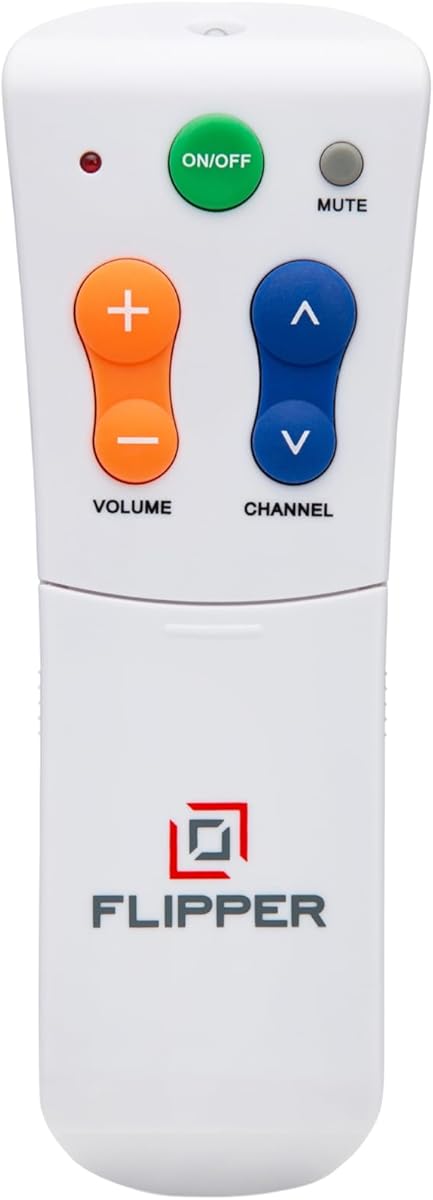
The Flipper Big Button TV Remote stands out as a top choice for elderly users who need simplicity above all else. With a rating of 4.2 stars it offers a streamlined interface that eliminates the confusion often caused by traditional remotes.
We may earn a commission when you buy through this link, at no additional cost to you.
Its standout feature is the four-button main interface which uses color coding to distinguish between power volume and channel controls. This design ensures that even users with low vision or cognitive challenges can operate their television independently without constant assistance.
While it excels at basic functions the remote does not support navigation within streaming applications like Netflix or Roku. This limitation is acceptable for households that rely primarily on traditional cable or satellite broadcasting but might frustrate cord cutters.
We recommend this product for families seeking a reliable solution for grandparents or loved ones with Alzheimer's. The ability to pre-program favorite channels adds a layer of convenience that makes daily viewing stress-free and enjoyable.
The four-button layout removes unnecessary complexity allowing seniors to focus on watching their favorite shows without frustration.
Caregivers can feel confident that their loved ones can operate the TV safely without needing constant help with setup or navigation.
We may earn a commission when you buy through this link, at no additional cost to you.
The EZclicker Big Button Universal TV Remote is designed with specialized features that cater to users with limited dexterity or vision issues. It has earned a solid 4.2 rating from customers who appreciate its accessible design and ease of use.
We may earn a commission when you buy through this link, at no additional cost to you.
Key strengths include the extra-large enter button and tactile feedback which make pressing keys more comfortable and precise. The remote is compact enough to be easily stored yet large enough to be seen clearly on a coffee table or nightstand.
However this model is strictly for television sets and does not work with cable boxes or streaming devices like Fire Stick. Users who need control over external devices may find this limitation restrictive compared to more universal options.
This remote is ideal for seniors who primarily watch over-the-air or cable television directly on their set. Its simple setup process and affordable price point make it a practical choice for households seeking straightforward control.
The tactile feedback and oversized buttons provide a physical response that helps users confirm their actions without visual confirmation.
Programming takes less than a minute requiring only basic steps to pair with the television for immediate use.
We may earn a commission when you buy through this link, at no additional cost to you.
The GE BigEZ OneTouch remote offers excellent value for seniors needing a reliable control solution with vision-friendly features. Its 4.3 star rating reflects strong satisfaction with its backlighting and straightforward setup process.
We may earn a commission when you buy through this link, at no additional cost to you.
The fully backlit buttons are a significant advantage for users who watch television in low light conditions. Additionally the colorblind-friendly design uses blue for volume and orange for channels to aid distinction without relying on color recognition.
While it supports multiple devices the preset options are limited to five major TV brands. Users with other brands may need to use the AUX button which requires additional steps to program correctly for full functionality.
We recommend this remote for households on a budget that still want quality features like backlighting. The inclusion of US-based technical support adds peace of mind for families who might need help during setup or troubleshooting.
Backlit keys ensure buttons remain visible even in a dark living room reducing the strain on aging eyes.
Free technical support availability helps resolve setup issues quickly ensuring the remote works as intended.
We may earn a commission when you buy through this link, at no additional cost to you.
This EZclicker model prioritizes simplicity with an extra simple layout that minimizes confusion for elderly users. It carries a 4.2 rating indicating consistent performance for basic television control tasks.
We may earn a commission when you buy through this link, at no additional cost to you.
The tactile feedback on the buttons provides a satisfying click that confirms input which is helpful for those with reduced sensation in their fingers. Its compact dimensions make it easy to handle and store without cluttering the living space.
Users should note that this remote does not support streaming devices or cable boxes which limits its utility in modern entertainment setups. It is best suited for traditional television setups where only power volume and channel functions are required.
For seniors who struggle with complex remotes this model offers a no-fuss alternative. The ease of programming and durable construction make it a practical tool for everyday use in a home environment.
By removing unnecessary buttons the remote reduces cognitive load making it easier to find the right function quickly.
Sturdy construction ensures the remote withstands daily handling and potential drops common in household settings.
We may earn a commission when you buy through this link, at no additional cost to you.
This universal remote stands out for its broad compatibility with major TV brands including Samsung LG and Sony. With a 4.4 star rating it is highly regarded for its ease of use and out-of-box functionality.
We may earn a commission when you buy through this link, at no additional cost to you.
The ability to work without programming is a major benefit for seniors who may find technical setup steps overwhelming. Simply inserting batteries allows immediate control which saves time and reduces frustration during the initial setup phase.
While it covers most major brands it does not support streaming devices which might be a drawback for users relying on apps. The warranty service adds value ensuring customers can reach out for help if the product fails.
We recommend this remote for households with standard televisions that want a hassle-free setup. The combination of brand compatibility and user-friendly features makes it a reliable choice for daily entertainment needs.
The no programming requirement means the remote works instantly saving seniors from complicated pairing processes.
Support for numerous brands ensures this remote fits most existing television setups without compatibility issues.
We may earn a commission when you buy through this link, at no additional cost to you.
The Large Button TV Remote Control is designed to provide effortless operation for seniors and low vision users. Its 4.4 star rating reflects satisfaction with its ergonomic design and clear button labeling.
We may earn a commission when you buy through this link, at no additional cost to you.
The simple layout with clearly marked buttons helps users avoid accidental presses which is common with cluttered remotes. An ergonomic lightweight body ensures that holding the remote does not cause strain during extended use sessions.
While it works well with most major TV brands it does not support cable boxes or niche TV brands. This limitation makes it best suited for standalone television setups where streaming functions are handled separately or not needed.
This remote is an excellent choice for families looking to promote independence in elderly household members. Its durable build and straightforward design make it a reliable tool for everyday entertainment control.
The lightweight body fits comfortably in smaller hands reducing the effort needed to hold the remote.
Clear labeling ensures users can quickly identify the right button without struggling to read small text.
We may earn a commission when you buy through this link, at no additional cost to you.
The Philips BigEZ OneTouch remote focuses on ease of use with a fully backlit keypad that aids visibility in low light. While it has a lower rating of 3.8 stars it still offers useful features for seniors needing accessible controls.
We may earn a commission when you buy through this link, at no additional cost to you.
Its OneTouch setup process simplifies pairing with supported TV brands reducing the time required to get started. The directional pad allows basic navigation which can be helpful for accessing menus on smart TVs or streaming devices.
Users may find the rating slightly lower due to occasional compatibility issues or setup hurdles compared to competitors. However the inclusion of technical support helps mitigate these issues ensuring help is available when needed.
We suggest this remote for users who prioritize backlighting and simple navigation features. It is a solid option for those who value Philips brand reliability and the added convenience of a backlit keypad.
The backlit keypad ensures buttons remain visible even in dark rooms preventing fumbling during use.
A directional pad is included to allow basic menu navigation on compatible smart TV systems.
We may earn a commission when you buy through this link, at no additional cost to you.
This Big Button Universal TV Remote is marketed specifically for seniors and those with dementia needing simple control. Its 3.0 star rating suggests mixed experiences with performance and ease of setup compared to other models.
We may earn a commission when you buy through this link, at no additional cost to you.
The design features large clearly marked buttons that aim to reduce confusion and improve visibility. Tactile feedback helps users confirm their input which is beneficial for those with cognitive or sensory impairments.
Users should be aware that this model does not support streaming devices which limits functionality in modern setups. The lower rating may indicate inconsistencies in compatibility or build quality that buyers should consider before purchasing.
Despite the lower rating it can still be useful for basic television control in households without streaming needs. It is worth considering if the primary goal is a straightforward remote for traditional broadcast viewing.
The simplified layout minimizes cognitive load helping those with memory issues operate the remote effectively.
Physical feedback on buttons ensures users know when a command has been successfully registered by the TV.
We may earn a commission when you buy through this link, at no additional cost to you.
This remote is specifically engineered for Samsung smart TVs offering a premium experience with backlit buttons that stay lit for 30 seconds. Its 4.4 star rating highlights high satisfaction among users with vision challenges or Parkinson's disease.
We may earn a commission when you buy through this link, at no additional cost to you.
The inclusion of a soft silicone protective cover and a mount hook adds significant value by protecting the remote and keeping it accessible. This thoughtful packaging ensures the remote remains in good condition and within easy reach for daily use.
While it is limited to Samsung TVs the lack of setup requirements makes it incredibly convenient for immediate use. The ergonomic design with soft silicone buttons provides a comfortable grip that reduces strain for users with limited dexterity.
We recommend this remote exclusively for Samsung TV owners who want a dedicated solution with extra accessories. The combination of backlighting protection and ease of use makes it a top choice for those who prioritize comfort and durability.
Buttons remain illuminated for 30 seconds allowing users to navigate without losing track of the keypad.
The cover and hook protect the remote and prevent it from getting lost under cushions or furniture.
We may earn a commission when you buy through this link, at no additional cost to you.
The Anderic RR1004 remote features glow-in-the-dark keys that enhance visibility in low light environments. With a 4.0 star rating it offers a minimalist design suitable for assisted living facilities or seniors who prefer core functions only.
We may earn a commission when you buy through this link, at no additional cost to you.
Its learning function allows users to copy commands from existing remotes which adds flexibility for custom setups. This is useful for households that need specific functions like input switching without navigating complex menus.
Setup may require assistance initially but once programmed the remote is dependable for everyday control. It does not work with RF systems which limits its use with some modern smart TV remotes but works well with traditional IR models.
We suggest this remote for those who need a simple reliable tool with some customization options. Its glow-in-the-dark feature and minimalist design make it a practical choice for caregivers and elderly users seeking efficiency.
The learning feature lets you copy essential commands from other remotes to fit specific needs.
Glow-in-the-dark keys ensure the remote remains usable even when lights are dimmed.
We may earn a commission when you buy through this link, at no additional cost to you.
Selecting the right remote involves considering features like button size and setup complexity to match the user's needs.
Large clearly marked buttons reduce misclicks and help users identify functions quickly. A simple layout avoids overwhelming the user with unnecessary controls.
Look for remotes with extra large buttons and minimal clutter for ease of use.
Seniors often struggle with technical setup so remotes that work out of the box or have one-touch pairing are ideal.
Choose models that require minimal programming to ensure quick and frustration free implementation.
Ensure the remote works with your TV brand and any connected devices like cable boxes or streaming players if needed.
Verify compatibility with major brands to avoid issues with pairing or functionality later.
Backlit or glow-in-the-dark keys help users operate the remote in low light conditions without squinting.
Opt for remotes with lighting features if the user often watches TV in the evening.
Buttons that provide a tactile click confirm that an action was registered which is helpful for those with reduced sensation.
Prioritize models with tactile feedback to enhance usability and confidence during operation.
Robust construction ensures the remote withstands accidental drops or daily wear and tear common in home use.
Select remotes made from durable materials that can handle regular handling.
Check what type of batteries are required to ensure they are easy to find and replace for the user.
Standard AA or AAA batteries are preferable for ease of maintenance and availability.
Access to technical support can be crucial if setup issues arise or if the remote malfunctions unexpectedly.
Choose brands offering reliable customer service to assist with any potential problems.
To begin using your new remote insert the recommended batteries ensuring they are aligned correctly with the polarity markings.
Follow the simple setup instructions provided with the remote to pair it with your television which usually takes less than a minute.
Clean the remote regularly with a soft cloth and keep it away from moisture to maintain its functionality and appearance over time.
Most of the listed remotes work with Smart TVs for basic functions like power volume and channel control. However they may not support navigating complex app menus which often require specific navigation buttons.
Some models support cable boxes but others are strictly designed for televisions only. Always check the compatibility list before purchasing to ensure it fits your setup.
Setup times vary by model but many offer one-touch or automatic pairing that takes less than a minute. Some may require manual steps if they lack preset programming options.
Yes several models are designed with large tactile buttons and ergonomic grips that accommodate users with limited dexterity or tremors. Look for features emphasizing accessibility and ease of grip.
Yes all the reviewed remotes require batteries to operate typically AA or AAA types. Make sure to check the included specifications to ensure you have the correct battery type.
If the remote is not compatible check the supported brand list provided in the product details. You may need to look for a model specifically designed for your TV brand or one that supports universal programming.
Most basic models do not support button customization but some offer learning features to copy commands from other remotes. This allows limited customization if the remote supports that function.
Yes several remotes feature backlit buttons or glow-in-the-dark keys to aid visibility in low light. This feature is particularly useful for users who watch TV in the evening.
Our top picks offer a range of options tailored to different needs from basic control to advanced accessibility features for seniors.
When choosing prioritize simplicity and visibility to ensure the remote meets your loved one's specific requirements for ease of use.
Always check current product details and prices before purchasing as features and availability may change over time.