
MSTJRY Charging Station for Multiple Devices
4.3Editor score
5 Port USB-A Design
7 Short Cables Included
Removable Dividers
Discover the top charging stations for multiple devices in October 2026. This guide compares 10 models with USB-C and USB-A ports for families.
Managing the power needs of smartphones, tablets, and laptops can quickly clutter your desk or nightstand. A quality charging station for multiple devices organizes cables and delivers reliable power through efficient port distribution.
We evaluated ten leading models based on port count, total wattage, build quality, and safety features. Our comparison highlights options for travelers, home offices, and family centers needing simultaneous device charging.
Each pick below showcases real user ratings and detailed specifications to help you choose the right hub. Keep in mind that prices and availability may fluctuate based on market conditions and sales events.
4.3Editor score

4.5Editor score

4.7Editor score
The following table provides a side-by-side view of the ten selected charging stations. Each entry details core specifications to help you compare port types, total power, and included accessories quickly.


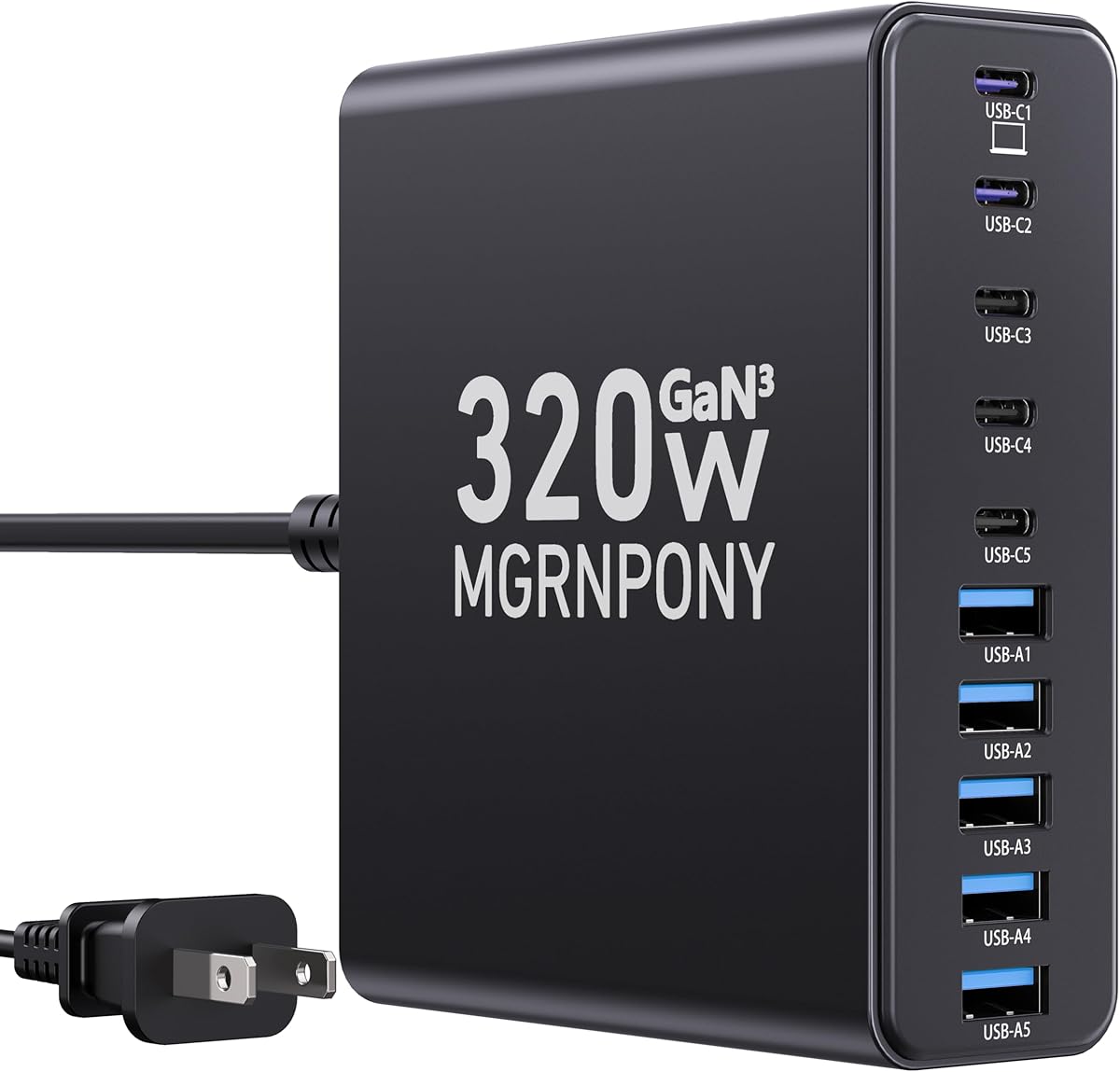


This Zobirez model leads our list with a massive 420W output and ten ports. It earns its high user rating by balancing power with organization for families.
We may earn a commission when you buy through this link, at no additional cost to you.
The inclusion of five USB-C ports allows simultaneous laptop charging. Users appreciate the eight included cables that reduce initial setup clutter immediately.
While the unit is larger than compact hubs, the wide slots hold cases securely. This design choice sacrifices minimal desk space for significant utility.
If you need one station for laptops and phones, this is the top recommendation. It offers the best balance of power and included accessories.
The mix of high-wattage USB-C and USB-A ports ensures every device type can charge without waiting.
Short cables in the box mean you can start organizing your desk instantly without buying extras.
We may earn a commission when you buy through this link, at no additional cost to you.
With 750W total output, this station handles the most demanding setups. It is ideal for households with many laptops and tablets needing power.
We may earn a commission when you buy through this link, at no additional cost to you.
The USB-C ports can deliver up to 120W each. This ensures even larger laptops charge rapidly without throttling due to shared power.
Ten cables are included to match the ten ports perfectly. However, the size might be overwhelming for smaller nightstands.
Choose this if raw power is your priority. It supports multiple high-performance devices simultaneously without compromise.
120W on USB-C ports means fast laptop charging even when other devices are connected.
Ten matching cables mean you don't need to source extra cords for your full device set.
We may earn a commission when you buy through this link, at no additional cost to you.
Anker is known for reliability, and this Prime station delivers. It fits well on tight desks while providing serious power for up to six devices.
We may earn a commission when you buy through this link, at no additional cost to you.
Each USB-C port supports up to 100W when used individually. This makes it perfect for charging laptops alongside phones efficiently.
The compact size is a benefit for space-constrained areas. However, fewer ports mean less simultaneous capacity for families.
Ideal for professionals needing high-quality, reliable power. It balances performance and size effectively.
Anker reputation ensures consistent performance and durable build materials over time.
GaN tech reduces heat and size compared to traditional silicon-based chargers.
We may earn a commission when you buy through this link, at no additional cost to you.
This block is designed for efficiency and portability. It packs six ports into a surprisingly small form factor for travel or small desks.
We may earn a commission when you buy through this link, at no additional cost to you.
With 100W total, it handles phones and tablets well. Note that it is not intended for high-wattage laptop charging.
The price point is very competitive. It fits tight budgets while still offering multiple ports for daily gear.
Best for casual users who need to charge several phones or accessories quickly.
The compact design frees up valuable outlet space in hotels or offices.
Low cost allows you to buy one for multiple locations easily.
We may earn a commission when you buy through this link, at no additional cost to you.
If you use iPhone and Apple Watch, this dock simplifies bedside charging. It features 15W wireless power with official certification.
We may earn a commission when you buy through this link, at no additional cost to you.
The design supports vertical and landscape angles for viewing. This flexibility is great for nightstands where screen visibility matters.
It does not support heavy laptop charging. It is strictly for mobile and wearable devices in the Apple ecosystem.
Choose this for a clean, wireless experience with guaranteed speed.
Qi2 certification ensures safe and efficient charging for your phone.
Built-in support for Apple Watch keeps one cable free for other gear.
We may earn a commission when you buy through this link, at no additional cost to you.
This unit combines a power strip with USB ports for ultimate versatility. It protects connected electronics while charging six devices.
We may earn a commission when you buy through this link, at no additional cost to you.
The 100W USB-C ports handle laptops efficiently. The AC outlets allow you to plug in non-USB gear directly.
The surge protection is a vital safety feature for expensive computers. This justifies the premium price point.
Best for office desks where surge protection and USB power are both needed.
AC outlets and USB ports cover all your hardware connection needs in one unit.
300J surge protection guards against power spikes and potential damage.
We may earn a commission when you buy through this link, at no additional cost to you.
This model is ideal for basic charging needs. It offers five USB-A ports at a budget-friendly price point.
We may earn a commission when you buy through this link, at no additional cost to you.
Seven cables are included to start charging immediately. The removable dividers help organize tablets of different sizes.
Note that USB-A limits maximum speeds for modern phones. It is best for older devices or low-power charg.
A great gift for parents or dorm rooms needing simple, reliable power.
Cables in the box mean no extra purchase required for basic charging.
Adjustable slots allow you to fit larger tablets with protective cases.
We may earn a commission when you buy through this link, at no additional cost to you.
This station offers impressive specs for the price. It includes ten ports and GaN tech for efficient power delivery.
We may earn a commission when you buy through this link, at no additional cost to you.
The IceShield 3.0 system monitors temperature to protect devices. Users appreciate the safety measures included at this price point.
While not as premium as Anker, it delivers solid daily performance. It is a strong contender for families on a budget.
Select this for high port counts and safety features without breaking the bank.
Daily temperature checks help prevent overheating during long charging sessions.
GaN materials ensure faster charging with less heat generation.
We may earn a commission when you buy through this link, at no additional cost to you.
The retractable cables are the highlight here. They reduce clutter significantly compared to fixed cables.
We may earn a commission when you buy through this link, at no additional cost to you.
Eight devices can charge at once with decent wattage. The GaN support helps keep speeds reasonable.
The mechanism may wear over time with frequent use. However, the convenience is high for organized setups.
Good for desks where neatness is a top priority.
Retractable design keeps your desk clean when not actively in use.
Eight devices can charge together without needing multiple wall outlets.
We may earn a commission when you buy through this link, at no additional cost to you.
This unit balances port count and wattage effectively. With 300W, it handles most daily charging needs without issue.
We may earn a commission when you buy through this link, at no additional cost to you.
Two 65W ports can charge laptops. The safety features are robust for the price range.
It lacks some premium build materials found in higher-end models. Still, it delivers reliable performance for standard users.
A practical choice for family rooms needing reliable power.
300W ensures phones and tablets charge quickly without delay.
Overload and short-circuit protection keep devices safe during use.
We may earn a commission when you buy through this link, at no additional cost to you.
Selecting the right station depends on your device types, power needs, and space constraints.
Check how many devices you need to charge simultaneously. Look for a mix of USB-C and USB-A to match your current hardware. Many new devices require USB-C for fast charging, so ensure the hub has enough of these ports.
Count your current devices and add two for future growth. This ensures the station remains useful as you buy new gadgets.
Total wattage determines if the station can charge all devices fast at once. Higher wattage is necessary for laptops, which typically need 65W or more per port. A 200W station may suffice for phones, but a 400W+ station is better for mixed use.
Match the total wattage to your heaviest device's needs. This prevents slow charging when multiple devices are plugged in.
Many stations sell without cables. Buying a unit that includes multiple cables saves time and money. Check the cable types and lengths to ensure they fit your setup comfortably.
Prioritize kits that include mixed cable types. This ensures compatibility with all your different devices immediately.
Look for durable materials like flame-retardant ABS. Fixed slots are often more reliable than removable dividers. Ensure the slots are wide enough to hold devices with thick protective cases.
Invest in a sturdy model that won't crack under daily use. This extends the lifespan of the product.
Overheat and short-circuit protection are critical for safety. Advanced hubs may monitor temperature automatically to prevent overheating. Ensure the model has relevant certifications for peace of mind.
Choose a station with multiple safety layers. This protects your expensive devices from power surges and heat.
Measure your desk or nightstand area before buying. Larger units with more ports take up more space. Compact models are better for travel or small surfaces.
Balance port count with physical size. A bulky station might be impractical for a small workspace.
Prices vary based on technology like GaN and brand reputation. Entry-level models work for basic phone charging. Premium models offer better efficiency and safety but cost more.
Determine your max spend based on needs. Avoid overspending on features you won't use.
A reliable warranty indicates manufacturer confidence. Look for at least a 12-month warranty. Better brands offer 24 months or more for electronic accessories.
Prioritize brands with strong support policies. This helps if you encounter defects later.
Place the station on a flat, stable surface away from water sources. Ensure adequate ventilation to prevent overheating during long sessions.
Connect all devices using the provided cables. Plug the power cord into a wall outlet and turn on the unit if it has a switch.
Clean the station regularly with a dry cloth to remove dust. Check cables for signs of wear to maintain safe operation.
Yes, provided the station has enough total wattage. Ensure at least one USB-C port supports high wattage like 65W. Check the total output rating to confirm it handles the load.
Most modern stations have overcharge protection. However, it is best practice to unplug devices when fully charged to protect battery health. Always ensure the station is certified.
Many include a power brick or cord, but some may not. Verify if an adapter is included. Otherwise, you must purchase one separately matching the voltage.
GaN chargers are smaller and more efficient. They generate less heat and charge faster. This makes them ideal for compact stations with high power.
Use the included ties or clips. Tuck excess cable length neatly to avoid tangling. A tidy desk reduces clutter and improves safety.
No, if the hub is quality-made. It manages power output correctly. Fast charging speeds up time without harming the device's internal health.
Yes, most stations work with standard cables. High-power cables are needed for laptops. Using the provided ones ensures maximum compatibility.
USB-C supports modern devices and fast charging. It allows reversible connection. Most new electronics require this type of port.
We highlighted ten models covering various needs from budget to premium. The Zobirez 420W offers the best balance of power and features.
Prioritize total wattage and cable inclusion for daily utility. A reliable hub simplifies your morning routine and keeps devices ready.
Always check current prices before purchasing as they fluctuate. This guide provides the specs you need to make an informed choice.