
HP OmniBook 3 14 inch Next Gen AI PC
4.4Editor score
Snapdragon X X1-26-100 Processor
2K OLED Display
Up to 41 Hours Battery Life
Artificial intelligence is transforming how we work and create on portable devices. Modern AI laptops integrate specialized hardware like NPUs to handle complex tasks locally. These machines offer faster processing and better privacy for everyday computing needs.
We analyzed ten leading models released in 2026 to find the best options available today. Our comparison focuses on performance benchmarks, display quality, battery endurance, and specific AI capabilities. Each laptop was evaluated based on real-world usage scenarios for professionals and students.
Each pick below highlights key strengths and potential limitations for different user types. You will find details on processors, memory, storage, and unique AI features like Copilot+ integration. Please note that prices and availability can change frequently on retailer sites.
4.4Editor score
4.8Editor score

5.0Editor score
As an Amazon Associate we earn from qualifying purchases.
The following table provides a side-by-side overview of the ten top AI laptops evaluated in this guide. It highlights core specifications including processor type, display resolution, memory capacity, and storage options to help you quickly compare capabilities.


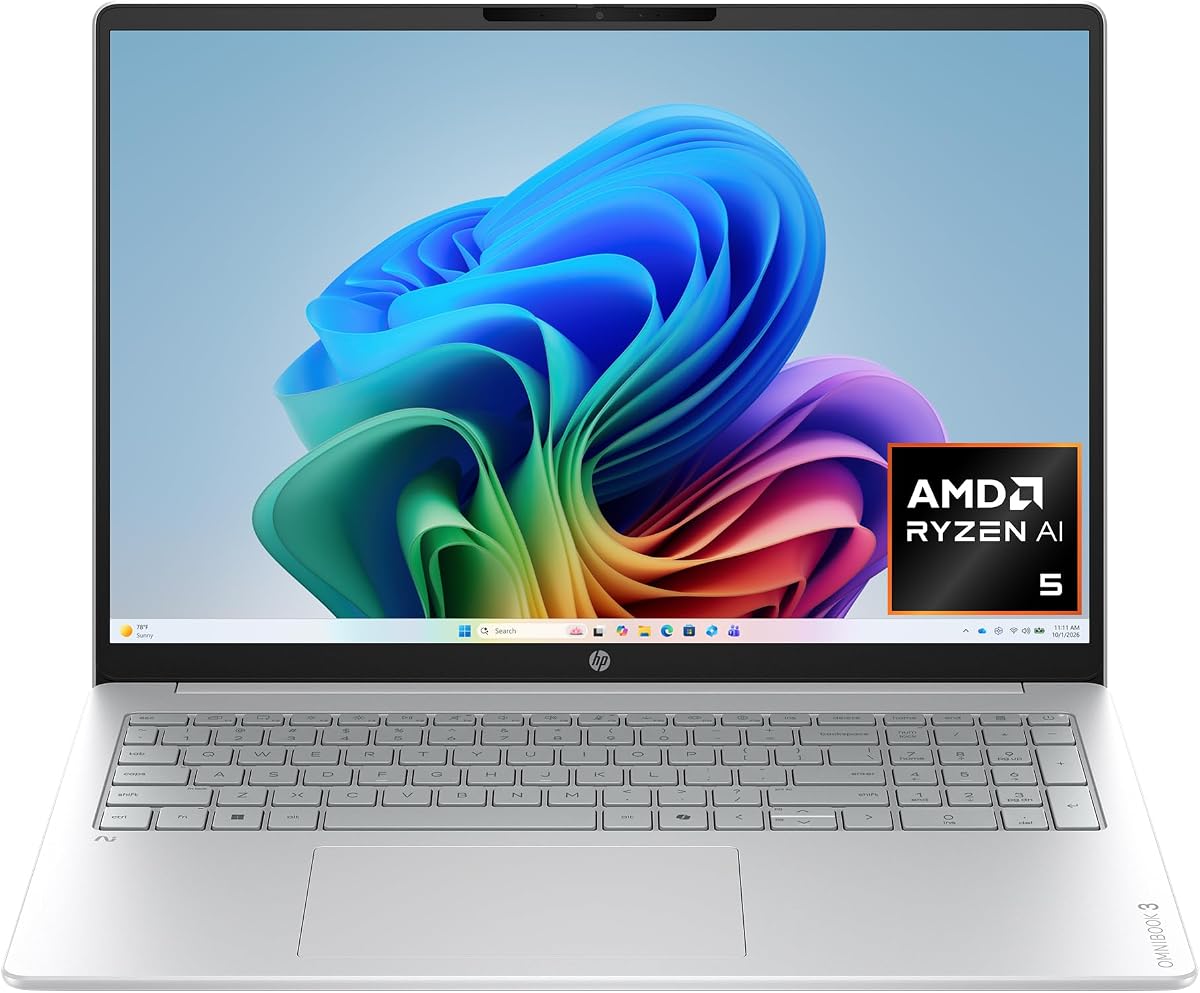
The HP OmniBook 3 16 inch stands out as a top choice for users seeking powerful AI capabilities without a premium price tag. It holds an impressive rating and delivers on the promise of next-gen AI performance through its AMD Ryzen AI processor.
We may earn a commission when you buy through this link, at no additional cost to you.
This laptop excels in multimedia and productivity tasks thanks to its 2K IPS touchscreen and AMD Radeon graphics. The advanced AI noise reduction ensures clear communication during calls, while the Copilot key provides quick access to intelligent assistance.
While it offers robust performance, the lack of a fingerprint reader might be a minor downside for security-focused users. However, the Windows Hello support via camera and strong overall build quality make these trade-offs acceptable for most buyers.
Ideal for students and professionals who need a versatile machine for daily tasks, this model balances performance and efficiency well. We recommend it as the best overall pick for those entering the AI laptop market in 2026.
The Advanced Personal Mode tracks your voice during calls and filters out background noise automatically for clearer meetings.
HP Fast Charge restores the battery from zero to fifty percent in about forty five minutes to keep you productive on the go.
We may earn a commission when you buy through this link, at no additional cost to you.
The Lenovo ThinkBook 16 Gen 8 is engineered specifically for business users who require reliability and strong security features. Its Intel Ultra 7 processor handles complex spreadsheets and video calls with ease while maintaining professional polish.
We may earn a commission when you buy through this link, at no additional cost to you.
With 32 GB of DDR5 RAM and a 1 TB SSD, this laptop ensures smooth multitasking across multiple enterprise applications. The fingerprint reader adds a layer of physical security that is essential for protecting sensitive business data.
Although it is not the lightest device on the market, its durability and robust feature set justify the weight for mobile professionals. The integration of Windows 11 Professional further enhances its value for corporate environments needing advanced management tools.
We recommend this model for office workers and executives who prioritize security and performance over portability. It is a solid investment for those needing a mobile workstation that can handle demanding daily workflows.
Windows 11 Professional and fingerprint reader work together to protect sensitive business data with advanced security protocols.
WiFi 6E and Bluetooth 5.3 ensure stable connections for seamless video conferencing and file sharing during meetings.
We may earn a commission when you buy through this link, at no additional cost to you.
The HP OmniBook X 14 inch features a remarkable 3K OLED touchscreen that delivers deeper blacks and richer color depth for media consumption. It is an excellent choice for creatives who need accurate color representation and a vibrant visual experience.
We may earn a commission when you buy through this link, at no additional cost to you.
This laptop stands out with up to twenty seven hours of battery life which is rare in its class. Smart Sense technology automatically adjusts performance modes based on your activity ensuring optimal thermal management during usage.
While the price is on the higher side and it lacks discrete graphics, the display quality and battery endurance make it a compelling option. The Intel Core Ultra processor ensures solid performance for most creative tasks without needing heavy GPU power.
We suggest this model for artists, designers, and power users who value screen real estate and longevity. It is the ideal choice for those who travel often and need a laptop that lasts through long work sessions.
The OLED display lights each pixel separately to provide deeper blacks and enhanced color depth for a premium viewing experience.
Smart Sense adapts temperature and fan noise automatically to manage warmth and noise levels for your personal comfort.
We may earn a commission when you buy through this link, at no additional cost to you.
The HP OmniBook 5 16 Touchscreen offers a large 1 TB SSD at a competitive price point making it great for users needing ample storage. Its Intel Core Ultra 7 processor provides the AI acceleration necessary for modern workflows and multitasking.
We may earn a commission when you buy through this link, at no additional cost to you.
With a 16 inch touchscreen and sleek silver aluminum design this laptop combines style with utility. The backlit keyboard ensures comfortable typing in low light conditions which is beneficial for evening work sessions.
The display resolution is standard compared to other models but the storage capacity compensates for users with large media libraries. It strikes a good balance between performance and affordability for general consumers.
We recommend this laptop for students and home users who prioritize file storage and budget. It is a practical choice for everyday tasks where space is a priority over high-end graphical performance.
The massive 1 TB SSD ensures you have plenty of storage for files photos and applications without needing external drives.
Wi-Fi 6E provides faster speeds and greater capacity for stable connections during video calls and streaming activities.
We may earn a commission when you buy through this link, at no additional cost to you.
The HP OmniBook 5 16 inch with Snapdragon X processor offers exceptional battery life that can last over a day on a single charge. This makes it an ideal companion for travelers and remote workers who cannot always access a power outlet.
We may earn a commission when you buy through this link, at no additional cost to you.
It includes Otter.ai an AI assistant that can record and transcribe meetings automatically to save time. The Qualcomm Adreno GPU supports smooth graphics performance and efficient power consumption for mobile users.
While the Snapdragon ecosystem might require an adjustment period for some users the energy efficiency is unmatched. The 512 GB SSD is adequate for most but heavy users might want external storage options for large projects.
We recommend this laptop for anyone prioritizing endurance and portability. It is a fantastic tool for digital nomads and students who need their device to last through long days without recharging.
Otter.ai automatically captures slides transcribes audio and generates meeting summaries so you can stay organized and save time.
The infrared sensor provides Windows Hello support for a safer and faster way to log in to your computer securely.
We may earn a commission when you buy through this link, at no additional cost to you.
The HP OmniBook 3 14 inch offers one of the most accessible entry points into the AI laptop market with its budget friendly pricing. It does not compromise on core features offering a 2K OLED display and Snapdragon X processor for solid performance.
We may earn a commission when you buy through this link, at no additional cost to you.
Battery life is a major highlight with up to forty one hours of usage which is exceptional for this price range. The OLED technology ensures rich colors and crisp visuals making it a pleasure to use for media and work.
The 256 GB SSD is a limitation for users with large file needs but cloud storage can compensate for this. For general computing tasks this laptop provides great value and reliable performance without breaking the bank.
We suggest this model for students and casual users looking for an affordable yet capable machine. It is a smart choice for those who want AI features and long battery life on a strict budget.
Delivers essential performance and AI capabilities at a lower price point making next-gen tech accessible to more users.
The OLED display provides rich colors and crisp visuals ensuring a vibrant and clear viewing experience for productivity.
We may earn a commission when you buy through this link, at no additional cost to you.
The Dell 16 Plus Touchscreen Laptop brings the latest Wi-Fi 7 technology to the table offering unprecedented wireless speeds and capacity. It is powered by the Intel Core Ultra 9 processor making it a powerhouse for demanding professional workflows.
We may earn a commission when you buy through this link, at no additional cost to you.
It features a comprehensive port selection including Thunderbolt 4 and multiple USB ports which allows for versatile connectivity without dongles. The build quality is solid and designed for durability in a business setting.
While it is more expensive than some rivals the advanced connectivity and raw processing power justify the cost for power users. The Copilot key ensures easy access to AI tools for efficient work management.
We recommend this laptop for IT professionals and creatives who need fast data transfer and reliable connections. It is a high-end choice for those who require the latest standards in networking and performance.
Wi-Fi 7 offers faster speeds and enhanced capacity for seamless wireless performance in busy environments.
Multiple USB and Thunderbolt 4 ports let you connect external drives and displays without needing extra hubs.
We may earn a commission when you buy through this link, at no additional cost to you.
The ASUS Vivobook S16 (2026) earns a perfect rating with its stunning OLED display and powerful AMD Ryzen AI 9 processor. It combines style and performance offering a minimalist design that is incredibly thin and lightweight for its size.
We may earn a commission when you buy through this link, at no additional cost to you.
With 32 GB of RAM and 1 TB of storage this laptop handles heavy multitasking effortlessly. The up to twenty three hours of battery life ensures you can work through long days without interruption while maintaining high performance.
The premium price reflects the high quality components and build but users get a truly refined experience in return. It stands out as a top-tier option for those who want the best of everything in a portable package.
We suggest this model for professionals and enthusiasts who demand top performance and premium build quality. It is the best choice for anyone who appreciates design and power in a single device.
The sleek modern and ultra-portable chassis weighs only 3.75 lbs and is 0.7 inches thin for effortless style.
Dolby Atmos and ASUS Audio Booster provide richer immersive sound for a better multimedia and communication experience.
We may earn a commission when you buy through this link, at no additional cost to you.
The acer Aspire 16 AI distinguishes itself with a 120Hz touchscreen that provides exceptionally smooth visuals for scrolling and animations. It features a premium integrated GPU and NPU that delivers optimized processing for diverse workloads.
We may earn a commission when you buy through this link, at no additional cost to you.
AcerSense AI solutions are built-in to streamline settings and optimize video presence making daily interactions more efficient. The display supports vibrant colors and sharp detail which is great for both work and entertainment.
While the design is simple and battery life is good but not class-leading the performance features are impressive. It offers a unique combination of high refresh rate display and AI capabilities at a competitive price.
We recommend this laptop for users who enjoy smooth scrolling and interactive displays. It is a solid option for those who want modern refresh rates and AI features without paying premium prices.
The 120Hz display acts as a playground for entertainment with smooth visuals and sharp detail for engaging interactions.
Intuitive AI solutions help you streamline settings and optimize video presence for easier communication and productivity.
We may earn a commission when you buy through this link, at no additional cost to you.
The HP Omnibook 16 is built for creators needing robust processing and memory for heavy workflows. It features the AMD Ryzen AI 7 350 with 50 TOPS NPU power ensuring seamless handling of AI workloads and local tasks.
We may earn a commission when you buy through this link, at no additional cost to you.
With 32 GB of DDR5 RAM and a 1 TB SSD this laptop provides ample space and speed for large project files. Windows 11 Pro adds enterprise-grade security which is beneficial for professional environments handling sensitive data.
Although it lacks Wi-Fi 7 the anti-glare finish and DTS:X Ultra audio offer a comfortable and immersive experience. The 2K touch display ensures fluid visuals ideal for navigating complex creative software.
We recommend this laptop for creators and professionals who need high memory and security. It is an elite choice for those who prioritize raw performance and local AI processing power.
The 50 TOPS NPU ensures seamless AI workloads for professional workflows and creative projects.
Windows 11 Pro provides enterprise-grade security for safe handling of professional data and sensitive files.
We may earn a commission when you buy through this link, at no additional cost to you.
Choosing the right AI laptop requires understanding how specific hardware components impact your daily tasks. This section outlines the key factors to consider when evaluating models for performance and efficiency.
Look for laptops with dedicated Neural Processing Units (NPUs) in their CPU such as Intel Core Ultra or AMD Ryzen AI. These chips handle AI tasks locally which reduces latency and improves privacy compared to cloud-based solutions.
Prioritize models with at least 10 TOPS of NPU power to support future software updates and advanced AI features effectively.
Ensure your laptop has at least 16 GB of RAM to handle multiple applications smoothly while AI features run in the background. For storage aim for a minimum of 512 GB SSD to accommodate large files and fast load times.
More RAM like 32 GB is beneficial for heavy multitasking and future-proofing your investment against growing software requirements.
A high-quality display is crucial for creative work and prolonged usage. Look for OLED screens for deep blacks and vibrant colors or IPS panels for accurate viewing angles.
Resolution should be at least 1920 x 1200 to ensure sharp text and detailed images during productivity tasks.
Since AI processing can be power-intensive look for models that advertise long battery life typically above 15 hours. This ensures you can work remotely without constant access to a power outlet.
Fast charging technology is also valuable to quickly replenish power during short breaks in your workday.
Modern laptops should include Wi-Fi 6E or Wi-Fi 7 support to handle high-speed data transfers and stable connections. USB-C ports with power delivery are essential for versatile charging and docking options.
Check for Bluetooth 5.3 or newer to ensure seamless pairing with wireless peripherals and audio devices.
Evaluate the pre-installed software and OS features that leverage the hardware AI capabilities. Systems with Copilot+ integration often provide useful tools like recall and advanced search features.
Ensure the operating system supports regular updates to keep these AI tools current and secure over time.
If you travel frequently consider the weight and thickness of the laptop. Models under 4 lbs are easier to carry but may sacrifice some battery capacity or cooling performance.
Look for durable materials like aluminum or magnesium alloys to protect the device during daily commute and use.
Hardware-based security like fingerprint readers or IR cameras for Windows Hello adds a layer of protection for your data. These features ensure only you can access the device securely.
Business-focused models often include additional management tools and encryption features beneficial for professional environments.
To get the most out of your AI laptop enable the Copilot+ features in your settings and allow necessary permissions. This ensures the hardware acceleration is utilized for tasks like voice transcription and background noise cancellation.
Keep your system updated to receive the latest AI model improvements and security patches. Regularly running maintenance checks will keep the storage organized and the NPU running efficiently.
Protect your device by using a cooling pad during intensive work sessions to prevent overheating. Clean the screen with a microfiber cloth and avoid placing heavy objects on the laptop when closed to preserve the hinge and keyboard.
A Copilot+ PC is a device designed to meet specific hardware standards for local AI processing including a fast NPU. These computers enable new features like natural language search and real-time voice translation without relying on the cloud.
Many AI features on these laptops work offline because the processing happens locally on the NPU. However some advanced tools may require internet access for data updates or cloud synchronization.
At least 16 GB of RAM is recommended for smooth performance when using AI applications alongside other programs. For heavy creators or developers 32 GB provides a safer buffer for future needs.
While AI tasks can consume more power the dedicated NPUs are designed to be energy efficient. Most modern AI laptops offer battery life comparable to traditional models despite the added computing power.
Most slim AI laptops have soldered RAM and storage making upgrades difficult or impossible. It is best to choose a model with sufficient memory and storage at the time of purchase.
The Neural Processing Unit is a specialized chip designed to handle AI computations efficiently. It offloads tasks from the main CPU allowing for faster responses and lower power consumption.
The ten AI laptops reviewed here offer a range of options for every user from budget-friendly portable devices to powerful workstations. Our top picks highlight the balance between performance battery life and unique features like OLED displays and Copilot+ integration.
When making your decision prioritize the hardware that supports your specific daily tasks whether it is creative work or business collaboration. Consider the longevity of the device by looking for future-proof specs like ample RAM and Wi-Fi 7 support.
Prices for these models may vary over time so checking current listings before purchasing is always recommended. We hope this guide helps you find the perfect AI laptop to enhance your productivity in 2026.