
MINISFORUM NAB9S
4.5Editor score
13th Gen Core i9-13900HK
Dual 2.5G Ethernet Ports
Quad Screen Display Support
This comprehensive guide compares ten top Intel Core i9 Mini PC models for 2026, evaluating performance, connectivity, and design to help you choose the right
The Intel Core i9 Mini PC represents the pinnacle of compact computing power available today. These devices pack flagship performance into a small footprint, making them ideal for workstations, gaming setups, and home entertainment systems without consuming excessive desk space.
We have evaluated ten leading models based on processor architecture, thermal efficiency, connectivity options, and expandability. Our analysis focuses on real-world usability for creative professionals, gamers, and enterprise users seeking reliable high-performance desktop alternatives.
Each selection highlights specific strengths such as multi-core throughput, AI acceleration capabilities, or enterprise-grade networking. Prices and availability may vary over time, so verify current listings before making your final purchasing decision for your specific workflow needs.
4.5Editor score

4.5Editor score

4.5Editor score
The following table provides a side-by-side overview of key specifications for all ten selected models. Use this comparison to quickly identify which device best aligns with your specific performance requirements, connectivity needs, and intended use cases.


The MINISFORUM M1-1390 delivers flagship performance with its Intel Core i9-13900HX processor. It achieves a 4.5 rating by balancing raw power with compact design for office and home use. Its standout quality lies in handling complex tasks like video editing without slowdown.
We may earn a commission when you buy through this link, at no additional cost to you.
With 24 cores and 32 threads, this Mini PC manages multitasking efficiently. The 32GB DDR4 RAM ensures smooth operation during heavy workloads. Storage expands up to 8TB via dual M.2 slots, offering massive capacity for large files and media libraries.
While DDR4 limits maximum memory speeds compared to newer standards, the impact on daily tasks is minimal. Thermal management can struggle under sustained full loads, so ensuring good airflow is advisable for optimal performance stability over long periods.
Professionals needing high throughput in a small space should consider this unit. The triple 4K display output enables efficient workflows. It is a strong recommendation for users prioritizing processing power and connectivity in a Mini PC form factor.
The hybrid architecture distributes tasks between performance and efficiency cores, optimizing resource usage for varied workloads effectively.
Dual M.2 slots allow for adding a second drive, accommodating up to 8TB total storage for growing data needs.
We may earn a commission when you buy through this link, at no additional cost to you.
The Beelink GTi13 stands out with Thunderbolt 4 connectivity and DDR5 memory. Its 4.6 rating reflects a focus on high-speed data transfer and security. The standout quality is the integration of AI features like voice interaction and biometric login for convenience.
We may earn a commission when you buy through this link, at no additional cost to you.
With a 13900HK processor, it offers significant power for creative tasks. The 32GB DDR5 RAM enhances bandwidth for demanding applications. Dual 2.5G LAN ports ensure stable network connections, crucial for cloud work or streaming large media files.
The requirement for an external docking station to access the PCIe slot adds cost and complexity. The fingerprint sensor is limited in utility compared to facial recognition systems. These trade-offs are acceptable for users valuing specific security and connectivity features.
Creative professionals and security-conscious users will appreciate this design. The Thunderbolt support enables fast external storage access. It is a top recommendation for those needing top-tier connectivity and modern memory standards in a Mini PC.
The fingerprint sensor provides quick logins and file encryption, enhancing security for sensitive corporate documents.
Built-in B1 AI chip supports voice commands and barriers-free recognition, simplifying smart home control.
We may earn a commission when you buy through this link, at no additional cost to you.
The KAMRUI Hyper H2 delivers the fastest clock speeds available in the selection. Its 4.5 rating is earned through raw performance and effective cooling. The standout quality is the 14th Gen processor enabling faster response times and productivity gains.
We may earn a commission when you buy through this link, at no additional cost to you.
With up to 5.8GHz boost, it outperforms competitors in single-threaded tasks. The silent centrifugal fan and dual copper pipes manage heat well. Dual M.2 slots allow for expanding storage significantly, accommodating up to 4TB total capacity.
DDR4 memory restricts bandwidth compared to DDR5 options found in some rivals. External GPU support is absent, limiting graphical upgrades. These are acceptable trade-offs for users prioritizing CPU speed and efficient cooling over expandability in a gaming context.
Gamers and video editors should consider this model highly. The 5.8GHz boost ensures smooth rendering and multitasking. It is a top recommendation for those needing maximum CPU performance in a compact, silent chassis.
The all-copper structure and dual-fin module boost heat dissipation efficiency significantly under heavy loads.
Measuring only 5.04 x 5.04 x 1.63 inches, it saves desk space while delivering desktop-level power.
We may earn a commission when you buy through this link, at no additional cost to you.
The MINISFORUM NAB9S offers exceptional value as the most affordable Intel Core i9 Mini PC. Its 4.5 rating highlights solid performance at a low cost. The standout quality is delivering flagship processing power while keeping entry barriers low.
We may earn a commission when you buy through this link, at no additional cost to you.
Despite 16GB RAM and 500GB SSD, the i9-13900HK handles daily tasks efficiently. Dual 2.5G Ethernet ports support advanced networking needs like link aggregation. Quad screen display support enhances productivity for multitasking environments.
Limited initial RAM and storage require upgrades for demanding professional use. This adds cost and time to the setup. These are acceptable trade-offs for buyers seeking a budget-friendly base that supports future expansions easily.
Students and home users will find this model appealing. The quad display support aids multitasking. It is a top recommendation for those wanting an i9 processor without a high upfront investment.
The NAB9S delivers flagship processing power at a price point suitable for budget-conscious buyers.
Dual 2.5G Ethernet ports support firewalls and multi-band aggregation for stable high-speed networking.
We may earn a commission when you buy through this link, at no additional cost to you.
The MINISFORUM MS-01 is a workstation-grade Mini PC built for enterprise and advanced users. Its 4.5 rating reflects robust features like PCIe expansion and high-speed networking. The standout quality is its ability to support discrete GPUs and server-level data speeds.
We may earn a commission when you buy through this link, at no additional cost to you.
With 32GB DDR5 RAM and vPro support, it suits business deployments requiring manageability. The 10Gbps SFP+ ports enable massive data throughput for NAS setups. Three M.2 SSD slots offer unparalleled storage capacity options.
The price point reflects the specialized hardware, making it expensive for general use. Setup complexity requires technical expertise for optimal configuration. These are acceptable for users needing workstation capabilities in a compact footprint.
IT professionals and creative power users should consider this model. The GPU slot allows for external graphics cards. It is a top recommendation for those needing maximum expandability and enterprise features.
vPro support enables remote management and enhanced security for corporate environments.
Total network speed up to 65Gbps allows fast access to NAS documents and cloud storage.
We may earn a commission when you buy through this link, at no additional cost to you.
The GEEKOM IT13 MAX features Intel Ultra 9 185H with a dedicated NPU for local AI tasks. Its 4.6 rating highlights privacy-focused AI capabilities and silent operation. The standout quality is handling local LLMs without cloud dependencies.
We may earn a commission when you buy through this link, at no additional cost to you.
With 16GB DDR5 RAM and optimized cooling, it remains quiet in shared spaces. The 3-year warranty adds peace of mind. No bloatware ensures a clean system out of the box for developers and creative professionals.
The lower RAM capacity limits heavy multitasking compared to higher configurations. The price reflects premium AI features, which may be unnecessary for standard users. These are acceptable for those specifically seeking local AI inference capabilities.
Developers and privacy-conscious users will find this model ideal. The silent operation suits hospitals and classrooms. It is a top recommendation for those needing local AI processing and long-term reliability.
The NPU supports lightweight local LLMs and private document Q&A, reducing cloud uploads.
IceBlast 3.0 cooling delivers 65W performance while maintaining whisper-quiet levels.
We may earn a commission when you buy through this link, at no additional cost to you.
The MINISFORUM MS-01 Barebone offers a chassis ready for custom components. Its 4.5 rating reflects flexibility for advanced users. The standout quality is allowing selection of specific RAM, storage, and even discrete graphics cards.
We may earn a commission when you buy through this link, at no additional cost to you.
With U.2 SSD support and 10G SFP+ ports, it suits homelab servers. The PCIe x16 slot enables high-performance GPU upgrades. This makes it adaptable to diverse workloads ranging from virtualization to 3D rendering.
Assembly requires technical skill and additional investment in parts. It lacks out-of-the-box readiness for general users. These are acceptable trade-offs for hobbyists needing a tailor-made high-performance system.
Server admins and enthusiasts will find this model valuable. The GPU support allows for powerful visual compute. It is a top recommendation for those needing maximum customization and enterprise features.
The barebone version supports any DDR5 RAM and U.2 enterprise SSDs for tailored capacity.
Dual 10G SFP+ ports support link aggregation and ultra-fast wired connections.
We may earn a commission when you buy through this link, at no additional cost to you.
The GEEKOM XT13 Pro offers generous storage and memory for gaming and content creation. Its 4.1 rating indicates strong specs but average overall performance. The standout quality is the 2TB SSD ensuring ample space for large game libraries.
We may earn a commission when you buy through this link, at no additional cost to you.
With 32GB DDR5 RAM, multitasking remains smooth. The 3-year warranty provides confidence for long-term use. Local repair support adds value for businesses relying on continuity. This unit suits those needing large local storage.
Intel Iris Xe graphics limit AAA gaming performance without external solutions. The lower rating suggests some reliability issues. These are acceptable for users focusing on storage capacity and warranty support over raw graphics power.
Gamers needing storage space should consider this model. The 32GB RAM supports multitasking. It is a top recommendation for those prioritizing local storage and warranty coverage.
The 2TB SSD accommodates large game collections and video archives without immediate upgrades.
The 3-year hardware coverage minimizes service downtime for critical workflows.
We may earn a commission when you buy through this link, at no additional cost to you.
The GEEKOM GT13 MAX combines AI acceleration with high-end graphics. Its 4.4 rating highlights strong private document processing. The standout quality is the NPU supporting local LLMs and OCR without cloud dependency.
We may earn a commission when you buy through this link, at no additional cost to you.
With Intel Arc Graphics, it supports AAA gaming and video editing. The quad display output enables wide multitasking. Rigorous testing ensures stability for 24/7 operation. This unit suits professionals needing on-device intelligence.
Memory expansion caps at 96GB, which may limit extreme workloads. Setting up local AI tools requires technical effort. These are acceptable trade-offs for users valuing privacy and graphics performance.
Developers and enterprise users should consider this model. The local NPU improves workflow efficiency. It is a top recommendation for those needing private AI processing and versatile display support.
The Intel AI Boost NPU offers up to 11 TOPS for local LLMs and image processing.
Dual USB4 and dual HDMI enable up to four displays for cross-display debugging.
We may earn a commission when you buy through this link, at no additional cost to you.
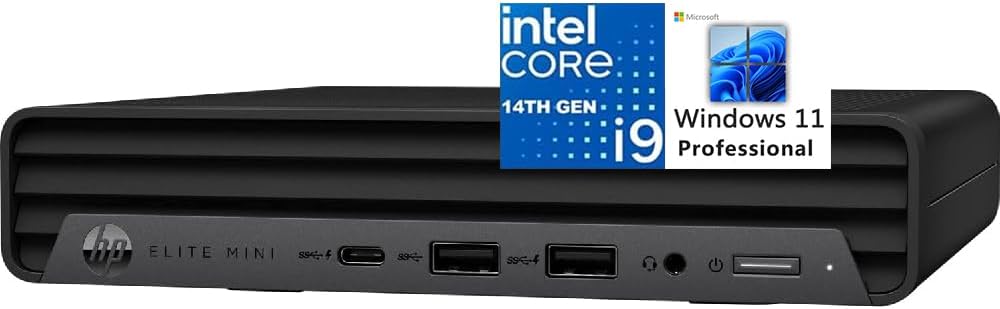
The HP Elite Mini 800 G9 brings trusted enterprise reliability to the Mini PC category. Its 4.6 rating reflects stability and professional features. The standout quality is the ultra-quiet design ensuring it fits in shared workspaces.
We may earn a commission when you buy through this link, at no additional cost to you.
With Windows 11 Pro and AI Copilot, it supports productivity workflows. The 16GB DDR5 RAM handles daily office tasks. Multiple USB ports including Type-C ensure easy peripheral connections without dongles.
Lack of expansion options limits long-term upgrades. The RAM is non-upgradeable in some configurations. These are acceptable for businesses valuing simplicity and reliability over hardware customization.
Corporate IT and office users will find this model ideal. The quiet operation suits open-plan offices. It is a top recommendation for those needing reliable business-ready hardware.
Windows 11 Professional comes pre-installed with full Copilot and security features.
Ultra-quiet design ensures the device operates silently even under load.
We may earn a commission when you buy through this link, at no additional cost to you.
Selecting the right Mini PC requires understanding your specific workload needs. This guide breaks down essential factors to consider before purchasing.
Choose between the 13th Gen, 14th Gen, or Ultra 9 series. The 14th Gen and Ultra 9 offer improved AI performance and single-thread speeds. Ensure the core count matches your multitasking demands, with 24 cores offering high throughput.
Prioritize the latest generation for future-proofing and maximum efficiency.
DDR5 RAM provides higher bandwidth than DDR4, which is critical for creative applications. Aim for at least 32GB for heavy multitasking and video editing. Check if the system allows expansion to future-proof your investment.
Select DDR5 models for better performance in data-intensive tasks.
Look for PCIe 4.0 SSDs to ensure fast boot times and file transfers. Models with multiple M.2 slots allow for easy upgrades, which is vital for growing storage needs. Dual slots support RAID configurations for data redundancy.
Ensure the device offers at least one extra storage slot for future capacity increases.
Check for USB-C with Power Delivery and video output support. Models with Thunderbolt 4 enable high-speed peripherals and docking stations. Multiple HDMI and DisplayPort outputs support multi-monitor setups for productivity.
Verify that the available ports match your current peripheral ecosystem.
For high-speed file transfers, look for 2.5G or 10G Ethernet ports. Wi-Fi 6E ensures stable wireless connectivity. Enterprise models may offer link aggregation for combined bandwidth and failover protection.
Prioritize models with high-speed wired connections for critical data tasks.
Small form factor devices require robust cooling to maintain performance under load. Systems with copper pipes and large fans prevent throttling. Ensure the noise levels are acceptable for your intended environment.
Choose models with advanced cooling systems to ensure stable sustained performance.
Windows 11 Pro offers enhanced features for business users. Some models come as barebones, requiring you to install the OS yourself. Confirm compatibility with necessary software tools before purchase.
Decide between pre-installed OS for convenience or barebones for control.
Long-term warranties protect your investment. Models with 3-year coverage indicate higher build quality. Check if local repair support is available for quick resolution of hardware issues.
Opt for brands offering extended warranties to safeguard against unexpected failures.
Place the Mini PC in a well-ventilated area to prevent overheating. Ensure at least a few inches of clearance around the vents for proper airflow. Avoid enclosing the device in tight cabinets that restrict air circulation.
Regularly update your BIOS and drivers to maintain system stability. Use manufacturer tools to check temperatures and fan speeds. This proactive maintenance helps prevent thermal throttling and extends the hardware lifespan.
If using an external GPU or heavy storage arrays, manage cables carefully. Use high-quality cables to avoid connection instability. Proper cable management not only looks professional but also improves cooling efficiency.
Most standard Mini PCs do not support eGPUs due to limited ports. However, workstation models like the MS-01 include a PCIe x16 slot for discrete GPUs. Check connectivity ports to confirm compatibility before purchasing.
Most models feature accessible DDR4 or DDR5 slots for upgrades. Verify the specific model's max capacity, as some support up to 96GB. Always check compatibility with SO-DIMM standards before replacing memory.
Yes, models with 32GB RAM and modern CPUs like the 14900HX handle 4K editing well. The integrated graphics support 4K output, but rendering may be slower than dedicated GPUs. Ensure sufficient SSD space for scratch disks.
TDP ranges from 35W to 65W depending on the model. These are significantly more efficient than traditional desktops. Expect idle consumption to be low, which helps save on electricity over time.
Most models support dual or triple 4K displays via HDMI and USB-C. High-end models like the NAB9S offer quad display support. This allows for flexible workflows and multi-monitor setups.
Yes, most models are compatible with major Linux distros. The GEEKOM IT13 MAX explicitly supports Ubuntu and Debian out of the box. Ensure drivers for Wi-Fi and audio are available for your chosen version.
The ten Intel Core i9 Mini PCs reviewed offer diverse options for every need. The KAMRUI Hyper H2 delivers top performance, while the MINISFORUM MS-01 stands out for expandability. Budget options like the NAB9S provide flagship power at lower costs.
Prioritize memory speed and cooling solutions to ensure long-term stability. If AI workflows are essential, look for models with NPUs like the Ultra 9 series. Balance connectivity needs with available desk space.
Prices and availability fluctuate regularly so check current listings before buying. This guide helps you select the right system for your specific professional or personal requirements today.