
Calibrite Display 123 Monitor Calibration Colorimeter for Photo Editing and Color Accurate Viewing
4.0Editor score
Simple 1 2 3 software workflow
Supports up to 2 displays
USB C connection included
This guide compares the best colorimeter for monitor calibration tools for photo and video editing, featuring top models from Calibrite, Datacolor, and ASUS
Choosing the right colorimeter for monitor calibration is essential for creators who need accurate colors. A good tool ensures your screen matches final outputs, reducing guesswork in photography and video workflows.
We evaluated ten top-rated devices based on sensor accuracy, software features, and compatibility with modern displays like OLED and mini LED. Our analysis highlights tools that balance ease of use with professional-grade precision for diverse creative needs.
Each pick below showcases specific strengths, from budget-friendly options to advanced HDR capable units. Keep in mind that pricing and availability fluctuate, so verify current deals before making your final decision for your workspace setup.
4.0Editor score
4.5Editor score

4.0Editor score
The following table provides a side-by-side overview of ten leading colorimeters, highlighting key specifications to help you identify the right tool for your specific display technology and creative workflow requirements.


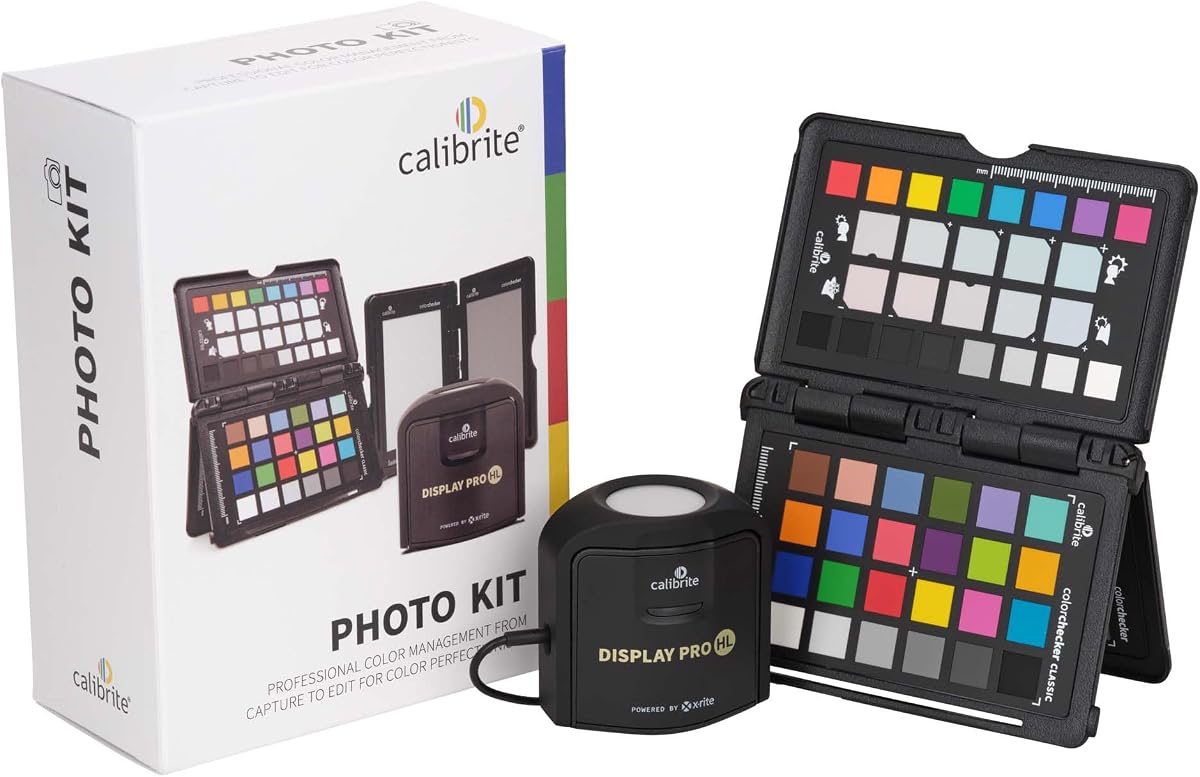
The Calibrite Photo Kit stands out as the top choice for photographers seeking a unified color management solution. It combines the Display Pro HL monitor calibrator with the ColorChecker Passport Photo 2 to bridge the gap between capture and display. With a strong 4.5 rating, users appreciate the cohesive workflow that minimizes color mismatches across devices.
We may earn a commission when you buy through this link, at no additional cost to you.
This kit excels in handling modern display technologies including mini LED and OLED panels which are becoming standard in high end monitors. The Display Pro HL ensures that what you see on screen matches your final print or digital output. The included Passport Photo 2 allows for creating custom camera profiles that capture the true color of your specific camera sensor under various lighting conditions.
One trade-off is the complexity involved in using the full PROFILER software suite compared to simpler one click tools. However, professionals will find the control over white point and gamma worth the extra time. The initial investment is higher than basic models but the accuracy gains justify the cost for serious creatives.
This kit is ideal for photographers who need consistency from the moment they press the shutter to when they deliver the final image. If you want a system that trusts both your camera and your monitor equally, this is the recommended pick for professional photo workflows.
The integration between camera profiling and monitor calibration ensures color consistency across your entire production pipeline.
Handles high brightness and high dynamic range displays with precision for reliable color grading.
We may earn a commission when you buy through this link, at no additional cost to you.
The Calibrite Display 123 is an excellent entry point for creators needing reliable color accuracy without breaking the bank. It features a streamlined 1 2 3 software workflow that makes calibration accessible even for beginners. With a solid 4.0 rating, it delivers consistent results for photo editing tasks.
We may earn a commission when you buy through this link, at no additional cost to you.
Its USB C connection and compact body make it easy to carry between different workstations or client sites. The device supports up to two displays which is useful for multi screen setups common in editing environments. The before and after check feature lets you visually confirm the improvements immediately after calibration.
While it lacks the advanced HDR controls found in premium models it covers the essential needs for SDR workflows. The simplicity means less time tweaking settings and more time creating. It is a practical choice for hobbyists or freelancers who need dependable color without complexity.
If you need a cost effective tool to ensure your edits look right on other screens this model delivers strong value. It removes the guesswork from color management and helps maintain consistency across your projects with minimal effort.
The guided workflow reduces technical barriers so you can focus on creative work rather than settings.
Lightweight design and simple connectivity make it perfect for mobile editing setups.
We may earn a commission when you buy through this link, at no additional cost to you.
The Calibrite Display Plus HL is designed for professionals working with high dynamic range and super bright displays. Its advanced sensor measures up to 10000 nits ensuring accurate calibration for HDR capable monitors and projectors. This makes it indispensable for video editors and colorists working in demanding environments.
We may earn a commission when you buy through this link, at no additional cost to you.
The included PROFILER software offers deep control over white point luminance and gamma allowing for precise team workflows. It supports broadcast standards like Rec.709 which is crucial for video production pipelines. The validation tools help ensure that your display remains consistent over time.
For users working only with standard dynamic range screens the extra cost may not be justified. However for those dealing with mini LED or XDR panels this tool provides necessary precision. The ability to measure extreme brightness accurately is a key differentiator from standard colorimeters.
This device is the top choice for video professionals who need to trust every highlight and shadow in their work. It brings a level of control that matches the high end hardware it calibrates ensuring your grading decisions are reliable across devices.
Accurate measurement of ultra bright displays ensures reliable HDR content creation and grading.
Supports broadcast color standards to maintain consistency across professional video pipelines.
We may earn a commission when you buy through this link, at no additional cost to you.
The datacolor Spyder Monitor Calibrator introduces a unique DevicePreview feature that simulates how your photos will look on other devices directly on your screen. This is particularly useful for web designers and photographers who need to preview outputs across different platforms. It delivers professional results with a quick 90 second calibration process.
We may earn a commission when you buy through this link, at no additional cost to you.
Its ambient light sensor tracks room lighting changes and adjusts your display brightness accordingly to maintain consistent viewing conditions. The software warns you when recalibration is needed based on these environmental shifts. This adaptability ensures your color accuracy remains stable throughout the day.
While the DevicePreview feature is innovative it relies on software integration that may vary by operating system. Users should expect to run calibration sessions regularly to account for environmental changes. The ease of use makes it suitable for both novices and experienced creatives.
If you need a tool that bridges the gap between your screen and final devices this model offers compelling functionality. It simplifies the process of checking color consistency across different viewing environments without needing multiple physical tests.
Preview how your edits will appear on client devices before export to save time and revisions.
Automatic adjustments based on room light help maintain accuracy during long editing sessions.
We may earn a commission when you buy through this link, at no additional cost to you.
The Calibrite Creator Kit is tailored for hybrid shooters who work with both stills and video. It includes the Display 123 colorimeter alongside the ColorChecker Passport Video 2 for comprehensive capture control. With a perfect 5.0 rating users love the streamlined approach to consistent color from set to edit.
We may earn a commission when you buy through this link, at no additional cost to you.
This kit helps you set accurate white balance on set ensuring that footage matches across multiple cameras. The Passport Video 2 provides reference targets that simplify post production grading. The Display 123 ensures your editing environment matches those captured colors for reliable delivery.
While it does not support high dynamic range displays the simplicity works well for standard projects. The focus on workflow efficiency reduces trial and error corrections significantly. It is a practical choice for content creators who need reliability over technical complexity.
If you balance both photography and videography needs this kit offers a unified solution for color consistency. It removes the guesswork from matching cameras and monitors so you can focus on storytelling and creativity.
Combines camera and monitor tools to simplify color management for hybrid content creators.
Quick white balance checks help maintain consistent footage in changing lighting conditions.
We may earn a commission when you buy through this link, at no additional cost to you.
The Calibrite ColorChecker Display Pro is a versatile tool that extends beyond standard monitors to support projector profiling. Its rotatable diffuser arm allows for table top measurements and ambient light readings. The built-in tripod mount facilitates larger venue calibration tasks making it unique among similar devices.
We may earn a commission when you buy through this link, at no additional cost to you.
Powered by X-Rite technology it delivers high repeatability across different display types and conditions. The optical design ensures consistent results whether you are profiling a laptop screen or a cinema projector. It integrates with ccProfiler or i1Profiler software for detailed control.
The physical build is more substantial which might be less portable for field work compared to smaller units. However for professionals needing projector capabilities this is a key advantage. It offers robust functionality for those managing multiple display environments including large venues.
If your work involves calibrating projectors or measuring ambient light alongside screens this model provides necessary tools. It ensures your visual presentations maintain color integrity across various projection surfaces and lighting setups.
Specialized features enable accurate calibration for large scale presentation and projection systems.
High repeatability ensures that your profiles remain accurate over time and across units.
We may earn a commission when you buy through this link, at no additional cost to you.
The Datacolor Spyder5PRO is a classic tool designed to help serious photographers and designers match their prints accurately. Its room light monitoring feature suggests optimal brightness settings to ensure shadow details are visible. The before and after view lets you verify the impact using your own images.
We may earn a commission when you buy through this link, at no additional cost to you.
Full calibration takes approximately five minutes which is efficient for regular maintenance. The software focuses on RGB monitor profiling to ensure your colors translate well to print. While it is an older model it still holds value for print-based workflows.
Users may find it lacks support for newer display technologies like OLED or mini LED found in modern monitors. The simplicity means it is less adaptable to high dynamic range content. However for standard photo editing it remains a dependable choice.
If your primary focus is matching screen colors to physical prints this model offers proven reliability. It helps reduce the print-edit cycle waste by ensuring your initial setup is as accurate as possible for output.
Optimized for ensuring on-screen edits match final printed results with high precision.
Before and after views help you understand the tangible changes made during calibration.
We may earn a commission when you buy through this link, at no additional cost to you.
The ASUS ProArt CaliContrO MCA02 is a unique 3-in-1 colorimeter that integrates hardware calibration with display OSD control. It works best with ASUS ProArt monitors allowing for deep hardware-level adjustments. The built-in ASUS Dial provides shortcuts for precise control within creator software.
We may earn a commission when you buy through this link, at no additional cost to you.
While it measures up to 10000 nits for HDR calibration its low user satisfaction suggests compatibility or software challenges. It is designed to keep long-term color accuracy consistent through software integration. However it may not be suitable for non-ASUS display setups.
The integration with specific hardware means it is less flexible than standalone colorimeters. Users report issues with software compatibility and ease of use despite the promising feature set. It is a specialized tool rather than a general solution.
If you are deep within the ProArt ecosystem this unit offers direct control features not found elsewhere. However for broader compatibility and ease of use other models may be more reliable for general calibration tasks.
Direct control over monitor hardware settings for persistent color accuracy without software dependencies.
Seamless connection with ProArt displays allows for optimized color management within the ASUS ecosystem.
We may earn a commission when you buy through this link, at no additional cost to you.
The Datacolor Spyder4Pro is known for its improved accuracy and stability over previous generations. It features a full-spectrum sensor with double-shielded color filters for closer matches to CIE standards. The recalibration assistant makes it quick to compensate for changes over time without full recalibration.
We may earn a commission when you buy through this link, at no additional cost to you.
While it is an older model its stability remains a draw for users who prioritize consistency. It supports multiple displays with a single sensor keeping things simple for multi-screen setups. However it lacks some of the advanced features found in newer units.
The Recal feature is particularly useful for maintaining calibration between full sessions saving time and effort. Its simplicity makes it easy to use for basic needs without complex software. It is a solid choice for those who need dependable performance.
If you need a reliable tool for standard monitoring needs without extra bells and whistles this model works well. It maintains its value through consistent results and a straightforward approach to display calibration.
Improved sensor stability ensures your calibration remains accurate over extended periods.
Easy recalibration tools help you maintain accuracy without restarting the full process.
We may earn a commission when you buy through this link, at no additional cost to you.
The Datacolor Spyder X Pro is designed with an intuitive workflow that makes it easy for first-time users to get professional results. Its groundbreaking lens-based color engine provides higher accuracy across multiple monitors. The wizard offers predefined targets for quick calibration in just a minute or two.
We may earn a commission when you buy through this link, at no additional cost to you.
Room light monitoring and automatic profile changing help maintain accuracy as conditions change. The SpyderProof functionality allows for before-and-after evaluation using your own images. This combination of ease and precision makes it a strong contender for various skill levels.
While it is priced higher than entry-level models the user experience justifies the cost. The automatic features reduce manual effort significantly. However users should keep software updated to ensure compatibility with newer operating systems.
If you want a tool that balances professional accuracy with an easy-to-use interface this is an excellent choice. It ensures precise screen color without requiring deep technical knowledge or complex settings.
Advanced lens technology provides superior color accuracy across various display types.
Automatic profile changes help keep your screen consistent without manual intervention.
We may earn a commission when you buy through this link, at no additional cost to you.
Selecting the right colorimeter involves understanding your specific workflow needs and display technologies. This guide outlines key factors to consider for making an informed decision.
Modern monitors increasingly use OLED and mini LED panels which require sensors capable of handling high luminance and high dynamic range. Ensure the colorimeter supports your specific display type to avoid calibration errors.
Check the device specifications to confirm compatibility with the panels you use daily for accurate color.
The accompanying software determines how easy it is to create profiles and manage color. Look for tools that offer preset targets and easy verification features.
Choose software that fits your skill level and provides necessary controls without overwhelming complexity.
Consider whether the colorimeter integrates with other parts of your workflow like camera profiling or printing. Some kits offer end-to-end solutions that bridge capture and display.
A unified toolset reduces guesswork and ensures consistency across all your devices.
Display colors shift over time and environmental conditions affect performance. Devices with ambient light sensors help adjust for these changes automatically.
Regular calibration is essential so choose a tool that makes scheduling easy to maintain accuracy.
Entry level colorimeters cover basic needs but lack advanced HDR or projector support. Premium models offer more control but at a higher cost.
Select a device that matches your workflow complexity to avoid overpaying for unused features.
If you work across multiple locations a compact and durable design is important. USB C connectivity simplifies connection to modern laptops.
A portable unit ensures your color consistency remains reliable wherever you create.
Professional colorimeters include tools to validate calibration results like quick checks and uniformity reports. These help build trust in your display accuracy.
Look for features that confirm your calibration is successful before you start editing work.
Many creators use multiple screens for different tasks. Ensure the colorimeter can profile multiple displays for consistent color across the workspace.
Matching monitors prevents color mismatches when moving projects between screens.
Start by warming up your monitor for at least thirty minutes to ensure stable performance. Connect the colorimeter to your computer and launch the calibration software before placing the device on the screen.
Follow the on-screen prompts to measure the display. Keep the room lighting consistent during the process to avoid influencing the sensor readings significantly.
Store the colorimeter in its protective case when not in use to prevent dust accumulation. Recalibrate your display every few months or when moving to a new environment.
Monitor calibration ensures that the colors you see on screen match the final output whether it is a print or digital file. It helps avoid surprises when sharing work with clients or viewers on different devices.
Ideally you should recalibrate every few weeks depending on usage and environment. Displays drift over time and changing light conditions can affect accuracy so regular checks are best.
Not all colorimeters support OLED technology due to differences in pixel structure and brightness. You need a device specifically certified for OLED or mini LED panels to ensure accuracy.
Software calibration adjusts the GPU signal and is easier but hardware calibration adjusts the monitor directly for better accuracy. Hardware is preferred for professional work where precision matters most.
Some advanced colorimeters include diffuser arms and mounts specifically for projector calibration. Standard units may not support this feature so check specifications before buying.
Calibration itself does not extend hardware life but it helps maintain consistent brightness and color over time. Proper usage during calibration can prevent unnecessary strain on the panel.
The top picks in this guide offer solutions for every level from beginners to professional video editors. Each device brings unique strengths whether it is the unified workflow of the Calibrite Photo Kit or the simplicity of the Display 123.
Prioritize accuracy and compatibility with your specific display technology over just cost. A reliable colorimeter is an investment that pays off through consistent results and fewer revisions.
Remember to verify current prices and availability before purchasing as these can change frequently. Keeping your workflow calibrated ensures your creative work looks exactly as intended across all platforms.