
TP-Link AV600 Powerline Ethernet Adapter Kit
4.2Editor score
Up to 750 feet range
Power saving mode included
Secure wired network
This guide compares the top ten Ethernet Line Extender solutions for reliable network connectivity across large homes and professional environments without
Modern homes and offices often struggle with limited network reach due to thick walls or distance from the router. An Ethernet Line Extender solves this by utilizing existing wiring to deliver stable connections where traditional cables fail.
We evaluated ten leading models based on range, speed, ease of setup, and real-world reliability. Each product was analyzed for its ability to maintain data integrity over long distances while supporting modern high-bandwidth applications.
Every pick includes detailed specifications, pros, cons, and use-case recommendations to help you find the right fit. Note that availability and pricing may fluctuate, so verify current details before purchasing your preferred model.
4.2Editor score
4.4Editor score

4.8Editor score
The following table provides a side-by-side overview of all ten reviewed models, highlighting their unique capabilities, range limits, and ideal use cases for different network environments.


The TP-Link AV1000 Powerline Kit stands out as a top choice for home users needing reliable wired connections. It uses existing electrical wiring to extend your network, overcoming obstacles like thick walls where routers struggle. With a Gigabit port and HomePlug AV2 technology, it delivers high-speed data transmission suitable for 4K streaming and gaming.
We may earn a commission when you buy through this link, at no additional cost to you.
Its standout quality is the combination of speed and convenience. The Nano size design ensures it doesn't block adjacent outlets, while the included Ethernet cables simplify installation. You can set it up in minutes without technical expertise, making it accessible for any household seeking improved connectivity without renovation costs.
However, performance depends on your home's wiring quality and electrical circuit layout. Adapters must be plugged directly into wall outlets on the same circuit, avoiding power strips or surge protectors. AFCI breakers common in newer homes may limit functionality, so check your electrical setup before purchase.
This kit is ideal for multi-story homes or areas like basements and garages where Wi-Fi signals falter. If you need a secure, fast connection for desktops or game consoles, this model offers an excellent balance of performance and ease of use.
HomePlug AV2 technology ensures stable data transfer rates that support modern bandwidth-intensive activities like video conferencing and large file transfers.
The automatic power-saving mode reduces energy consumption by up to 85 percent when the device is idle, lowering utility costs without impacting performance.
We may earn a commission when you buy through this link, at no additional cost to you.
The NETGEAR Powerline Adapter Kit offers exceptional speed capabilities, making it suitable for demanding network environments. It supports up to 2000 Mbps through existing electrical wiring, providing robust connectivity for multiple devices simultaneously. The Homeplug AV2 technology ensures efficient data transmission with minimal latency.
We may earn a commission when you buy through this link, at no additional cost to you.
A key strength is the extra noise filtered power outlet built into the adapter, allowing you to plug in other devices without compromising network performance. MIMO with Beamforming technology directs the signal where needed, improving coverage across larger spaces. This feature enhances stability for streaming and gaming applications.
While performance is impressive, the unit is priced higher than basic models. Additionally, it is designed for use in the US only, limiting its applicability for international users. Ensure your electrical system meets compatibility requirements before installation to avoid potential issues.
Choose this kit if you require maximum throughput for high-bandwidth tasks. It is particularly effective for connecting smart TVs, streaming players, and game consoles where lag-free performance is critical for an optimal user experience.
MIMO Beamforming technology optimizes data streams by directing signals toward connected devices, reducing interference and improving overall network reliability.
The integrated filtered outlet allows additional devices to be powered without introducing electrical noise that could degrade network signal quality.
We may earn a commission when you buy through this link, at no additional cost to you.
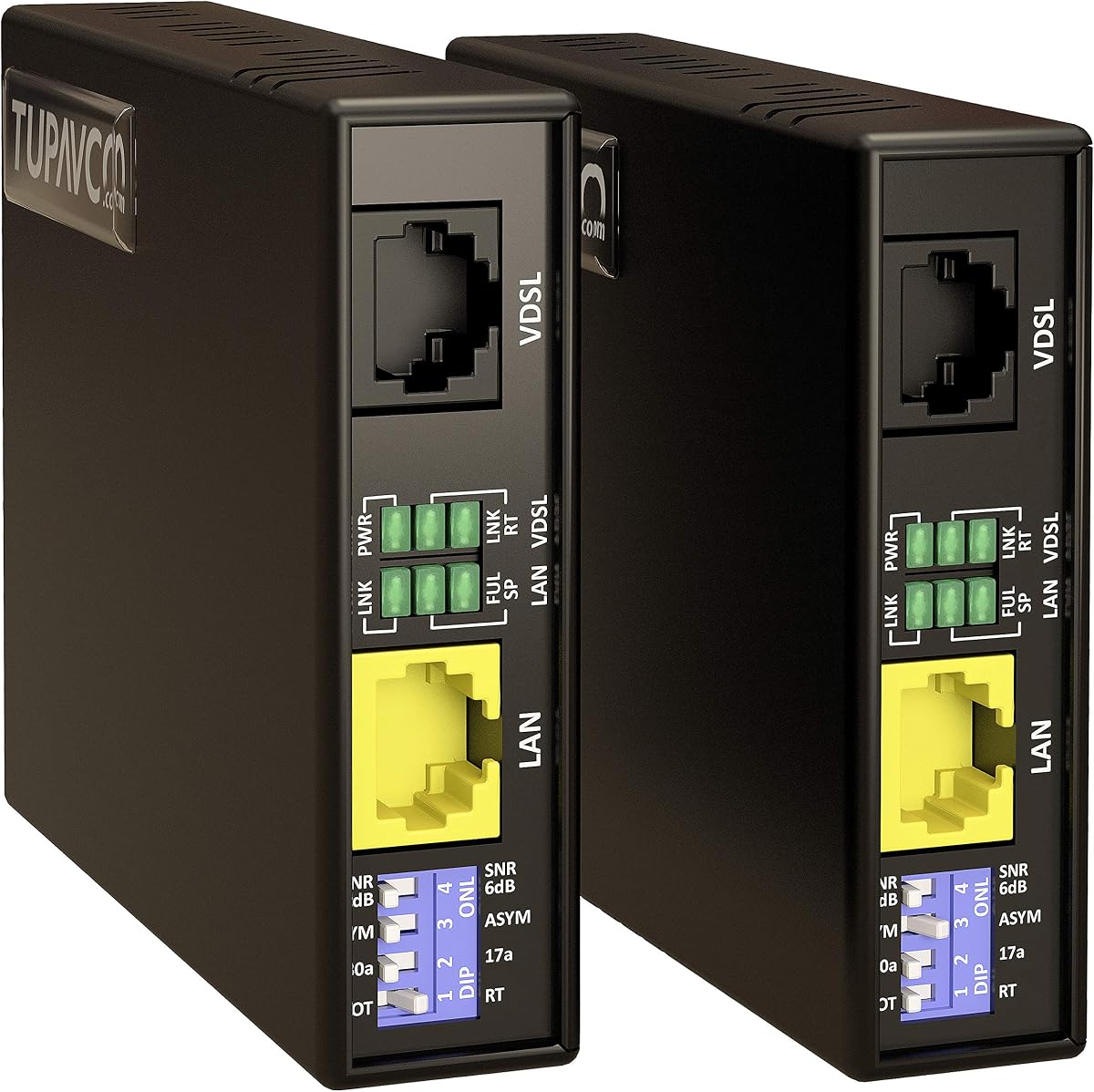
This Ethernet Extender Kit utilizes VDSL technology to overcome the standard 328ft limit of traditional Ethernet cables. It can extend network range up to 7000ft using existing phone or network cabling, making it ideal for large properties or industrial settings where running new cable is impractical.
We may earn a commission when you buy through this link, at no additional cost to you.
The kit includes a preset configuration for central and remote locations, ensuring quick deployment without driver installation. It supports CAT5 through CAT8 cables as well as phone lines, offering versatility in cabling choices. This flexibility allows you to leverage existing infrastructure for cost-effective network expansion.
Setup simplicity is a major advantage, but the unit works best with quality wiring to maintain signal integrity over long distances. The cost is higher than basic powerline adapters, yet the range capabilities justify the investment for specific long-distance needs.
Select this extender for remote devices like cameras, VoIP phones, or routers located far from the main network hub. It provides a reliable solution for extending connectivity without the expense of professional cabling installation.
Support for CAT5 to CAT8 and phone cables allows you to utilize existing wiring infrastructure, reducing the need for new installations and lowering overall costs.
Provides stable connections for remote devices such as security cameras and VoIP phones, ensuring reliable data transmission over extended distances.
We may earn a commission when you buy through this link, at no additional cost to you.
The StarTech Ethernet Extender is designed for professional and industrial applications requiring compliance with trade agreements. It supports distances up to 0.5 miles, overcoming standard Ethernet limits while maintaining transparency in network protocols. This makes it suitable for government projects and enterprise environments with strict procurement requirements.
We may earn a commission when you buy through this link, at no additional cost to you.
Its ability to pass VLAN tags and support WoL, PXE, and jumbo frames ensures compatibility with complex network setups. The kit ships ready for deployment with power adapters and DIP switches for configuration, minimizing setup time. LED indicators help administrators monitor connectivity status effectively.
While it is limited to 10/100Mbps speeds, this suffices for many IoT and surveillance applications where bandwidth needs are modest. The high price reflects its specialized features and TAA compliance, which are critical for certain institutional buyers.
Choose this model for remote equipment diagnosis, IP video surveillance, or automation systems in regulated industries. It provides a robust, compliant solution for extending network access where standard extenders fail to meet requirements.
Fully compliant with Trade Agreements Act requirements, making it eligible for government and federal procurement programs that mandate US-origin or approved country products.
Seamlessly passes Ethernet protocols without altering data, ensuring compatibility with existing network configurations and advanced features like VLANs and DHCP.
We may earn a commission when you buy through this link, at no additional cost to you.
The TP-Link AV600 Powerline Adapter offers an accessible entry point for users needing basic network extension. It delivers speeds up to 100 Mbps through existing electrical wiring, suitable for general browsing and streaming. The included Ethernet cable and straightforward setup make it a convenient choice for budget-conscious buyers.
We may earn a commission when you buy through this link, at no additional cost to you.
Security is a key focus, with the device adhering to CISA Secure-by-Design principles. Power saving mode reduces energy consumption significantly when inactive, contributing to lower operational costs. The compact design ensures it fits discreetly in tight spaces without blocking nearby outlets.
Performance is limited to 100 Mbps, which may not support modern Gigabit internet plans fully. Additionally, wiring quality and distance impact speed, so results may vary in older homes. These trade-offs are acceptable for users with modest connectivity needs.
This adapter is ideal for secondary rooms or devices that do not require high bandwidth. It provides a cost-effective way to extend wired connectivity without major investments in new infrastructure or advanced hardware.
The device is designed with advanced security as a core requirement, following industry standards to protect against potential vulnerabilities and unauthorized access.
Automatic power saving reduces energy consumption by up to 85 percent when not in use, helping to lower electricity bills while maintaining network readiness.
We may earn a commission when you buy through this link, at no additional cost to you.
This hybrid kit combines powerline Ethernet with Wi-Fi 6 technology to extend both wired and wireless coverage. It delivers AV1000 powerline speeds and AX1500 Wi-Fi 6 speeds, supporting up to 64 devices simultaneously. The dual-band design ensures seamless streaming and gaming across large areas.
We may earn a commission when you buy through this link, at no additional cost to you.
EasyMesh compatibility allows you to create a whole-home network by connecting to compatible routers. The WiFi Clone button simplifies configuration by instantly matching your router's SSID and password. This reduces setup time and ensures consistent network names throughout your home.
The Gigabit Ethernet port accommodates high-bandwidth devices like game consoles and smart TVs directly. However, adapters must be on the same electrical circuit for reliable connectivity, and wiring quality affects overall performance. This requirement limits flexibility in some home layouts.
Opt for this kit if you need comprehensive coverage with both wired and wireless options. It is particularly beneficial for households with many devices seeking optimized connectivity without replacing existing routers or cabling.
AX1500 Wi-Fi 6 technology provides faster speeds and better efficiency for multiple devices, reducing congestion and improving performance in crowded networks.
Seamlessly integrates with EasyMesh-compatible routers to expand your network, providing unified coverage and simplified management across all connected nodes.
We may earn a commission when you buy through this link, at no additional cost to you.
The TP-Link AV1000 Passthrough Kit extends network connectivity via electrical wiring while providing integrated Wi-Fi 5 coverage. Its pass-through design includes an extra outlet, allowing you to plug in other devices without losing power capacity. This feature maintains convenience in rooms with limited outlets.
We may earn a commission when you buy through this link, at no additional cost to you.
Wi-Fi Clone simplifies network configuration by copying router settings automatically. OneMesh compatibility enables whole-home coverage when paired with supported routers. The Gigabit Ethernet port ensures high-speed wired connections for critical devices like smart TVs and gaming consoles.
However, Wi-Fi 5 technology is older compared to Wi-Fi 6, which may limit future-proofing for high-density device environments. Direct outlet plugging is required for best performance, restricting placement flexibility. These factors should be weighed against the convenience of the pass-through design.
This kit suits users needing a balanced mix of wired and wireless extension in rooms with outlet constraints. It offers a practical solution for expanding network reach while keeping electrical usage efficient and manageable.
The pass-through power socket allows you to maintain your existing plug usage while extending network connectivity, avoiding the need for additional power strips.
Compatible with TP-Link OneMesh routers to create a unified network, simplifying management and providing seamless roaming across connected access points.
We may earn a commission when you buy through this link, at no additional cost to you.
This Ethernet Coupler is a passive device designed to join two Ethernet cables seamlessly, extending total cable length up to 328 feet. It supports speeds up to 10Gbps, making it compatible with modern high-speed networks. The compact design ensures minimal interference while maintaining data integrity.
We may earn a commission when you buy through this link, at no additional cost to you.
PoE support allows you to power devices like cameras without an additional supply, enhancing flexibility in installation. It works with Cat5 through Cat8 cables, ensuring broad compatibility across different network setups. Plug and play functionality requires no configuration, simplifying deployment for quick fixes.
Since it is a passive coupler, it does not regenerate signals, so performance depends on the quality of the joined cables. The 328-foot limit aligns with standard Ethernet distance constraints, so it is best for moderate extensions rather than long-distance needs.
Choose this coupler for extending existing cables in offices or homes where short distance is needed. It is ideal for connecting cameras or switches where PoE power simplifies the installation process without extra wiring.
Compatible with Power over Ethernet devices, allowing you to power network cameras and phones through the same data cable for streamlined installations.
Works with Cat5, Cat6, Cat6A, Cat7, and Cat8 cables, ensuring you can connect various existing network infrastructure without replacing older cables.
We may earn a commission when you buy through this link, at no additional cost to you.
This kit enables Ethernet extension over just two copper wires, utilizing existing infrastructure like alarm cables or intercom lines. It supports distances up to 600 meters, making it practical for buildings where running standard Ethernet is difficult. The transparent Layer 1 operation ensures all network data passes unchanged.
We may earn a commission when you buy through this link, at no additional cost to you.
Both units are mains powered with included adapters, ensuring signal regeneration for reliable connectivity. You can use twisted pair or coax cables with provided adapters, offering significant flexibility in deployment. No software or configuration is needed, simplifying setup for technical staff.
Performance varies based on wire quality and distance, with throughput falling as runs lengthen. This trade-off is acceptable for applications like IP cameras or remote sensors where full Gigabit speeds are not critical. Power consumption remains low at under 2W per unit.
Ideal for expanding networks in commercial buildings or remote areas with existing wiring. It provides a cost-effective way to extend connectivity without installing new cabling, leveraging what is already in place for network access.
Supports spare pairs in existing Cat5e or alarm cables, allowing network expansion without new wiring installations, which saves costs and construction time.
Supplied as a complete pair with power adapters and BNC-to-wire-pin adapters, ensuring you have everything needed to establish a functional network link immediately.
We may earn a commission when you buy through this link, at no additional cost to you.
This VDSL Ethernet Extender Kit increases network range up to 5000ft, overcoming the standard 328ft limitation. It uses existing phone or network cabling to deliver speeds up to 300Mbps, offering a cost-effective solution for extending connectivity without replacing infrastructure. The device is ready out of the box with standard RJ45 ports.
We may earn a commission when you buy through this link, at no additional cost to you.
G.INP technology ensures signal stability by reducing sensitivity to noise and interference, maximizing speed over long distances. Four-position DIP switches offer eight different profile settings to adapt to various cabling scenarios. LED indicators provide clear status monitoring for quick diagnostics.
While 300Mbps may not meet Gigabit needs, it suffices for most business and home applications where range is a priority. The configuration flexibility allows optimization for specific environments, though this adds slight complexity compared to plug-and-play units.
Select this kit for remote sensors, IP video surveillance, or VoIP setups where long-range reliability is essential. It balances performance and cost effectively, making it suitable for deployments that need extended reach without expensive upgrades.
G.INP support makes broadband signals less sensitive to noise and interference, ensuring consistent performance over long distances even with varying cable quality.
DIP switch settings allow eight profile options to optimize the connection based on your specific cable type and distance requirements for best performance.
We may earn a commission when you buy through this link, at no additional cost to you.
Choosing the right Ethernet Line Extender requires understanding your network needs, existing infrastructure, and the specific technical capabilities each model offers.
The range your extender supports is critical for ensuring connectivity reaches all necessary locations. Powerline adapters typically cover 750 to 1000 feet depending on electrical wiring quality, while VDSL kits can reach 5000 to 7000 feet using existing cables. Evaluate the physical distance between your router and the target area to select an appropriate range capacity.
Match the extender's maximum range to your specific layout needs to avoid signal loss in larger homes or industrial spaces.
Speed capabilities vary significantly across models, from 100 Mbps to 2000 Mbps powerline speeds. Consider the number of devices and activities like 4K streaming or gaming to determine required bandwidth. Gigabit ports ensure that wired devices can achieve full internet plan speeds without bottlenecks.
Prioritize models with higher speed ratings if you have multiple high-demand devices connecting to the network simultaneously.
Check what types of wiring your extender supports to leverage existing infrastructure effectively. Some kits work with CAT5 to CAT8 network cables, while others accept phone lines or coaxial cables. Compatibility with your current setup reduces installation costs and complexity significantly.
Ensure the extender supports the specific cable types already installed in your walls to avoid unnecessary upgrades or replacements.
Powerline adapters require direct wall outlet connection and may fail with surge protectors or AFCI breakers. Look for devices with energy-saving modes to reduce consumption during inactivity. TAA compliant options are necessary for government projects or specific procurement standards.
Verify electrical compatibility and safety certifications to prevent installation issues or regulatory non-compliance in your environment.
Plug and play functionality simplifies installation without requiring software or driver installations. Some models feature WiFi clone buttons or EasyMesh compatibility for streamlined network integration. Preconfigured kits save time and effort, especially for users without technical expertise.
Choose units with intuitive configuration options to ensure quick deployment and minimal setup frustration during implementation.
Network security is paramount, so look for devices adhering to Secure-by-Design pledges or industry certifications. Encryption and VLAN pass-through support ensure data integrity across the extended network. Stable performance over time reduces downtime risks for critical applications.
Prioritize models with strong security standards to protect sensitive data from vulnerabilities in extended network segments.
Consider how many devices you need to connect at once and whether the extender supports multi-node networks. Some models connect up to 64 devices or support mesh integration for scalable expansion. Ensure the system can grow with your needs without requiring complete replacement later.
Select extenders that allow adding more units as your network expands to maintain consistent performance as demands increase.
To begin installation, plug the first adapter directly into a wall outlet near your router and connect it using the included Ethernet cable. Then plug the second adapter into an outlet at the target location and connect your devices similarly. Ensure both adapters are on the same electrical circuit for optimal signal transmission.
Place adapters away from large appliances and interference sources like washing machines or air conditioners to maintain stable connectivity. If performance drops, try moving the remote unit to a different outlet or reducing electrical noise by avoiding shared circuits with high-power devices.
Regularly check LED indicators to confirm network status and troubleshoot connectivity issues quickly. Keep firmware updated if supported to ensure security patches and performance improvements are applied. Clean dust from ports periodically to prevent connection degradation over time.
No, most powerline adapters must be plugged directly into wall outlets. Surge protectors and power strips can block or degrade the signal transmission. Plugging directly into the wall ensures the best performance and reliability for your network connection.
Yes, some VDSL kits support phone lines alongside network cables. They transmit Ethernet signals over telephone wiring to extend connectivity to remote areas. Check the specific model's compatibility list to confirm support for your existing cable type.
Powerline adapters typically support up to 750 feet on the same electrical circuit. Actual performance depends on wiring quality and distance between outlets. VDSL models can reach much further, up to 7000 feet using existing cables.
Many modern models offer Gigabit ports and speeds up to 2000 Mbps powerline rates. Verify that both the adapter and your internet plan support Gigabit speeds for full performance. Older models may be limited to 100 Mbps port speeds.
Pairing is usually done by pressing a pair button on each adapter within two minutes. Follow the manufacturer's instructions for syncing new units to the existing network. Some models auto-pair when connected to the same circuit.
AFCI breakers can limit or block powerline signals in homes built after 2000. This is a known compatibility issue due to circuit breaker design. Test adapters in your location before purchasing to confirm they function properly with your electrical system.
We reviewed ten exceptional Ethernet Line Extender models suited for diverse needs from budget home setups to industrial compliance requirements. The TP-Link AV1000 Powerline Kit leads for Gigabit home speeds, while the VDSL kit offers unmatched range for long-distance cabling.
Consider your specific distance needs, wiring infrastructure, and security requirements when selecting a model. Prioritize features like energy efficiency and plug-and-play setup for ease of use in everyday environments.
Remember that prices and availability may change, so verify current details before purchasing. With the right extender, you can achieve reliable network coverage across any space without complex renovations or expensive cabling.